How to Script a Talking-Head Video (Without Sounding Robotic)
A complete, retention-first framework for scripting talking-head videos that sound natural, hold attention, and outperform improvised takes. Templates, pacing data, and word-choice principles inside.

36 min read
Here is the uncomfortable truth about talking-head videos: the only person on screen is you. There is no crash-cut spectacle, no time-lapse over Iceland, no game footage doing the heavy lifting. The camera is on your face. The audience decides in about eight seconds whether to keep listening or click something more interesting — and they make that decision again, quietly, every fifteen seconds after that.
Which is why the script is the entire video.
You can have a beautiful camera, warm lighting, and a voice like honey. If the words on the page are the wrong words in the wrong order, the retention graph will show it. Conversely, creators recording on a phone in a bedroom regularly outperform million-dollar setups — because the language they wrote is doing the work.
This guide is a working manual, not a pep talk. By the end of it you will know how to script an opening that survives the eight-second cliff, how to structure a middle that does not sag, how many words per minute your delivery should actually target, and how to write dialogue that sounds like you talking — not you performing. Along the way we'll rewrite a real script from scratch, publish the templates our research team uses at RetentionYT, and hand you a pre-record checklist.
Who this guide is for
Creators making educational, commentary, opinion, tutorial, or "explainer" talking-head videos between 4 and 20 minutes long. If you record vlogs, gameplay, or highly visual formats, most principles still apply — but the pacing math is calibrated for face-on-camera content.
Why scripting wins on YouTube
There is a persistent myth that scripting makes videos worse. That it kills your energy. That authenticity requires improvising. That the best creators just talk. This myth exists because most people have never watched a great creator's actual script — they've only watched the finished product, where the seams don't show.
The reality is closer to this: almost every top-100 talking-head channel — from long-form video essayists to explainer channels to solo commentary — writes tight scripts. What separates them from beginners is not whether they script, but how. Their scripts are engineered to be spoken, not read.
There are three practical reasons scripting outperforms improvisation for talking-head content:
1. You get one shot at every second of retention
YouTube's algorithm doesn't care how earnest you were during minute three. It cares whether the average viewer stayed. When you improvise, you fill air. You add "so basically," you repeat yourself, you circle back. Each of those tics costs a small percentage of your audience. Multiply that across ten minutes and you've lost half your channel's potential watch time to filler you could have edited out on the page.
2. Improvised transitions leak viewers
The single most common retention drop in unscripted talking-head videos happens at transitions. You finish point one, glance at your notes, say "okay so, um, the next thing…" — and viewers who were on the fence use that half-second to leave. A written script forces you to design transitions that pull the viewer forward instead of pausing to breathe.
3. Structure is invisible; the lack of it is not
Well-structured content feels effortless. Poorly structured content feels effortless too — for the creator. To the viewer it feels meandering, unfocused, and slow. Scripting gives you the chance to see the whole shape of your argument before you commit it to film. You can spot the sag in the middle. You can catch the moment you've buried the lede.
"The best-performing scripts don't sound scripted. They sound like the version of you that thought of the perfect thing to say — and then said it, on the first try."
None of this means "write a stage play and read it stiffly." Sounding natural is a craft you can learn. The rest of this article is that craft.
What "sounding robotic" actually means
When viewers say a creator sounds robotic, they almost never mean the voice itself. They mean the language. Robotic delivery is a symptom of five specific script-level problems: uniform sentence length, over-explanation of the obvious, prepositional stacking ("in terms of the ability to make use of…"), the passive voice, and — the largest culprit — the absence of what linguists call speech markers: the small connective phrases ("here's the thing," "and look," "which is why") that signal a live human is thinking in real time.
You can measure your own script for these problems in about two minutes. Print or export the script. Highlight every sentence over 20 words. If more than a third of your sentences are highlighted, you have a length problem. Then circle every instance of "is," "are," "was," or "were" — if that count exceeds one per 50 words, you likely have a passive-voice problem. Finally, count your speech markers. Fewer than two per minute of runtime and your script will read like a corporate memo out loud.
Robotic isn't a personality trait. It's a diagnosis, and it's fixable at the line level.
The anatomy of a retention-first script
Before we get into individual sections, look at the shape of the whole thing. A retention-first talking-head script is not a linear essay. It's a chain of promises and payoffs, engineered so that at every moment the viewer has a reason to keep watching.
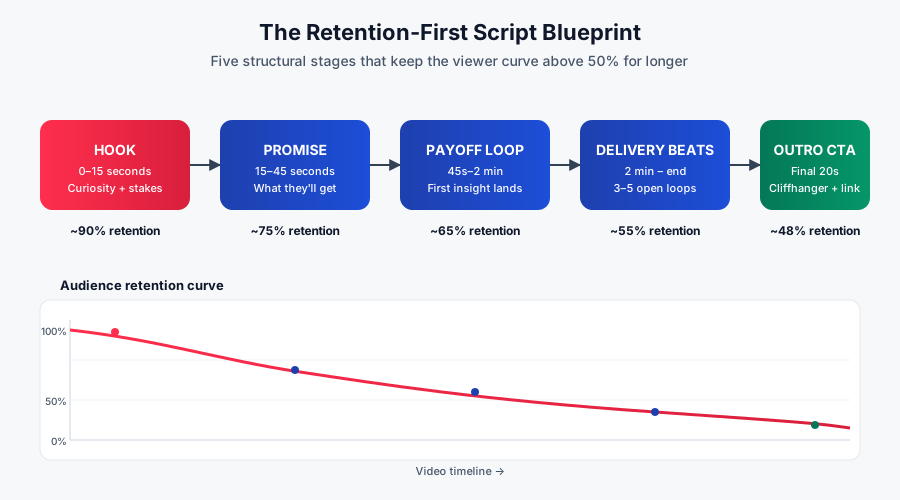
Each stage has a specific job. Miss the job and the whole downstream section suffers.
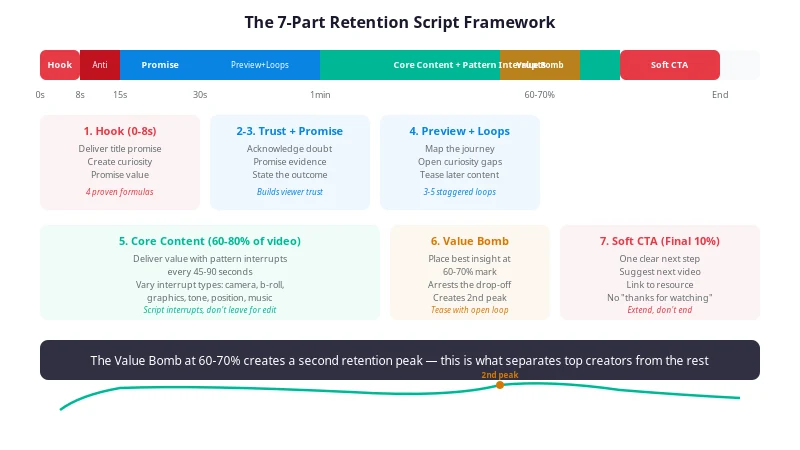
- Hook (0–15s): Buy attention with a specific, concrete promise and immediate tension.
- Promise (15–45s): Tell the viewer what they will be able to do or understand by the end.
- Payoff loop (45s–2min): Deliver an early, real insight so the viewer feels their attention is being repaid.
- Delivery beats (2min–end): Chain 3–5 open loops through the body, each opening before the last one closes.
- Outro CTA (final 20s): Close cleanly, tease the next natural next-step, and hand the viewer off before curiosity dies.
Notice what's missing from this shape: a slow build. On stage or in a print essay you can spend three minutes setting up context. On YouTube you cannot. The front-loading of value is what distinguishes retention-first scripts from television-style scripts.
Best practice: draft in reverse
Start by writing the outro — the single most important idea you want the viewer to walk away with. Then write the payoff. Then work backward to the hook. This forces every earlier line to justify itself against the final destination.
Structuring the opening (the first 30 seconds)
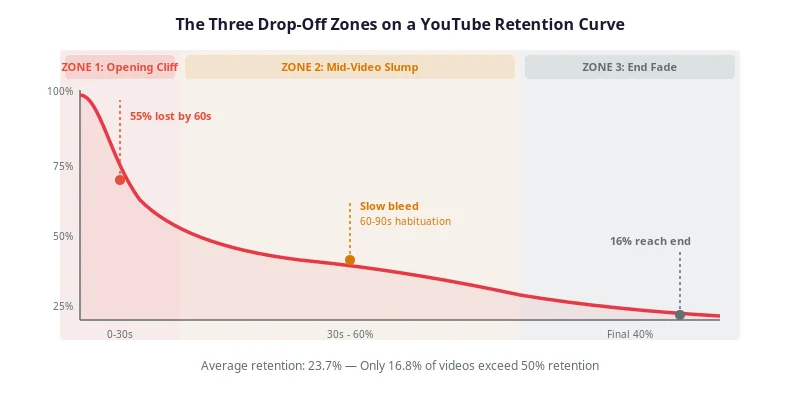
The opening is where most talking-head videos are decided. If you plot audience retention curves for a hundred underperforming videos you'll see the same pattern — a cliff between seconds 3 and 15, a second smaller cliff around second 30, and then a slower, longer decay. The first cliff is a hook failure. The second is a promise failure. You want to write to survive both.
The hook: eight seconds, one specific promise
An effective hook does four things simultaneously:
- States who the video is for (implicitly or explicitly).
- Introduces tension — a problem, a paradox, or an unexpected claim.
- Makes a concrete promise ("by the end of this video you'll know exactly how to…").
- Previews the payoff without spoiling it.
Here is a hook that does all four in twelve seconds:
HOOK · 0:00–0:12
[Direct to camera, no cold open]
Most talking-head videos lose half their audience before the second minute — and it's almost never the topic that's boring. It's the first three sentences. In the next ten minutes I'll show you the exact scripting structure that keeps viewers watching, using a real before-and-after rewrite from a channel that doubled its retention.
Break that down. "Most talking-head videos" identifies the audience. "Lose half their audience" is the tension. "The exact scripting structure" is the concrete promise. "A real before-and-after rewrite" is the payoff preview. Twelve seconds, four jobs done.
Common hook mistakes to eliminate
- The greeting hook. "Hey guys, welcome back to the channel, my name is —" This is the fastest way to lose a new viewer. Save the introduction for after the hook has bought their attention.
- The vague-promise hook. "Today we're going to talk about scripting." Talk about it how? For whom? What will I learn? The viewer needs specificity.
- The over-hyped hook. "This is going to change everything about how you make videos." Nobody believes you. Concrete stakes beat inflated stakes every time.
- The context-first hook. Three sentences of background before the promise lands. Cut them. They can appear at 0:45.
Seconds 15–45: the promise expansion
You bought their attention. Now you have to justify the click. This is where you expand the hook's promise into a specific roadmap and — critically — where you introduce the first open loop that will not resolve until later in the video.
PROMISE · 0:12–0:38
I've spent two years studying retention curves across thousands of talking-head videos, and there's a single pattern that separates the ones that hold viewers from the ones that don't. It's not editing. It's not personality. It's actually one specific decision you make on the page — and most creators don't even know they're making it. I'll show you what it is, why it works, and exactly how to apply it. But first, we have to talk about why so many "good" scripts still sound robotic on camera.
Notice how the last sentence opens a loop ("why so many good scripts still sound robotic") that the viewer now has to stay for. That's the doorway into the body.
Common pitfall
Creators write extraordinary hooks and then immediately follow with the phrase "But before we get into that, let me introduce myself." This is the sound of watch time evaporating. Introductions belong after the first payoff, not before it.
The stakes ladder: giving the viewer a reason to care
Attention is not the same as investment. A hook can grab a viewer for six seconds without giving them any reason to stay past sixty. The bridge between attention and investment is the stakes ladder — the progression, across the first minute, from generic interest to personal relevance to specific gain.
The ladder has three rungs, and skipping any of them collapses the whole thing:
- Recognition: The viewer sees themselves in the setup. "If you make talking-head videos and you've ever watched your retention graph fall off a cliff in minute two — this is for you."
- Cost: Name what the viewer is losing right now by not solving the problem. "That drop is costing you subscribers, ad revenue, and — worst — the algorithm's confidence in your channel."
- Gain: Preview the specific, measurable outcome they'll walk away with. "By minute nine, you'll have a scripting framework you can apply to your next upload."
Notice the order. Recognition comes before cost, and cost comes before gain. Reverse them and the ladder falls over. Lead with gain and the viewer doesn't yet believe the problem is theirs. Lead with cost and you sound like an infomercial. Recognition first, always.
Building the middle without losing viewers
The middle is where most talking-head videos are lost. Openings get polished endlessly. Endings get memorized. The middle gets treated as "the stuff between." That is why the average retention curve on unscripted content shows a long, mushy decline between the 30% and 70% marks — creators wrote a great hook, and then just… kept talking.
Think in beats, not paragraphs
A written essay flows through paragraphs. A spoken script flows through beats — short, contained units of meaning, each roughly 20–45 seconds long, each doing one thing. When you script in beats you can see the shape of the middle at a glance, and you can identify sags before you ever pick up the camera.
A well-scripted eight-minute video has roughly 12–16 beats. If you draft a script and count only six, the middle will sag. If you count more than 20, you're probably going to feel breathless on camera.
Every beat needs a job
Assign each beat one of four functions:
| Beat type | What it does | When to use it |
|---|---|---|
| Insight | Delivers a concrete idea, principle, or piece of information. | The load-bearing content of your video. |
| Example | Illustrates an insight with a specific, real case. | Immediately after every insight. Always. |
| Loop | Opens or closes narrative tension (a question, a stake, a cliffhanger). | Every 90–120 seconds throughout the middle. |
| Bridge | Moves from one beat to the next with forward momentum. | Between beats — never as a beat itself. |
If two consecutive beats are both "insight," you're teaching too fast. If two consecutive beats are both "example," you're padding. If a beat is only a "bridge," delete it.
The 90-second gravity check
Somewhere between minutes 2 and 4, viewers who are still on the fence will drop. You cannot prevent this entirely, but you can flatten the curve by scheduling a gravity reset — a moment engineered to re-hook the audience.
A gravity reset can be:
- A tightly delivered surprise or contrarian claim ("You've probably heard the opposite of this. That advice is wrong, and here's why.")
- A hard payoff to the loop opened during the promise expansion.
- A B-roll or on-screen graphic that pattern-interrupts the visual monotony of a talking head.
- A direct address that punches through the fourth wall ("Stay with me. This is the part most creators skip.").
Schedule at least one gravity reset per 3 minutes of runtime. On the page, mark them clearly so that when you record you don't drift past them.
The retention triangle: information, tension, and personality
Every beat in your middle should be balancing three ingredients at once: information (what the viewer learns), tension (why they need to keep watching to find out what's next), and personality (why they're watching you and not someone else say the same thing).
A beat that has only information is a Wikipedia article read aloud. A beat that has only tension is a clickbait tease with no payoff. A beat that has only personality is a vlog nobody outside your existing audience will finish. The retention winners land all three within roughly every 30-second window.
When you review your draft, annotate each beat with I, T, or P — or preferably all three. Any beat missing a letter is a rewrite candidate. Beats consistently missing the same letter reveal your default weakness: creators who over-index on information write dense, dry middles; creators who over-index on personality write charming middles that never land a lesson; creators who over-index on tension write breathless middles that feel like being sold to.
Structural signposting: how to move without "okay so"
Every time you finish a beat and start a new one, there is a micro-transition. Most creators fill these transitions with verbal exhaust — "okay so," "alright," "moving on," "the next thing." Each one is a small opt-out moment for the viewer. Written transitions eliminate them.
Four transition patterns that carry momentum instead of losing it:
- The consequence bridge. "Which is exactly why the next thing matters more than most people realize." The prior beat becomes the setup for the next.
- The contrast pivot. "That's the theory. Here's what actually happens." Signals a shift from concept to reality without a pause.
- The escalation. "And this is where it gets worse." or "And this is where it gets useful." Raises the stakes at the transition itself.
- The callback. "Remember the retention drop we opened with? This is what causes it." Ties two beats together and closes a mini-loop in the process.
Write these transitions into your script deliberately. If a transition is not on the page, it will improvise itself on camera — usually as "so, um, yeah."
"The middle sags because the script sagged first. You cannot outperform your outline."
Pacing, rhythm, and word choice
You can write the perfect structure and still sound robotic if your sentences are the wrong shape. Pacing on the page determines pacing on camera. Three variables matter here: words per minute, sentence length variance, and syllable density.
Words per minute: aim for 165–180
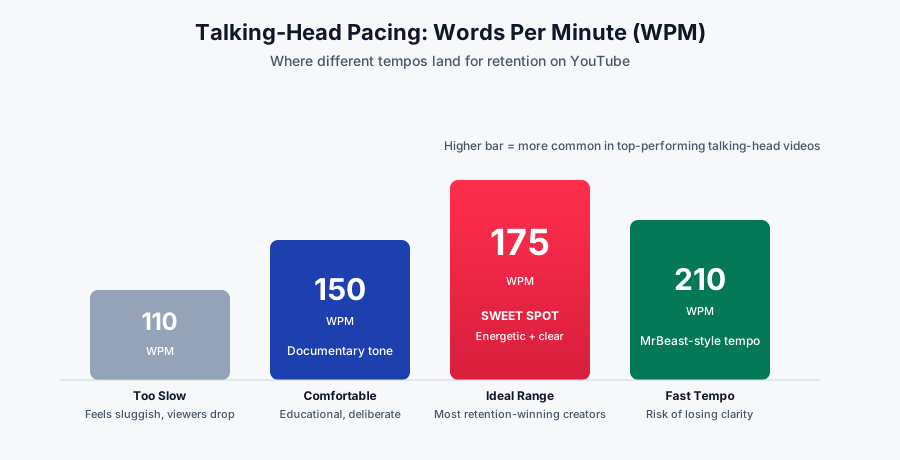
Slower than 140 WPM and you feel sluggish; faster than 200 WPM and you outrun the viewer. The retention sweet spot for most educational talking-head content sits at 165–180 words per minute. This is not the pace of casual conversation (which is closer to 130 WPM). It is a deliberate, edited pace — the natural speech of someone who knows exactly what they want to say next.
To hit that on the page, do the math backward. An 8-minute video at 175 WPM needs ~1,400 words of spoken script. If your draft is 2,300 words, you either need to cut roughly 40% or accept that the video will run 13 minutes with a slower feel.
Sentence-length variance is the entire game
Long, uniform sentences feel robotic. Short, uniform sentences feel jerky. Great scripts alternate — long, medium, short, medium, short-short — the way natural speech does. This is the single biggest reason "written" scripts sound written.
Robotic
Scripting a talking-head video requires careful attention to structure, pacing, and language, as each of these variables contributes to the overall retention of the audience, and neglecting any one of them will typically result in a noticeable decline in watch time and engagement metrics.
Natural
Scripting a talking-head video comes down to three things. Structure. Pacing. Language. Get any of them wrong, and you'll see it in the retention graph.
The natural version is 30 words. The robotic version is 55. Same information, half the runtime, twice the punch. This is what "cutting for cadence" looks like.
Syllable density: use one-syllable words on purpose
Multi-syllable words slow the mouth and, worse, slow the ear. Compare "utilize" versus "use." "Approximately" versus "about." "Demonstrate" versus "show." The shorter word almost always wins on camera, not because it's smarter but because it's easier for the listener to keep up.
A useful rule: if a sentence contains three or more words with four+ syllables, rewrite it. Nobody talks that way. Nobody wants to listen to someone who does.
Read every line out loud
If you can't say a sentence in one breath, comfortably, it's too long. If you stumble over a word twice, replace it. If a phrase makes you sound like a press release, it will sound like a press release on camera. Reading aloud is the single highest-leverage editing pass you can do.
Rhythm devices that stay natural
- Triplets. Three-item lists have a musical quality the ear rewards ("Structure. Pacing. Language.").
- Sentence fragments. Not full sentences. Just fragments. Used deliberately.
- Rhetorical questions. They make the viewer answer silently, and involvement is retention.
- Callbacks. Reference an earlier phrase two minutes later. It signals a designed script without feeling scripted.
- Contrast pairs. "Not X. Y." This structure carries emphasis without adjective inflation.
Story beats and narrative tension
Even a purely educational talking-head video needs a story arc. Not a plot — an arc of tension. The viewer needs to feel like they are moving toward something, that stakes are escalating, and that the biggest payoff is still coming.
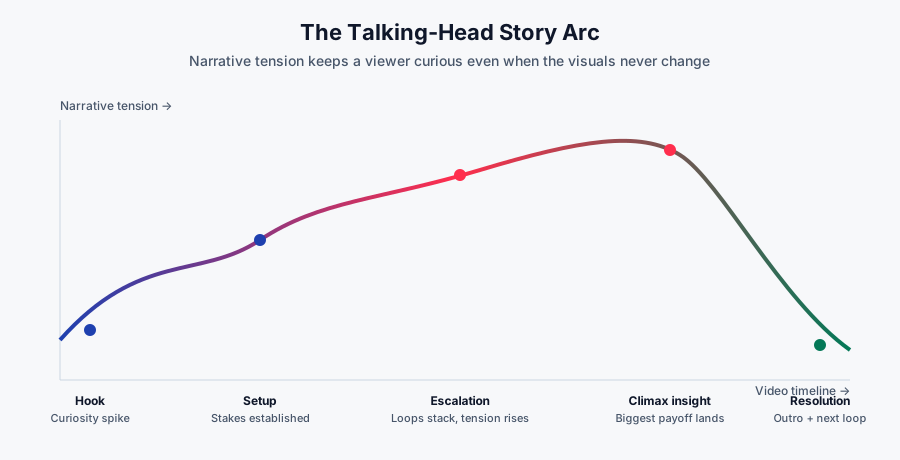
Map your script against this curve. The climax insight — your single most valuable idea — should land around the 65–75% mark of the runtime, not at the beginning and not at the very end. Beginners tend to front-load their biggest idea into the hook (killing the second half) or bury it in the outro (killing everything). Neither works.
To engineer the arc:
- Identify the one insight the entire video exists to deliver.
- Place it at ~70% of the runtime.
- Work backward and place progressively smaller insights before it, each one raising the stakes for the next.
- Give the climax room to breathe — a longer pause, a slower delivery, a pattern interrupt to signal this is the moment.
This shape is why a great talking-head video feels like it "goes somewhere" even though the camera never moves. The tension curve is the invisible engine.
Pattern interrupts and open loops
Two of the most misused terms in creator advice — and two of the most important. Get them right and your retention curve flattens dramatically. Get them wrong and you'll produce videos that feel gimmicky.
Open loops: the engine of watch time
An open loop is a question or promise raised in the script that is deliberately not resolved for another 30–180 seconds. The classic form is: "I'll show you exactly how, but first…" — but that phrasing is now overused to the point of parody. A better open loop is embedded, not announced.
Compare:
Announced (weaker)
"I'll show you the secret to good scripts in a second, but first let me explain the basics."
Embedded (stronger)
"There's one specific decision that separates scripts that hold viewers from scripts that don't — and if you make it wrong, none of the other advice matters. We'll get there. First, the basics."
The embedded version raises the stakes on the "basics" section. Now the viewer sits through it not because they're patient but because they're waiting for the payoff to a specific promise. That is the mechanic of retention.
Stack loops. Open a small one, open a medium one before the small one closes, open a large one before the medium one closes. When the small loop resolves, the audience feels rewarded and the medium loop keeps them anchored. This is why great scripts feel like they build even though no visual is doing the building.
Pattern interrupts: the retention CPR
A pattern interrupt is any planned break in the sensory pattern of a talking-head video: a cut, a graphic, a change in tone, a whispered aside, a hard silence, a change in framing. On camera the viewer's attention drifts on a predictable curve — a well-placed pattern interrupt resets it.
Practical pattern interrupts you can bake into the script:
- Text on screen. Mark places in the script where a phrase should appear as overlay — usually the single strongest sentence of a beat.
- Direct address shift. Move from "creators do X" to "look — if you are doing X…" A shift into second person is a retention lift.
- Deliberate silence. A one-second pause is a scream in an audio landscape of constant talking. Write pauses into the script.
- Whispered emphasis. A single sentence at half your normal volume, no music, no cut. Extremely effective in moderation.
- Question to camera. "Are you doing this right now? Be honest." Involves the viewer without changing the frame.
The rule of thumb: one pattern interrupt every 30–45 seconds in the middle third of the video. Any less and the visual monotony wins.
What ruins pattern interrupts
Zoom-punch every three seconds. Cartoon sound effects at random. Bright caption text on every word. When pattern interrupts stop feeling occasional, they stop being interrupts — they become the pattern. Restraint is the whole point.
Writing the ending and outro
The end of a talking-head video does two jobs at once: it delivers a final payoff, and it hands the viewer off to whatever they should do next. Get either wrong and everything that came before wastes itself in the last twenty seconds.
The "close the biggest loop last" principle
The last thing the viewer hears should be the resolution of the biggest open loop of the video. If the entire piece has been building toward one insight, the outro is where you name it plainly — no fanfare, no throat-clearing, just the clearest statement of the idea you've earned.
This principle sounds obvious and is broken constantly. The most common outro mistake is what we call the collapse: the creator, sensing the video is almost done, rushes through the final insight and pivots into a stack of asks — subscribe, like, comment, join the newsletter, check the description, watch the next video. The viewer, sensing sales pressure, leaves. In the retention curves we analyze, the same signature shows up constantly: a small cliff at the exact moment the outro pivots from content to CTAs. Delay that pivot by even ten seconds — spent slowly resolving the loop instead — and the cliff shrinks measurably.
Then, and only then, do you make the ask.
The three-part outro
- Resolution (final insight): One or two sentences. The single most important takeaway. Delivered slowly.
- Bridge (why the next thing matters): A single sentence that connects this video to another video, resource, or product — never a jarring "smash that subscribe button" ask.
- Handoff (the next thing itself): A specific, single call to action. Not three. Not five. One.
OUTRO · 8:40–9:10
So here's the whole thing in one line —
the script is the video
. The camera, the lighting, the editing — those are amplifiers. If the words on the page aren't already working, no amplifier saves them.
[pause]
If you want to see this applied to a real channel, watch how
[next video]
takes a scripted intro that was pulling 42% average retention and pushes it above 60% using one specific rewrite. That video is up next.
Notice what is absent. No "hit that like button." No "if you enjoyed this consider subscribing." Those asks belong scattered through the middle of the video, not stacked at the end where they undercut the payoff. Every second at the outro is fighting for the click to the next video. Use it accordingly.
Where subscribe asks actually belong
Subscribe requests have the highest conversion rate at the moment immediately after the viewer has just experienced value — not at the end when they're mentally packing up to leave. Practically, that means placing your one and only subscribe ask right after the first payoff loop resolves, somewhere between the 2:00 and 3:30 mark. One sentence, no chorus of asks:
MID-VIDEO ASK · ~2:30
If that reframe made something click for you — subscribe. This channel is entirely scripting breakdowns like this one.
Two sentences. Ten seconds. Delivered when the viewer is already feeling something. That is the highest-converting subscribe ask you can write, and it costs the video almost nothing in retention because it lives inside a beat instead of interrupting one.
Before vs after: a full script rewrite
Every principle above is easier to see in practice. Below is the opening minute of a real script we rewrote for a channel in the productivity space. The topic — "why you procrastinate" — is unchanged. The retention change was substantial: their next upload using this framework held viewers 27% longer through the first two minutes than their previous six videos.
Before
ORIGINAL · 0:00–1:00
Hey everyone, welcome back to the channel. My name is Alex and today I want to talk about something that I think most of us struggle with, which is procrastination. Now, procrastination is something that has been studied for a long time by psychologists and productivity experts, and there are actually a lot of different theories about why we do it. Some people say it's because of laziness, other people say it's because of fear of failure, and there are even people who argue that it's related to how our brains are wired from an evolutionary perspective. In this video, we're going to look at some of these theories, and I'll also share some tips that I've personally found useful for dealing with procrastination in my own life. Before we get started, if you're new here, my channel is all about productivity and self-improvement, so if that sounds interesting to you, definitely consider subscribing.
Let's diagnose. It opens with a greeting. The first specific word ("procrastination") appears at second 12. There is no tension, no promise beyond "some tips," and it introduces the creator before it has earned any attention. The pacing is slow (~135 WPM equivalent) and the sentence structure is uniform.
After
REWRITE · 0:00–1:00
You are not procrastinating because you are lazy. You are procrastinating because your brain is protecting you from something — and until you know what that something is, no productivity system will fix it.
[pause · text on screen: "It's not laziness."]
In the next nine minutes I'll show you the actual mechanism — a specific loop between your prefrontal cortex and your limbic system — and I'll walk you through the exact three-step reframe I use to shut it down in under a minute. There's data behind this. There's a name for it. And once you see it, you can't un-see it. But first — because this is going to sound counterintuitive — I need to explain why every piece of "just do it" advice you've ever heard makes the problem worse.
Diagnose the rewrite. The first sentence is a contrarian claim ("not laziness"). The second escalates it ("your brain is protecting you"). By second 15 the viewer has a specific promise ("three-step reframe"), evidence framing ("data behind this"), and an open loop ("why 'just do it' advice makes it worse") that will not resolve for another two minutes.
Word count on the two versions: 174 (original) vs. 156 (rewrite). Fewer words, more information, dramatically more tension. That is what retention-first writing looks like.
Diagnosing your own scripts with RetentionYT
If you already publish talking-head videos, run your last three uploads through RetentionYT — the retention analysis will pinpoint the exact seconds where viewers drop off, so you can trace those cliffs back to specific lines in the script — and before you record the next one, run the new draft through the YouTube script analyzer to catch those same cliff-building lines in the text.
Templates and frameworks
Every principle in this article distills into two reusable templates: an outline template you can drop any topic into, and a hook formula you can plug and play.
The retention-first script outline
TEMPLATE · TALKING-HEAD SCRIPT OUTLINE
HOOK (0:00–0:15)
· Contrarian or specific claim: __________ · Tension / stakes: __________ · Concrete promise: __________ · Payoff preview: __________
PROMISE EXPANSION (0:15–0:45)
· Roadmap sentence: __________ · First open loop (resolves at ~4:00): __________ · Transition into body: __________
PAYOFF LOOP (0:45–2:00)
· First real insight: __________ · Concrete example: __________ · Callback to hook: __________
DELIVERY BEATS (2:00–6:00)
· Beat 1 (insight + example): __________ · Beat 2 (loop open): __________ · Beat 3 (insight + example): __________ · Beat 4 (loop close + new loop open): __________ · Beat 5 (climax insight — the reason the video exists): __________
OUTRO (final 30s)
· Resolution of biggest loop: __________ · Bridge to next thing: __________ · Single call to action: __________
Six hook formulas that survive the eight-second cliff
- The Contrarian: "You've been told X. That advice is wrong, and here's what actually works."
- The Diagnosis: "If [specific painful symptom], the real cause is not what you think — it's [surprising root cause]."
- The Number Reveal: "[Specific unlikely number] — that's the difference between [outcome A] and [outcome B], and I'll show you why."
- The Insider: "After [credible experience], there's one pattern I keep seeing that nobody talks about."
- The Stakes Escalator: "This one decision costs [specific loss]. Most people make it wrong on purpose."
- The Confession: "I used to believe [common belief]. I was wrong. Here's what changed my mind."
Any of these plug directly into the outline template. Combine two — say, Contrarian + Number Reveal — and you have hooks that survive on almost any topic.
The loop-stacking framework
Templates cover shape. Loop-stacking covers momentum. Use this schema for every video longer than five minutes:
| Timestamp | Action | Why it works |
|---|---|---|
| 0:12 | Open Loop A (the big one) | Establishes the payoff of the entire video. |
| 0:45 | Open Loop B (medium, will resolve at 4:00) | Adds a nearer payoff to hold viewers through the setup. |
| 2:00 | Open Loop C (small, resolves at 3:00) | Immediate curiosity that survives the first potential drop. |
| 3:00 | Close Loop C | First reward — signals the video keeps its promises. |
| 3:05 | Open Loop D (small, resolves at 5:30) | Bridges into the middle without a lull. |
| 4:00 | Close Loop B | Bigger reward — trust in the script is now high. |
| 4:05 | Open Loop E (medium, resolves at 8:00) | Carries the viewer through the climax approach. |
| 6:30 | Climax insight (peak of tension arc) | The single idea the video exists to deliver. |
| 8:00 | Close Loop E | Final small resolution before the outro. |
| 8:40 | Close Loop A (the biggest, in the outro) | The last thing the viewer hears is the payoff they were promised at 0:12. |
Read that schema as a musical score, not a rulebook. The point is not the exact timestamps — it is the principle that at any given moment in your video, at least two loops are open, and no more than 150 seconds should pass without one closing. If you can annotate your draft this way and every row makes sense, your script has enough narrative gravity to hold viewers.
The "one thing" test
Every template above assumes you know what your video is actually about. Beginners think their video is about a topic ("procrastination," "scripting," "morning routines"). Retention-first creators know their video is about a single thesis — a specific, defendable claim about that topic.
Before you outline, force yourself to write a single sentence in this form:
"This video argues that ______, and by the end the viewer will be able to ______."
If you cannot fill in both blanks in under thirty seconds, do not start writing. Your video does not yet have a spine. Every beat in the finished script should be defensible against those two blanks. If a beat doesn't support the argument or move the viewer toward the outcome, it is padding — and padding is where retention goes to die.
The actionable pre-record checklist
Before you press record on your next talking-head video, run the finished script through this list. If any item fails, rewrite before shooting. This is faster than fixing it in the edit.
- My first sentence contains no greeting and no self-introduction.
- My hook is under 15 seconds and makes one specific promise.
- An open loop is planted before the 45-second mark.
- The first real payoff lands before 2:00.
- Every beat has one clear job — insight, example, loop, or bridge.
- The climax insight is placed between the 65% and 75% marks of the runtime.
- Total word count divides into runtime at 165–180 words per minute.
- No sentence exceeds what I can say comfortably in one breath.
- Sentence lengths visibly vary throughout the script.
- At least one pattern interrupt is scheduled every 45 seconds in the middle third.
- The outro resolves the biggest loop of the video before any call to action.
- There is exactly one call to action in the outro.
- I have read the script aloud, end to end, at least once.
Stop guessing which lines cost you viewers.
RetentionYT reads your existing talking-head videos second by second, ties every retention drop to the exact moment in your script, and shows you which rewrites will move the needle before your next upload.
Analyze my channel free →
Frequently asked questions
Should I script a talking-head video word-for-word or use bullet points?
For most creators, script the hook and the first 60 seconds word-for-word, then move to structured bullets with hand-written transitions. Full scripts protect retention where it matters most; bullets keep the middle sounding conversational. As you get more experienced, you can gradually shift more of the video into structured beats — but never improvise the hook.
How long should a talking-head video script be?
At an average delivery pace of 165–175 words per minute, an 8-minute talking-head video needs roughly 1,320–1,400 words of spoken content. Add roughly 15% overhead for reshoots, tangents, and B-roll narration. If your first draft is more than 20% over the target, cut ruthlessly before recording.
Why do I sound robotic when I read my own script?
You are almost certainly writing in written English, not spoken English. Cut prepositional stacks, replace multi-syllable words with plain ones, break long sentences into two, and read every line out loud before you record. If you cannot say a sentence in a single breath, rewrite it. Sentence-length variance is the single biggest factor in whether a script sounds natural on camera.
What is a good hook length for a talking-head video?
Aim for 8–15 seconds. A strong hook makes a specific promise, introduces tension or stakes, and previews the payoff without spoiling it. YouTube's own retention curves show the steepest drop between second 3 and second 15, so every word here matters. If your hook is longer than 15 seconds, you're almost certainly padding it with context that belongs later.
How many open loops should a talking-head script have?
For a 6–10 minute video, plan 3–5 open loops. Open one in the hook, resolve it around the 60–70% mark, and let smaller loops carry the middle. Too few loops and the video drags; too many and viewers feel jerked around. Stack them — open a new one before the previous one closes.
Do I need a teleprompter to sound natural?
A teleprompter helps, but only if your script is already written for the ear. A conversational script beats a formal script read from a prompter every time. Many creators memorize section beats and improvise the exact wording within each beat — this hybrid approach often outperforms strict teleprompter reading.
How do I know if my script is working before I publish?
Read the full script aloud into your phone's voice recorder and listen back at normal speed. If you get bored, your audience will too. Time the hook — if it exceeds 15 seconds, cut it. Time the payoff — if it lands after 2 minutes, you're front-loading too much setup. After publishing, use retention analytics to tie specific drops back to specific lines in your script and rewrite for the next upload.
Can I use AI to write my talking-head scripts?
You can use AI as a research assistant, an outliner, or a rewriting partner — but not as the primary writer. AI-generated prose defaults to written English (long sentences, high syllable density, uniform pacing), which is exactly what makes scripts sound robotic. If you use AI, your job is to break its output apart, cut it in half, and rewrite it in your own speaking voice.
Conclusion
Scripting is the invisible skill of every top talking-head channel. It is not a constraint on your personality — it is the frame that lets your personality land. A great script does not remove the "you" from the video. It removes everything that isn't.
The framework in this article — hook engineered for the eight-second cliff, promise expanded into a roadmap, beats that each do one job, tension arc peaking at 70%, open loops carrying the middle, pattern interrupts every 45 seconds, an outro that closes the biggest loop last — is not a formula for identical videos. It's a structural language. Fluency in that language is what separates creators whose retention curves flatten from creators whose curves collapse in minute two.
Write your next script from the outro backward. Cut it to 175 words per minute. Read it aloud until every sentence lives in one breath. Plant a loop before 45 seconds. Place your climax insight at 70%. Interrupt your own pattern before the viewer does. Then record.
The camera doesn't need to be new. The lighting doesn't need to be perfect. The words on the page just need to be doing their job.
Continue learning
Related reads from the RetentionYT Scripting and Hooks categories.
Hooks
How to Write a Video Hook That Survives the First 15 Seconds
Six repeatable hook formulas, ranked by retention lift, with real examples.
Scripting
Story Structure for YouTube: The Arc Behind Every Great Video
Adapt classic narrative arcs — including for pure explainer content — without sounding like a film school essay.
Scripting
Open Loops and Cliffhangers: How to Script Curiosity
A deeper technical walkthrough of loop-stacking, with 12 examples pulled from top-performing channels.
Analytics
How to Diagnose Retention Drops Second by Second
Tie every dip in your retention graph back to a specific line in the script — and fix it before your next upload.
Editing
Pacing and Editing for Talking-Head Video
What to cut in the edit when the script is already tight — and what to leave in.
Scripting
Words Per Minute: The Pacing Math Behind Retention
Why 175 WPM is the retention sweet spot — and how to hit it without sounding rushed.
External references
- YouTube Creator Academy — YouTube's official guidance on audience retention and engagement.
- YouTube Help: Understand your channel's audience — how the platform reports retention data.
- Nielsen Norman Group: How Users Read on the Web — foundational research on attention that generalizes to video pacing.
Frequently asked questions
- Should I script a talking-head video word-for-word or use bullet points?
- For most creators, script the hook and the first 60 seconds word-for-word, then move to structured bullets with hand-written transitions. Full scripts protect retention where it matters most; bullets keep the middle sounding conversational. As you get more experienced, you can gradually shift more of the video into structured beats — but never improvise the hook.
- How long should a talking-head video script be?
- At an average delivery pace of 165–175 words per minute, an 8-minute talking-head video needs roughly 1,320–1,400 words of spoken content. Add roughly 15% overhead for reshoots, tangents, and B-roll narration. If your first draft is more than 20% over the target, cut ruthlessly before recording.
- Why do I sound robotic when I read my own script?
- You are almost certainly writing in written English, not spoken English. Cut prepositional stacks, replace multi-syllable words with plain ones, break long sentences into two, and read every line out loud before you record. If you cannot say a sentence in a single breath, rewrite it. Sentence-length variance is the single biggest factor in whether a script sounds natural on camera.
- What is a good hook length for a talking-head video?
- Aim for 8–15 seconds. A strong hook makes a specific promise, introduces tension or stakes, and previews the payoff without spoiling it. YouTube's own retention curves show the steepest drop between second 3 and second 15, so every word here matters. If your hook is longer than 15 seconds, you're almost certainly padding it with context that belongs later.
- How many open loops should a talking-head script have?
- For a 6–10 minute video, plan 3–5 open loops. Open one in the hook, resolve it around the 60–70% mark, and let smaller loops carry the middle. Too few loops and the video drags; too many and viewers feel jerked around. Stack them — open a new one before the previous one closes.
- Do I need a teleprompter to sound natural?
- A teleprompter helps, but only if your script is already written for the ear. A conversational script beats a formal script read from a prompter every time. Many creators memorize section beats and improvise the exact wording within each beat — this hybrid approach often outperforms strict teleprompter reading.
- How do I know if my script is working before I publish?
- Read the full script aloud into your phone's voice recorder and listen back at normal speed. If you get bored, your audience will too. Time the hook — if it exceeds 15 seconds, cut it. Time the payoff — if it lands after 2 minutes, you're front-loading too much setup. After publishing, use retention analytics to tie specific drops back to specific lines in your script and rewrite for the next upload.
- Can I use AI to write my talking-head scripts?
- You can use AI as a research assistant, an outliner, or a rewriting partner — but not as the primary writer. AI-generated prose defaults to written English (long sentences, high syllable density, uniform pacing), which is exactly what makes scripts sound robotic. If you use AI, your job is to break its output apart, cut it in half, and rewrite it in your own speaking voice.
Find your video’s drop-off points before you publish
RetentionYT audits your script for the moments viewers leave — so you can fix them before recording.
Get retention tips in your inbox
Occasional, practical emails on hooks, pacing, and retention. No spam.
Related posts
YouTube Script Pacing: The Words-Per-Minute Rule for Retention
How many words per minute should a YouTube script run? Reference ranges by format, a method to measure your own speaking rate, and a worked pacing map for a 10-minute video.
YouTube Script Outline Template: A Timed, Copy-Paste Framework for Retention
A free YouTube script outline template with timecodes, word-count budgets, and purpose notes for every section — so you fix pacing and structure on paper, before you hit record.
5 Storytelling Frameworks That Make YouTube Scripts Addictive
Learn 5 storytelling frameworks — But/Therefore, the Story Spine, In Medias Res, Nested Loops, and the Hero's Journey — that turn any YouTube script into a retention machine. Templates, examples, and a full checklist.