YouTube Script Pacing: The Words-Per-Minute Rule for Retention
How many words per minute should a YouTube script run? Reference ranges by format, a method to measure your own speaking rate, and a worked pacing map for a 10-minute video.

12 min read
Pacing is the speed at which information moves through your script, and it quietly decides whether people stay. Go too slow and attention drifts to the next tab; go too fast and viewers feel like they're drinking from a fire hose and bail. The reliable baseline for spoken content is 130 to 150 words per minute — fast enough to keep momentum, slow enough to follow.
But the best scripts never hold one speed. They sprint through the hook, breathe on the payoff, and settle into a conversational rhythm in between. This guide covers the reference ranges by format, how to measure your own rate, and how to turn one flat script into a paced one — including the 20% you should always cut.
What pacing actually is
Pacing is not how fast you talk. It's the rate of new information arriving at the viewer, and words per minute is just the easiest proxy for it. Two scripts can run the same 140 wpm while one feels brisk and the other feels stalled, because the slower one spends its words restating, hedging, and circling back.
That distinction matters because it tells you where pacing fixes live:
- Slow pace felt = words per minute is fine, but the information rate dropped — the script is repeating itself or narrating the obvious. Fix: cut words, don't speed up.
- Fast pace felt = each sentence adds something new, with no breathing room to absorb it. Fix: slow the payoff moments and add visual support, don't pad with filler.
- Flat pace felt = the script runs one speed start to finish. Fix: vary it deliberately — sprints and breathers, mapped section by section.
When viewers say a video is "boring" or "dragging," they're usually describing an information-rate problem, and the words-per-minute number is how you find it on paper before anyone records anything.
The baseline: 130–150 words per minute
Conversational spoken English — the register of most YouTube delivery — lands in the 130–150 wpm range, natural pauses included. That's not a platform statistic; it's a long-standing broadcast reference range, and it's the number to use when budgeting scripts. A 10-minute video at 140 wpm is about 1,400 spoken words. (The full minute-to-word conversion table is in the script outline template.)
The baseline is an average, not a target
Do not try to speak at exactly 140 wpm for ten minutes. The range is what your total should divide out to. Individual sections should run faster or slower on purpose — that variation is what "pacing" means. A script where every minute has the same word count will feel monotone even at a perfectly average speed.
Reference ranges by format
Format changes the math more than niche does, because format determines what else is competing with your voice — demos, music, b-roll, or nothing at all. These are the working ranges we use when budgeting scripts:
| Format | Typical spoken WPM | Why the range sits there |
|---|---|---|
| Talking head / vlog | 130–150 | Pure conversation; nothing fills silence but you |
| Video essay, densely edited | 150–170 | Jump cuts strip dead air; every pause is a choice |
| Tutorial with on-screen demo | 110–140 | Narration must wait for the cursor and the UI |
| Documentary-style narration | 100–120 | Words share the track with visuals and music |
| Podcast / two-way conversation | 120–150 | Turn-taking inserts natural pauses |
| Shorts narration (under 60s) | 160–185 | No dead air survives; every word fights the swipe |
Two patterns in that table are worth internalizing.
Editing raises your effective rate. A script written at 140 wpm and tightly cut — breaths trimmed, hesitations removed — plays back at a higher effective words-per-minute because the dead air is gone. This is why edited essays run higher than live-feeling vlogs: the pauses were removed in post. You cannot write your way to that; the edit does it.
Visuals lower it. The more the viewer's eyes are doing work, the fewer words the script can carry. A demo tutorial that narrates at 150 wpm while the viewer is also tracking mouse movements will lose people at the first complicated step. Documentary narration goes slowest of all because the shots are the sentence.
If you script talking-head videos, the delivery-side techniques for staying inside these ranges without sounding robotic are in How to Script a Talking-Head Video.
How to measure your real speaking rate
Your number beats any table's number. Measuring it takes ten minutes:
- Pick two or three published videos where you spoke naturally — not read stiffly off a teleprompter.
- Pull the transcript. YouTube auto-generates captions for uploaded speech, and you can open the transcript from the video's description area in YouTube Studio or on the watch page and copy the text out.
- Count the spoken words in a representative stretch — say, three minutes from the middle, pasted into any word counter.
- Divide by the minutes you actually spent talking. Exclude silent demo stretches, music beds, and long b-roll sequences; they're not speech.
- Average the videos. That's your baseline. Most creators land between 125 and 155.
Re-measure whenever your delivery style changes — a new mic habit, a shift from scripted to bullet-point outlines, or a deliberate energy change will move the number. And once you have it, write it at the top of every outline: it's the conversion rate between minutes and words.
Worked example: pacing a 10-minute script
Here's the process end to end, for a 10-minute talking-head tech tutorial. The creator measured their natural rate at 140 wpm, so the total spoken budget is 10 × 140 ≈ 1,400 words, minus a demo stretch — call it 1,300.
The pacing map assigns each section its own target speed instead of spreading 140 across everything:
| Section | Timecode | Target pace | Word budget | Pacing note |
|---|---|---|---|---|
| Hook | 0:00–0:20 | 160 wpm | ~50 | Sprint. State the payoff immediately |
| Promise + roadmap | 0:20–0:50 | 150 wpm | ~75 | Still brisk; preview the route |
| Concept section | 0:50–3:00 | 140 wpm | ~295 | Conversational baseline |
| Demo part A | 3:00–4:30 | 110 wpm | ~165 | Slow — wait for the on-screen steps |
| Mid-video re-hook | 4:30–4:45 | 170 wpm | ~40 | Fast burst; reset attention |
| Demo part B + result | 4:45–7:00 | 120 wpm | ~270 | Measured; the payoff is here |
| Value bomb | 7:00–8:15 | 105 wpm | ~130 | Slowest section — let it land |
| Recap + CTA | 8:15–9:15 | 140 wpm | ~140 | Back to baseline |
| End screen lead-out | 9:15–10:00 | — | ~30 | Keep talking over the end screen |
The arithmetic: each section's budget is its minutes multiplied by its target pace. Add them up and you get roughly 1,295 words — inside the 1,300 budget. That closing check is the whole point of the map. If a draft section overruns its budget, the choice is explicit: cut words, or move the timecode and shrink another section. What you never do is silently speed up your delivery to squeeze the words in.
Notice the shape of the pace column: fast, fast, baseline, slow, fast, slow, slowest, baseline. The fastest moments bracket the slowest ones. The hook and the re-hook sprint because their only job is momentum; the demo and the value bomb breathe because their job is comprehension. That contrast — not any single number — is what a well-paced script feels like.
Varying pace on purpose
If your script currently runs at one speed, don't rewrite it — re-pace it, section by section:
- Sprint (150–185 wpm): the hook, re-hooks, and transitions between sections. Momentum moments.
- Baseline (130–150 wpm): arguments, story beats, anything conversational.
- Breathe (100–125 wpm): the payoff, key numbers, and any step the viewer must follow along with. Comprehension moments.
Mark the script into those three gears as a first pass — literally write S, B, or W in the margin. Then read it aloud. The shifts in speed will do more for how "alive" the video feels than any equipment upgrade, because what viewers register as energy is mostly change, and speed change is the cheapest change there is.
The cut-20% pass
Every script benefits from one dedicated deletion pass before the pacing map is final. Read the draft with deletion as the only goal and hunt these first:
- Filler adverbs: basically, essentially, literally, actually, honestly, very, really
- Filler phrases: "kind of," "sort of," "you know," "like I said," "as I mentioned," "the thing is," "at the end of the day"
- Narrating the obvious: "so as you can see here" over footage that shows it
- Double transitions: "so, anyway, moving on" — pick one
- Restatements: any sentence whose information the previous sentence already carried
A script tightened this way doesn't lose meaning; it loses the moments where a viewer's attention was going to wander. Cutting is also the only pacing fix with no downside — speaking faster compresses time but raises cognitive load, while cutting words compresses time and raises information density. That's why the instruction is "cut 20%," never "speak 20% faster."
Don't fix slow pacing by talking faster
If a section drags, the instinct is to speed up delivery. Resist it. Dragging almost always means too many words for the section's job. Speeding up keeps all the words and adds comprehension strain — viewers now miss things and feel rushed. Cut first; the pace column handles the rest.
Pacing mistakes that quietly cost retention
- One speed, start to finish. Technically correct at 140 wpm and rhythmically dead.
- Budgeting at reading speed. Silent reading runs 200–250 wpm; scripts planned that way run long and get rushed in delivery.
- Ignoring demo time. Narrating a two-minute demo at full conversational speed guarantees viewers miss the steps.
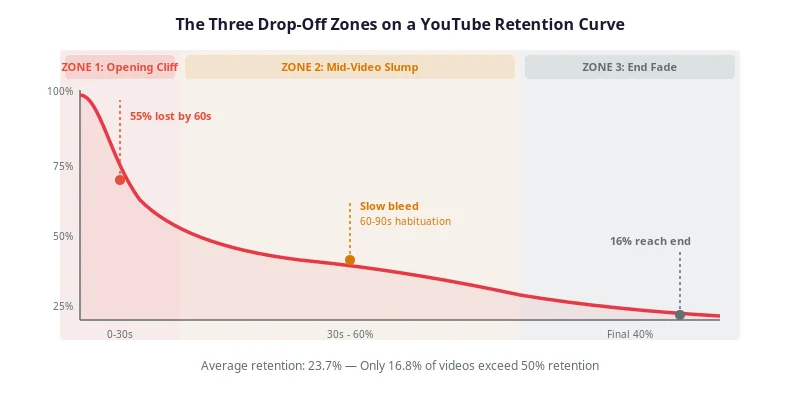
- Pacing only the hook. A hot opening followed by nine flat minutes produces the classic steep-then-bleed retention curve.
- No map, just vibes. Pacing decided "in the edit" means pacing was never decided — the edit can only remove pauses, not insert the structure.
- Trusting the felt sense. You cannot hear your own script the way a first-time viewer does. The word counts can.
Pacing checklist
- Your measured speaking rate is written at the top of the script
- Total word count divided by runtime lands inside your format's range
- The hook and re-hooks target a sprint pace; the payoff targets a breather
- Demo, b-roll, and music stretches were subtracted from the word budget
- A cut-20% deletion pass has removed fillers and restatements
- You read the script aloud once, top to bottom, without stopping
- The pace actually shifts between sections when you read it
Frequently asked questions
How many words is a 10-minute YouTube video?
At the standard 130–150 words-per-minute speaking range, a 10-minute video holds roughly 1,300–1,500 spoken words. Subtract 10–20% if the video contains demos, b-roll, or music stretches where nobody speaks — a 10-minute video with a two-minute demo needs only about 1,100–1,250 words of narration.
Is 170 words per minute too fast for a YouTube script?
Not for every format. Densely-edited video essays and Shorts narration routinely run 160–185 wpm because jump cuts remove pauses and the format rewards urgency. For tutorials and documentary-style content, 170 wpm usually outruns comprehension — viewers need time to follow on-screen actions. Your own read-aloud test is the deciding factor.
Why is documentary narration slower than talking-head pacing?
Because narration shares the track with visuals and music. Documentary-style scripts at roughly 100–120 wpm leave room for the shots to breathe, for score swells, and for moments that carry meaning without words. Talking-head videos have nothing to fill silence except the speaker, so they run faster — around 130–150 wpm.
How do I measure my own speaking rate?
Record yourself reading 60 seconds of an existing script at your natural delivery speed, then paste the transcript into any word counter. That count is your baseline words per minute. Average three readings from different videos, and re-measure whenever your delivery style changes — the number usually lands within 10 words per minute of 140.
See the pacing problems before you record
Pacing problems are invisible in a word processor — the script reads fine at any speed. RetentionYT reads them before recording instead: paste the script and it maps a pacing timeline with risk markers on the slow stretches, flags drop-off risk on sections that run long against their jobs, and checks whether the first 90 seconds actually deliver what the title promised. The verdicts come back as Record Now, Fix These First, or Rewrite Needed, and the free tier covers two audits a month at up to 5,000 words. The scores are structural estimates of the script itself — not YouTube Analytics data — so after publishing, the retention graph is still where you confirm what worked.
Continue reading in Scripting
- YouTube Script Outline Template: A Timed, Copy-Paste Framework for Retention
- How to Script a Talking-Head Video (Without Sounding Robotic)
- Pattern Interrupts: How to Reset Viewer Attention Every 45 Seconds
- How to Read Your YouTube Retention Graph (and Fix What It Shows)
Further reading (external authority references): YouTube's Help Center on audience retention in YouTube Analytics — for checking your pacing decisions against real curves after publish; YouTube on how its recommendation system works; and the Creator Insider channel, where YouTube's own creator team discusses watch-time signals.
Frequently asked questions
- How many words is a 10-minute YouTube video?
- At the standard 130–150 words-per-minute speaking range, a 10-minute video holds roughly 1,300–1,500 spoken words. Subtract 10–20% if the video contains demos, b-roll, or music stretches where nobody speaks — a 10-minute video with a two-minute demo needs only about 1,100–1,250 words of narration.
- Is 170 words per minute too fast for a YouTube script?
- Not for every format. Densely-edited video essays and Shorts narration routinely run 160–185 wpm because jump cuts remove pauses and the format rewards urgency. For tutorials and documentary-style content, 170 wpm usually outruns comprehension — viewers need time to follow on-screen actions. Your own read-aloud test is the deciding factor.
- Why is documentary narration slower than talking-head pacing?
- Because narration shares the track with visuals and music. Documentary-style scripts at roughly 100–120 wpm leave room for the shots to breathe, for score swells, and for moments that carry meaning without words. Talking-head videos have nothing to fill silence except the speaker, so they run faster — around 130–150 wpm.
- How do I measure my own speaking rate?
- Record yourself reading 60 seconds of an existing script at your natural delivery speed, then paste the transcript into any word counter. That count is your baseline words per minute. Average three readings from different videos, and re-measure whenever your delivery style changes — the number usually lands within 10 words per minute of 140.
Find your video’s drop-off points before you publish
RetentionYT audits your script for the moments viewers leave — so you can fix them before recording.
Get retention tips in your inbox
Occasional, practical emails on hooks, pacing, and retention. No spam.
Related posts
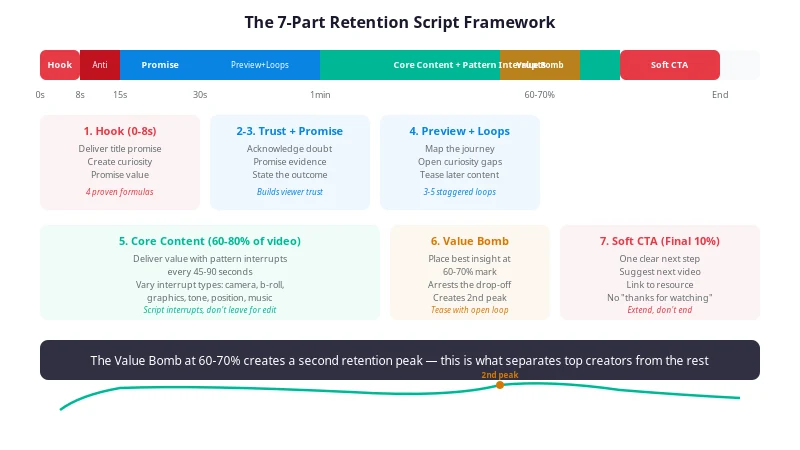
YouTube Script Outline Template: A Timed, Copy-Paste Framework for Retention
A free YouTube script outline template with timecodes, word-count budgets, and purpose notes for every section — so you fix pacing and structure on paper, before you hit record.
5 Storytelling Frameworks That Make YouTube Scripts Addictive
Learn 5 storytelling frameworks — But/Therefore, the Story Spine, In Medias Res, Nested Loops, and the Hero's Journey — that turn any YouTube script into a retention machine. Templates, examples, and a full checklist.
Words Per Minute for YouTube Scripts: How Many Words Is a 10-Minute Video?
Turn a target video length into a word budget before you draft: measure your own speaking rate, subtract the non-speaking minutes, and split the remaining words across the script.