How to Script a YouTube Video That Keeps Viewers Watching
A complete, data-backed system for scripting YouTube videos that hold attention from the first second to the last — hooks, open loops, pattern interrupts, pacing, and full script templates you can use today.

62 min readUpdated
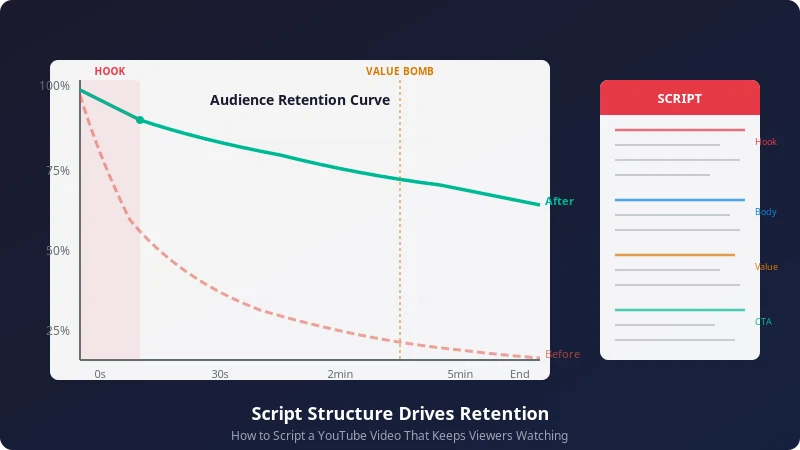
You upload a video. It picks up a few hundred views in the first hour, then flatlines. The algorithm stops pushing it. You open YouTube Studio, pull up the audience retention graph, and see the same shape every single time: a steep cliff in the first 30 seconds, a slow bleed through the middle, and a skeleton audience by the end.
If that sounds familiar, you are not alone. The average YouTube video retains just 23.7% of its audience by the final frame. More than half your viewers — 55% — are gone before the one-minute mark. And most of them make that stay-or-leave call in about 8 seconds.
The fix is not a better camera. It is not a louder thumbnail. It is your script.
A well-structured script is the single highest-leverage skill you can develop as a creator. It determines whether people stay past your hook, whether they watch through the middle stretch, and whether they stick around for your call to action. Every major creator — from MrBeast to Ali Abdaal — treats scripting as the foundation of their content, not an afterthought stapled onto the end of filming.
This guide breaks down everything you need to know about writing YouTube scripts that hold attention from the first second to the last. We will cover the psychology behind viewer drop-off, proven hook formulas, open loop techniques, pattern interrupt timing, pacing frameworks, and complete script templates you can adapt today. Every recommendation is backed by retention data from real YouTube channels — not theory.
By the end, you will have a repeatable system for scripting videos that keep viewers watching.
Why Scripting Matters More Than Ever
YouTube's algorithm has one primary job: keep people on the platform for as long as possible. It does this by recommending videos that maximize watch time. And the metric that matters most for watch time is audience retention — the percentage of your video that viewers actually watch before clicking away.
Here is what the latest data tells us:
These numbers tell a clear story: retention starts with structure, and structure starts with the script.
An extra 10% audience retention can be the difference between a video getting 100k views or 1 million.
When you script with retention in mind, you are not just writing words for a camera. You are engineering an experience that competes with every other video, every open browser tab, and every phone notification fighting for your viewer's attention. The script is where you decide what your hook is and when it lands, where to place open loops that pull viewers forward, when to introduce pattern interrupts that reset attention, how to pace information so it never feels slow or rushed, and where your call-to-action goes for maximum effect.
Creators who skip scripting tend to produce videos that start strong, drag in the middle, and end with a weak call to action. The retention graph confirms it every time: a sharp initial drop, a flat and fading middle section, and a tail-off at the end. Scripting fixes all three zones.
One more data point worth dwelling on: videos with strong first-minute retention — above 65% — see 58% higher average view duration across the full video. That means the work you put into your opening script pays dividends for the entire watch. A great hook does not just save the first minute. It raises the floor for everything that follows.
Key Takeaway
Retention is the algorithm's strongest signal for recommendation. Your script is the strongest lever for retention. If you want more views, start with better scripts — not better thumbnails.
What Makes Viewers Stop Watching
Before you can fix retention, you need to understand where and why viewers leave. YouTube Analytics gives you the retention curve for every published video, and across thousands of videos the same drop-off patterns emerge over and over.
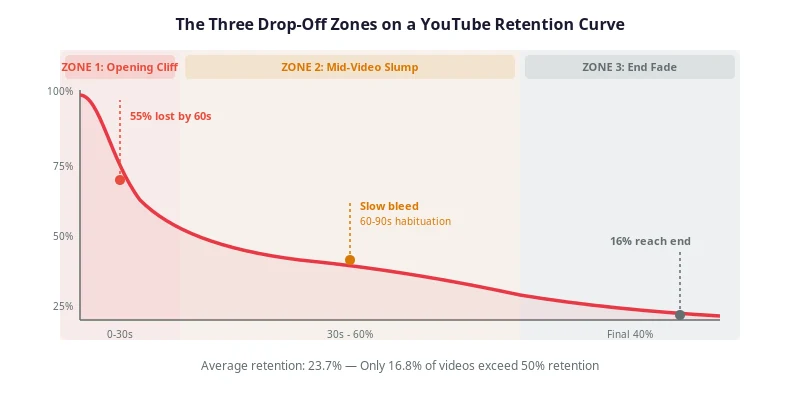
The Three Drop-Off Zones
Zone 1: The Opening Cliff (0–30 seconds)
This is where the most damage happens. Over 33% of viewers drop off in the first 30 seconds if the intro does not deliver on the promise made by the title and thumbnail. The most common cause is starting with a generic greeting: "Hey guys, welcome back to my channel." Viewers did not click for a greeting. They clicked for an answer to a question or the solution to a problem. Every second you spend on preamble is a second the algorithm counts against you.
Zone 2: The Mid-Video Slump (30 seconds to 60% mark)
After the initial cliff, retention tends to flatten — but it is not stable. It slowly bleeds. The human brain adapts to repetitive patterns within 60 to 90 seconds. If your delivery stays the same — same camera angle, same pace, same tone — viewers start to drift. They do not all leave at once, but they lose focus, and eventually they click away to something that feels fresher.
Zone 3: The End Fade (Final 40%)
Only 16% of viewers, on average, reach the final 10 seconds of a video. The end is where most creators lose people because they front-load all their best content and leave nothing compelling for the back half. The retention graph looks like a ski slope, and the algorithm reads that slope as a signal that the video is not holding attention.
The Five Most Common Reasons Viewers Leave
- Weak or misleading hooks. The video does not deliver what the title promised, or it takes too long to get to the point. The viewer feels cheated and clicks away.
- Slow pacing. Information is delivered too slowly, with long tangents, unnecessary backstory, or rambling explanations that add no value to the viewer's immediate question.
- No structure or journey. The video feels like a stream of consciousness rather than a guided experience with a clear beginning, middle, and end. The viewer has no sense of progress.
- No open loops. Nothing pulls the viewer forward. They can leave at any moment without missing anything, so they do — the moment they get slightly bored.
- Poor CTA placement. The call to action is either too early (causing drop-off), too aggressive (annoying the viewer), or too late (nobody is left to hear it).
Understanding these drop-off zones is the first step. The rest of this guide gives you the specific scripting techniques to fix each one — starting with the psychology behind why viewers behave this way in the first place.
Audience Psychology: Why People Click Away
Every retention technique in this guide is rooted in one fundamental question: what is happening inside the viewer's brain when they watch your video? Understanding the psychology of attention is what separates creators who script by feel from creators who script by design.
The Attention Economy
Your video is not competing with other YouTube videos. It is competing with every possible thing your viewer could be doing instead: scrolling TikTok, checking group chats, reading a news article, or just closing the tab. Attention is the scarcest resource on the internet, and viewers allocate it ruthlessly. If your video does not earn their attention in the first few seconds, they move on — and they do not come back.
This means your script needs to treat the viewer's attention as something you are constantly earning, not something you are given once and get to keep. Every section of your script should answer the question: Why should the viewer keep watching right now?
The Information Gap Theory
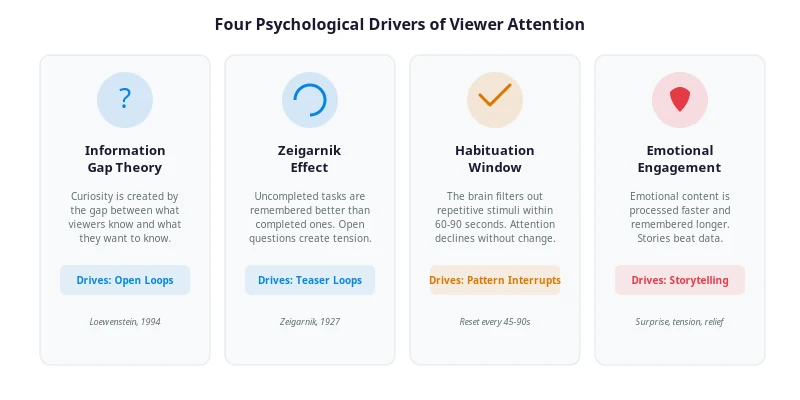
In 1994, behavioral economist George Loewenstein published a paper proposing the "information gap" theory of curiosity. The idea is simple but powerful: curiosity is not created by what people already know. It is created by the gap between what they know and what they want to know. When you expose that gap — when you make viewers aware that they are missing a piece of information — their brain creates a mild discomfort that can only be resolved by closing the gap.
This is the psychological engine behind open loops, teaser lines, and "coming up next" previews. When you say "I'll show you the exact template at the end of this video," you are opening an information gap. The viewer now knows there is a template, but they do not have it yet. To close the gap, they have to keep watching. The bigger the gap and the more relevant the missing information is to the viewer, the stronger the pull.
Pro Tip
Open multiple information gaps throughout your script, and close them at different times. This creates layered curiosity that keeps viewers hooked across the full video, not just at the beginning and end.
The Zeigarnik Effect
Related to the information gap is the Zeigarnik effect, a psychological principle first identified in the 1920s: people remember uncompleted tasks better than completed ones. Applied to YouTube, this means an unresolved question or unfinished story creates a cognitive itch that the viewer wants to scratch. Open loops leverage this effect. The moment you introduce a teaser — "but there's a catch, and I'll explain it later" — the viewer's brain flags it as unfinished business. They will keep watching because leaving the video would mean leaving that loop open, and the brain hates open loops.
Habituation and the 60-90 Second Window
The brain is wired to filter out repetitive stimuli. If you hear the same sound at the same volume for long enough, you stop noticing it. If you see the same camera angle for too long, your visual attention dims. This process is called habituation, and it is the enemy of retention.
Research on attention spans shows that the brain begins to habituate to a single delivery pattern within 60 to 90 seconds. After that window, attention starts to decline even if the content is good. This is why pattern interrupts are not optional — they are a biological necessity. By changing the stimulus every 45 to 90 seconds, you reset the habituation clock and force the brain to re-engage.
Emotional Engagement
Data beats information, stories beat data, and emotions beat everything. The brain processes emotional content faster and remembers it longer than neutral content. This is why a personal story about a mistake you made will retain better than a bullet-point list of tips, even if the tips contain the same information. Emotion — whether it is surprise, frustration, relief, humor, or even mild outrage — is what makes content feel alive rather than transactional.
When scripting, ask yourself: what emotion does each section evoke? If the answer is "nothing in particular," that section is a retention risk. Even educational content benefits from emotional anchors — the frustration of a problem, the satisfaction of a solution, the surprise of an unexpected result.
With these psychological foundations in place, let us turn to the most practical application: writing hooks that stop the initial drop-off before it starts.
Hook Creation: Winning the First 8 Seconds
Your hook is the most important part of your script. It is the first thing viewers hear and see, and it determines whether they stay or leave. The data is brutal: 55% of viewers are gone within the first 60 seconds, and most make their decision in about 8 seconds. That is not a lot of words. At a normal speaking pace of 130-150 words per minute, 8 seconds gives you roughly 17 to 20 words to earn the rest of the video.
Every second of preamble is a second spent not earning attention. This is why "Hey guys, welcome back to my channel" is the most expensive sentence on YouTube. It tells the viewer nothing, it delays the payoff, and it gives them 5 seconds of dead air to decide to leave.
What a Hook Must Do
A strong hook accomplishes three things simultaneously:
- Delivers on the title and thumbnail promise. If the viewer clicked a title that says "5 Mistakes Killing Your Views," start with mistake number one — not with your name, not with a channel intro, not with "before we get started."
- Creates curiosity or tension. Open an information gap that can only be closed by watching. Make the viewer aware that they are about to learn something they do not already know.
- Promises specific value. Tell the viewer exactly what they will gain from watching. "By the end of this video, you'll have a repeatable system for scripting videos that hold attention." Specificity builds trust.
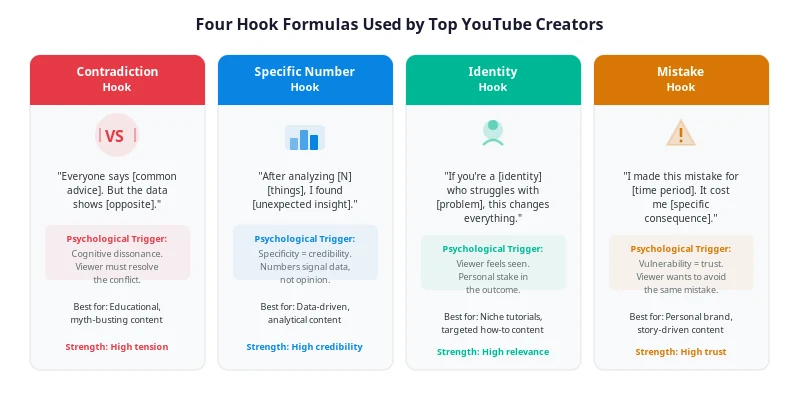
Four Hook Formulas That Work
These formulas come from analyzing the opening lines of top-performing videos across education, entertainment, and business niches. They are templates — fill in the brackets with your content.
1. The Contradiction Hook
Challenge a widely held belief. This creates immediate tension because the viewer's brain detects a conflict between what they thought they knew and what you are claiming.
Example
"Everyone says you need to post every day to grow on YouTube. But the data shows the opposite — creators who post less often but script better actually grow faster."
2. The Specific Number Hook
Numbers create instant credibility and specificity. They signal that what follows is backed by data, not opinion. The more specific the number, the stronger the hook.
Example
"After analyzing 500 YouTube retention graphs, I found one pattern that shows up in every video that breaks 100K views — and almost none of the ones that don't."
3. The Identity Hook
Call out your target audience directly. When a viewer hears themselves described, they feel seen. This creates an immediate personal stake in the outcome of the video.
Example
"If you're a YouTuber who's been creating for over a year and your views are still flatlining, this video is going to change how you script every video from here on out."
4. The Mistake Hook
Admit a personal failure and frame it as a lesson. This builds trust through vulnerability and creates curiosity about what went wrong and how to avoid it.
Example
"I made this one scripting mistake for two years. It cost me thousands of views on every video. And almost every creator I talk to is making it right now."
The Anti-Hook: Acknowledging Skepticism
After your hook lands, viewers who have been burned by clickbait before will be skeptical. The anti-hook is a technique borrowed from top creators: immediately acknowledge the viewer's doubt to build trust. It typically occupies seconds 8 through 15 of your video.
Example
"I know that sounds like a big claim. So I'm going to show you the actual data — retention graphs from real videos, before and after applying this framework. You can decide for yourself."
By acknowledging skepticism, you disarm it. Instead of the viewer thinking "yeah right" and clicking away, you address their doubt head-on and promise evidence. This converts skeptics into invested viewers.
Warning
Never start with a greeting, channel intro, or sponsor mention. These are the most common causes of first-30-second drop-off. Hook first. Everything else comes later — after you have earned the right to the viewer's time.
Hook Mistakes to Avoid
- Starting with "Hey guys" or "Welcome back." The sharpest retention drops happen in the first 10 seconds, and greetings are the primary cause.
- Front-loading the sponsor. Sponsor reads in the first 30 seconds cause massive drop-offs. Place them 2 to 3 minutes in, after retention has stabilized.
- Vague promises. "Today we're going to talk about scripting" is not a hook. "By the end of this video, you'll have a 7-part script template that holds 50%+ retention" is.
- Over-delivering in the hook. If you give away the answer in the first 10 seconds, there is no reason to keep watching. Tease the value, do not deliver it all at once.
Once your hook has earned the viewer's attention, the next challenge is holding it. That is where open loops come in.
Open Loops: The Strongest Retention Technique
If hooks are the most important part of your script, open loops are the most important structural technique in the body. An open loop is an unanswered question, an unresolved story, or a teaser for something that comes later. It creates psychological tension — the information gap we discussed earlier — that can only be resolved by continuing to watch.
Think of open loops as invisible threads running through your script. You plant one early, and the viewer follows the thread until you close the loop later. The longer the thread, the more of the video they watch.
How Open Loops Work
At minute 2 of your video, you say: "I'll show you the exact template I use at the 8-minute mark." That single sentence creates an open loop. The viewer now knows there is a template. They want the template. But they cannot have it yet — they have to wait until minute 8. Between minute 2 and minute 8, every time the viewer considers leaving, the open loop pulls them back. "I can't leave yet, I haven't gotten the template."
The key is that the payoff must be worth the wait. If you promise a template at minute 8 and minute 8 arrives with a vague "just be yourself on camera," the viewer feels manipulated, not rewarded. The open loop must deliver real value when it closes.
Types of Open Loops
The Teaser Loop
The most common form. You explicitly promise that something is coming later in the video.
Example
"Stick around, because at the end I'm going to walk through a full script for a 10-minute video using every technique in this guide — line by line."
The Story Loop
Start a personal anecdote but pause it before the resolution. Come back to it later in the video.
Example
"Two years ago, I almost quit YouTube. My retention was 18% and nothing I tried worked. But then I discovered one technique that changed everything — and I'll tell you exactly what it was in a few minutes."
The Question Loop
Pose a provocative question early in the video but delay the answer. The viewer keeps watching because they want the answer.
Example
"What if I told you that one line in your script could be responsible for 40% of your drop-off? I'll show you which line, and how to fix it, in just a minute."
The Contrast Loop
Show a "before" version early, and promise the "after" version later. This works especially well for tutorial and transformation content.
Example
"Here's a script opening that gets 25% retention. Later, I'll show you the rewrite that gets 55% — same topic, same creator, completely different structure."
How Many Open Loops Should You Use?
A good rule of thumb is to have at least one open loop active at all times throughout your video. That does not mean you need dozens — it means that whenever one loop closes, another should already be open. Think of it as a relay race: the baton of curiosity passes from one loop to the next so there is never a moment when the viewer has no reason to keep watching.
For a 10-minute video, plan for 3 to 5 open loops, staggered so they open and close at different points. Here is a sample open loop timeline for a 10-minute video:
| Time | Loop Action | Content |
|---|---|---|
| 0:30 | Open Loop 1 | "Full script template at the end" |
| 2:00 | Open Loop 2 | "The one line causing 40% drop-off" |
| 4:30 | Close Loop 2 | Reveal the line and the fix |
| 5:00 | Open Loop 3 | "Before-and-after script comparison coming up" |
| 7:00 | Close Loop 3 | Show the comparison |
| 9:00 | Close Loop 1 | Deliver the full template |
Notice how loops overlap. Loop 1 stays open from 0:30 to 9:00, creating a long-term pull. Loops 2 and 3 open and close in the middle, maintaining short-term curiosity. This layered structure ensures the viewer always has a reason to keep watching.
Pro Tip
Mark your open loops in your script outline with brackets: [OPEN LOOP: template at end] and [CLOSE LOOP: template]. This ensures you never forget to close a loop — an unclosed loop is worse than no loop at all, because it breaks trust.
Curiosity Techniques Beyond Open Loops
Open loops are the most powerful curiosity tool, but they are not the only one. A well-scripted video uses multiple curiosity techniques in combination to create a rich, layered viewing experience that keeps the brain engaged at every moment.
The "What Most People Miss" Pivot
This is a transitional phrase that signals to the viewer that you are about to share something they have not heard before. It works because it positions the upcoming content as exclusive or counterintuitive — information that other creators have not covered.
Example
"Here's what most people miss about scripting: they focus on the words, but the biggest retention gains come from the structure — specifically, where you place your best content."
The Cliffhanger Transition
Instead of smoothly transitioning between sections, cut at the moment of maximum tension. This borrows from television and serialized storytelling: end one segment with a question or revelation, then move to the next segment before resolving it. The viewer follows because they need the resolution.
Example
"And that's when I realized the problem was not with my content — it was with my script structure. But I'll get to exactly what I changed in a second. First, let me show you why pacing matters more than you think..."
The Unexpected Example
Illustrate a point with an example the viewer would never have predicted. Surprise is a powerful attention-reset mechanism. If you are talking about YouTube retention and suddenly reference a technique used by documentary filmmakers or stand-up comedians, the novelty of the comparison re-engages the viewer's attention.
The Counterintuitive Claim
State something that goes against conventional wisdom, then promise to prove it. This is similar to the Contradiction Hook but used within the body of the script to re-engage attention during a slower section.
Example
"Most scripting advice tells you to front-load your best content. But the data shows the opposite: placing your single best insight at the 60-70% mark of your video produces higher overall retention. Here's why."
The Direct Question
Ask the viewer a question directly. This shifts the script from a monologue to a conversation and forces the viewer's brain to engage. Even if they do not answer out loud, their brain begins processing the question, which means they are actively listening rather than passively consuming.
Example
"Quick question: when was the last time you looked at your retention graph and actually changed your script based on what you saw? If you're like most creators, the answer is never. And that's the problem we're about to fix."
These techniques work best when used sparingly and strategically. If every sentence is a curiosity technique, none of them stand out. Use them at natural transition points in your script — between sections, during slower explanatory passages, and right before a pattern interrupt.
Storytelling Frameworks for YouTube Scripts
Stories are the oldest retention tool humans have. Before YouTube, before television, before books, people gathered around fires and listened to stories for hours. The same neurological mechanisms that kept our ancestors engaged around a campfire keep viewers engaged on a screen. When you structure your script as a story — even an educational one — you tap into a retention engine that has been refined over thousands of years.
The AIDA Framework
AIDA stands for Attention, Interest, Desire, Action. Originally developed for advertising, it maps cleanly onto YouTube script structure:
- Attention: Your hook. Grab the viewer in the first 8 seconds with a bold claim, a surprising statistic, or a provocative question.
- Interest: The setup. Explain why the topic matters and what the viewer stands to gain. This is where your promise and preview live.
- Desire: The body. Deliver your content in a way that makes the viewer want the outcome you are describing. Use examples, demonstrations, and stories to make the value tangible.
- Action: Your CTA. Tell the viewer exactly what to do next — and make it a natural extension of the content, not a tacked-on request.
The Hero's Journey (Adapted for YouTube)
Joseph Campbell's monomyth — the Hero's Journey — is the storytelling backbone of nearly every film and novel you have ever consumed. It can be compressed into a YouTube-friendly version that works for educational and how-to content:
- The Ordinary World: Show the viewer's current reality. "Right now, your retention graph looks like a cliff."
- The Call to Adventure: Introduce the possibility of change. "But it doesn't have to. There's a framework that can flatten that curve."
- The Mentor: Position yourself (or the data) as the guide. "After analyzing hundreds of retention graphs, I found a pattern."
- The Trials: Walk through the challenges and mistakes. "Most creators try X, Y, and Z — and they all fail for the same reason."
- The Revelation: Deliver the key insight. "The fix is not about editing. It's about script structure — specifically, this 7-part framework."
- The Transformation: Show the result. "Here's what the retention graph looks like after applying it."
- The Return: Give the viewer the tool to replicate the transformation. "And here's the template so you can do it yourself."
You do not need to use all seven steps every time. But the underlying arc — from problem to revelation to transformation — is what makes content feel like a journey rather than a lecture.
The Problem-Agitate-Solve (PAS) Framework
PAS is one of the most effective structures for tutorial and how-to videos because it mirrors the viewer's psychological journey:
- Problem: Name the pain. "Your audience retention is dropping in the first 30 seconds."
- Agitate: Make the pain vivid. Show the consequences. "And every percentage point of drop-off is a percentage of views the algorithm will never give you. Over a year, that's thousands of views lost — all because of a weak opening."
- Solve: Present the solution. "Here are four hook formulas that have been shown to reduce first-30-second drop-off by up to 30%."
The 7-Part Retention Script Framework
This is the framework used by top retention-first creators. It combines elements of AIDA, the Hero's Journey, and PAS into a single, repeatable script structure designed to maximize retention at every stage of the video.
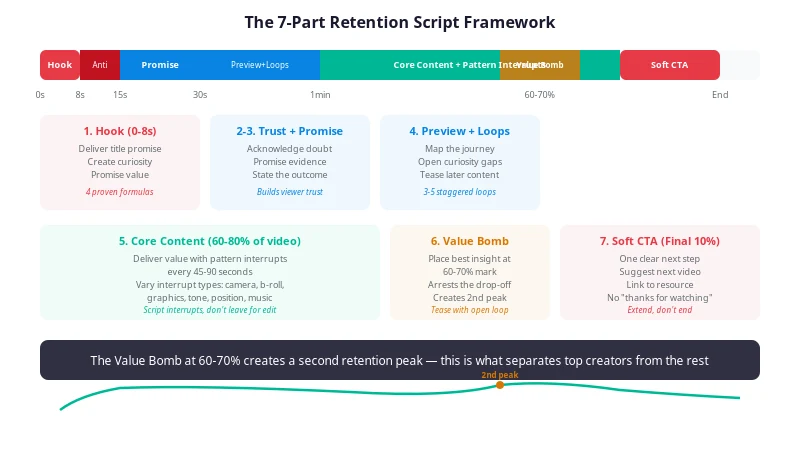
| Part | Timing | Purpose |
|---|---|---|
| 1. Hook | 0–8 seconds | Break scroll momentum. Deliver the title promise immediately. |
| 2. Anti-Hook | 8–15 seconds | Acknowledge skepticism. Build trust by promising evidence. |
| 3. Promise | 15–30 seconds | State exactly what the viewer will learn and be able to do. |
| 4. Preview with Open Loops | 30–60 seconds | Map the journey. Open curiosity gaps for later content. |
| 5. Core Content with Pattern Interrupts | 60%–80% of video | Deliver value with engagement resets every 45–90 seconds. |
| 6. Value Bomb | 60%–70% mark | Place your single best insight just before the typical drop-off point. |
| 7. Soft CTA | Final 10% | Suggest a next step that builds on the current video. |
The genius of this framework is in the placement of the Value Bomb at the 60-70% mark. Most creators front-load their best content and let the back half deflate. By saving your strongest insight for the point where retention typically starts to crater, you create a second peak that pulls the curve back up. Viewers who might have left at the 5-minute mark stay because they know the best part is still coming — because your open loop told them so.
Pattern Interrupts: Resetting Viewer Attention
Pattern interrupts are deliberate changes in your delivery — visual, auditory, or structural — that break the monotony and reset the viewer's attention. As we covered in the psychology section, the brain habituates to repetitive stimuli within 60 to 90 seconds. Without interrupts, attention naturally declines even when the content is good. Pattern interrupts are how you fight back against biology.
How Pattern Interrupts Work
When the brain detects a change in the pattern of stimuli it is receiving — a new camera angle, a shift in voice tone, a sudden graphic — it treats it as a potential threat or opportunity and re-allocates attention to process the change. This is an evolutionary survival mechanism. In the context of YouTube, it means that a well-timed interrupt can snap a viewer back to full attention in a fraction of a second.
The key insight is that pattern interrupts must be scripted, not left for the editing room. When you write your script, you should mark every 45 to 90 second block with a planned interrupt. This ensures your script has built-in rhythm and your editing has a roadmap to follow.
Six Types of Pattern Interrupts
| Type | How to Execute | Script Marker |
|---|---|---|
| Camera Angle Change | Switch between wide, medium, and close-up shots | [INTERRUPT: angle change] |
| B-Roll and Graphics | Cut to relevant footage, charts, or on-screen text | [INTERRUPT: show graphic] |
| Voice Tone Shift | Speed up, slow down, drop to a whisper, or raise energy | [INTERRUPT: energy shift] |
| Position Change | Stand up, sit down, walk to a new spot, or change location | [INTERRUPT: move] |
| Music or Sound Effect | Change background music, add a sound cue, or use silence | [INTERRUPT: music change] |
| Direct Question | Ask the viewer something to re-engage active processing | [INTERRUPT: ask viewer] |
How to Schedule Pattern Interrupts in Your Script
Here is what a pattern interrupt schedule looks like inside a script outline for a 10-minute video. Notice how the interrupts vary in type so the viewer never knows exactly what is coming:
0:00 - Hook (Contradiction Hook formula)
0:15 - Anti-Hook (acknowledge skepticism)
0:30 - Promise + Preview (open Loop 1: template at end)
0:45 - [INTERRUPT: angle change - switch to close-up]
1:30 - Section 1 begins
2:00 - Open Loop 2 (the one line causing drop-off)
2:15 - [INTERRUPT: show graphic - retention curve diagram]
3:00 - [INTERRUPT: energy shift - speed up delivery]
4:00 - [INTERRUPT: b-roll - show example video clip]
4:30 - Close Loop 2 (reveal the line and the fix)
5:00 - [INTERRUPT: angle change - move to different location]
5:00 - Open Loop 3 (before-and-after comparison coming up)
6:00 - [INTERRUPT: music change - shift tone]
6:30 - Value Bomb (the single best insight)
7:00 - Close Loop 3 (show the comparison)
7:15 - [INTERRUPT: direct question to viewer]
8:00 - [INTERRUPT: show graphic - checklist]
8:30 - [INTERRUPT: angle change - back to main shot]
9:00 - Close Loop 1 (deliver the full template)
9:30 - Soft CTA (suggest next video)
That is 11 pattern interrupts across a 10-minute video — roughly one every 55 seconds. The variety prevents the interrupts themselves from becoming predictable. If every interrupt is a camera angle change, the brain will start to habituate to that too.
Pro Tip
The strongest pattern interrupt is silence. After a fast, information-dense section, pause for 2 to 3 seconds before delivering your next point. The sudden absence of sound forces the brain to re-engage because it interprets silence as a potential change in the environment. Use this sparingly — once or twice per video — for maximum impact.
Videos with visual changes approximately every 2 seconds — a technique used heavily by top creators like MrBeast — consistently show higher retention than videos with static shots. You do not need to match that frequency, but the principle is clear: the more dynamic your visual and auditory rhythm, the more attention you hold. Script the rhythm in advance, and you give your editor a clear plan instead of leaving engagement to chance.
Retention Strategies: The Complete Toolkit
Now that we have covered the individual techniques — hooks, open loops, curiosity, storytelling, and pattern interrupts — let us assemble them into a comprehensive retention strategy. This is where the pieces come together into a system you can apply to every video you make.
1. Front-Load the Promise, Not the Content
Your opening should tell the viewer exactly what they are going to get, but it should not give it to them yet. This is a subtle but critical distinction. "In this video, I'll show you a 7-part script framework that holds 50%+ retention" is a promise. "Here's the framework: Hook, Anti-Hook, Promise, Preview, Core Content, Value Bomb, Soft CTA" is giving it away. Promise the value in the hook. Deliver it throughout the body. This gives the viewer a reason to stay without spoiling the payoff.
2. Place Your Best Content at the 60-70% Mark
This is the Value Bomb principle from the 7-part framework. Most retention curves show a gradual decline through the middle of the video, with a steeper drop starting around the 60% mark. By placing your single most valuable insight — the thing the viewer most wants to know — at exactly that point, you create a retention spike that arrests the decline. The viewer who was about to leave stays because the best part is happening right now.
To make this work, you need an open loop that teases the Value Bomb early. At minute 1 or 2, say something like: "And at around the 6-minute mark, I'll share the one technique that made the biggest single difference in my retention — it's counterintuitive, and almost nobody talks about it." That teaser creates a pull that lasts for 4 to 5 minutes of video.
3. Use the "Coming Up Next" Preview
Before each major section transition, preview what is coming next. This functions as a mini open loop and gives the viewer a reason to stay through the transition. Without it, section breaks are natural exit points — the viewer feels like they have completed a unit of content and can leave. With it, they know there is more value coming.
Example
"That's the hook taken care of. But the hook only earns you the first 30 seconds. Next, I'm going to show you how to hold attention through the middle of your video — which is where most creators lose 40% of their audience."
4. Use the "Recap and Reveal" Technique
At the midpoint of your video, briefly recap what you have covered so far, then tease what is still to come. This serves two purposes: it re-engages viewers who may have been passively watching by reminding them of the value they have already received, and it reactivates curiosity about what is next.
Example
"So far we've covered hooks, open loops, and pattern interrupts. But we have not yet talked about the single most important moment in your script — the moment that determines whether viewers stay for your CTA or leave in the last 30 seconds. That's coming up next."
5. End Each Section with a Question
Questions are natural engagement hooks. When you end a section with a question, the viewer's brain automatically begins processing it, which means they are still engaged during the transition to the next section. This prevents the drop-off that often happens at section boundaries.
6. Keep the Energy Variable
A flat energy level — even a high one — leads to habituation. Instead, vary your energy throughout the script. Start high in the hook, settle into a confident, measured tone for the setup, raise energy during key insights, drop to a conversational tone for personal stories, and build back up for the Value Bomb and CTA. This emotional variation is itself a pattern interrupt, and it makes the video feel dynamic rather than monotonous.
Retention Benchmarks by Video Length
Not all videos have the same retention potential. The length of your video significantly affects what kind of retention you can expect. Here are the benchmarks from the latest data:
| Video Length | Average Retention | Target Retention |
|---|---|---|
| Under 5 minutes | 28.2% | 45%+ |
| 5–10 minutes | 31.5% | 50%+ |
| 10–20 minutes | 26.8% | 40%+ |
| 20+ minutes | 21.3% | 35%+ |
Videos in the 5 to 10 minute range hold viewers best, with an average retention of 31.5%. This is the sweet spot for educational and how-to content — long enough to deliver substantial value, short enough to maintain pacing. If your videos are running longer than 10 minutes, consider whether the extra length is adding value or just adding air.
Script Pacing: The Rhythm of Retention
Pacing is the speed at which information flows through your script. Get it wrong and you lose viewers regardless of how good your content is. Too slow and they get bored. Too fast and they feel overwhelmed. The right pace keeps the viewer in a state of continuous engagement — always processing, never waiting, never drowning.
The 130-150 Word Per Minute Rule
The optimal speaking pace for YouTube content is 130 to 150 words per minute. This is fast enough to maintain momentum but slow enough for comprehension. At this pace, a 10-minute video requires approximately 1,300 to 1,500 words of script.
However, this is an average, not a constant. The best scripts vary their pace throughout the video. Fast delivery for hooks and high-energy sections. Slower delivery for complex explanations and emotional moments. Normal conversational pace for transitions and asides. The variation in pace is itself a retention tool — it creates rhythm, and rhythm keeps the brain engaged.
The Pacing Map
Before writing your full script, build a timed outline that maps every section to a target duration. This prevents the most common pacing mistake: spending too long on the intro and rushing the payoff. Here is a pacing map for a 10-minute video:
| Section | Time Allocation | Word Count (approx.) | Pace |
|---|---|---|---|
| Hook | 0:00–0:15 (15 sec) | 30–35 words | Fast, high energy |
| Anti-Hook + Promise | 0:15–0:30 (15 sec) | 30–35 words | Measured, confident |
| Preview + Open Loops | 0:30–1:00 (30 sec) | 65–75 words | Normal, conversational |
| Core Content Part 1 | 1:00–3:30 (2.5 min) | 325–375 words | Varied — fast for insights, slow for examples |
| Core Content Part 2 | 3:30–6:00 (2.5 min) | 325–375 words | Varied |
| Value Bomb | 6:00–7:00 (1 min) | 130–150 words | Slow, deliberate, high impact |
| Core Content Part 3 | 7:00–9:00 (2 min) | 260–300 words | Normal, wrapping up |
| Soft CTA | 9:00–10:00 (1 min) | 130–150 words | Conversational, forward-looking |
The "Cut 20%" Rule
After writing your first draft, read it out loud. Then cut 20% of the words. This is not about making the video shorter — it is about making it tighter. Every word you remove is a word that was not earning its place. Filler phrases like "without further ado," "as you can see," "so basically," and "at the end of the day" add nothing and train viewers to tune out. Cut them all.
A dense 8-minute video will outperform a bloated 15-minute one every single time. Information density — the amount of value per minute of watch time — is a retention multiplier. Viewers can feel the difference between a script where every sentence matters and one where the creator is padding for length.
Warning
Do not pad your script to hit a target video length. The algorithm does not reward length — it rewards watch time and retention. A 7-minute video with 50% retention will outperform a 15-minute video with 25% retention every time. Write the script as long as it needs to be to deliver the value, and not a word longer.
Pacing Mistakes That Kill Retention
- The Long Intro: Spending 2 minutes on setup before delivering any real value. The viewer leaves before the content starts.
- The Rushed Ending: Spending 8 minutes on the body and 30 seconds on the conclusion. The CTA gets lost because you are racing to finish.
- The Monotone Delivery: Same pace, same tone, same energy for the entire video. The brain habituates and attention fades.
- The Tangent: Going off-topic for 90 seconds in the middle of a section. The viewer forgets what they were watching and leaves.
- The Over-Explained Point: Making the same point three different ways because you are worried the viewer did not get it. Trust your viewer. Make the point once, clearly, and move on.
Emotional Transitions in Your Script
Emotion is the through-line of your script. While structure provides the skeleton and pacing provides the rhythm, emotion provides the color. A script that moves through a range of emotions — surprise, tension, relief, satisfaction, curiosity — feels alive in a way that a purely informational script never does.
The Emotional Arc of a High-Retention Video
Think of your script as having an emotional waveform. It should rise and fall, not stay flat. Here is what the emotional arc of a well-scripted YouTube video looks like:
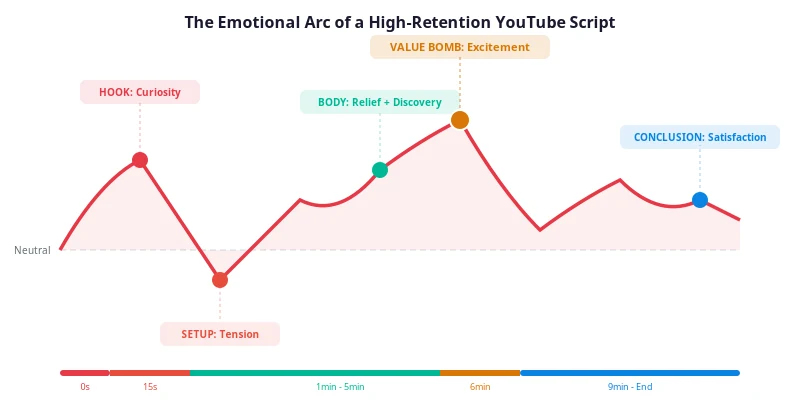
- Hook (Curiosity + Surprise): The viewer is intrigued. Something unexpected or bold has been said. Energy is high.
- Setup (Tension): You describe the problem. The viewer feels the friction. "Yes, that's exactly my problem."
- Body (Relief + Discovery): You start delivering solutions. The viewer feels relief as the tension resolves into understanding.
- Value Bomb (Excitement + Awe): The big insight lands. The viewer feels a spike of excitement — "I never thought of it that way."
- Conclusion (Satisfaction + Anticipation): The viewer feels satisfied that they learned something valuable and anticipates applying it.
How to Script Emotional Transitions
Emotional transitions are created through three tools: word choice, delivery notes, and structural shifts. In your script, annotate emotional shifts the same way you annotate pattern interrupts.
[EMOTION: curiosity/surprise]
"After analyzing 500 retention graphs, I found one pattern..."

[EMOTION: tension]
"But here's the problem. Most creators never look at their
retention graph. And the ones who do? They don't know what
to change."

[EMOTION: relief]
"The good news is, the fix is surprisingly simple..."

[EMOTION: excitement]
"And this one change alone took my retention from 25% to 48%
on my very next video."
These annotations serve two purposes. First, they remind you, the creator, of the emotional intent behind each section when you are filming. Second, they guide your editor on when to shift music, pacing, and visual treatment to match the emotional beat.
The Power of Vulnerability
One of the most effective emotional transitions is the shift from authority to vulnerability. After delivering confident, data-backed content, share a personal story about a time you failed or struggled with the exact problem you are solving. This does two things: it humanizes you, which builds trust, and it creates an emotional contrast that makes the preceding content feel more valuable by comparison. The viewer thinks: "Even the expert struggled with this. It's not just me."
Vulnerability works best when it is specific and genuine. "I used to be bad at scripting" is vague and forgettable. "For two years, every single video I published had the same retention cliff at the 30-second mark, and I had no idea why" is specific, vivid, and emotionally resonant.
Pro Tip
Map your emotional arc before you write a single word of script. Draw the waveform on a piece of paper — where does it peak, where does it dip, where does it spike? Then write your script to follow that arc. This ensures emotion is designed in, not added as an afterthought.
Re-engagement Methods: Winning Back Drifting Viewers
No matter how well you script, some viewers will start to drift. Their attention will waver, their finger will hover over the back button, and they will begin mentally composing their exit. Re-engagement methods are the techniques you build into your script to catch these viewers before they leave — to pull them back in at the exact moment they are about to click away.
The key is that re-engagement is not a single technique applied once. It is a series of strategic "attention checkpoints" distributed throughout your script, each designed to arrest a potential drop-off before it happens.
The 2-Minute Checkpoint
The first major re-engagement point should come at approximately the 2-minute mark. This is the point where viewers who stayed past the hook but are not fully committed start to consider leaving. Your checkpoint should be a pattern interrupt combined with a curiosity injection — something that resets their attention and gives them a new reason to stay.
Example
"Now, before we get into the framework, I want to show you something that completely changed how I think about scripting. [INTERRUPT: show graphic] This is a retention graph from one of my old videos. See that cliff at 30 seconds? That cost me about 12,000 views. But here's what happened when I fixed it..."
The Mid-Video Reset
At the 50% mark of your video, do a full re-engagement pass. This is where the mid-video slump hits hardest. Use a combination of three techniques: a recap of what has been covered (reminds the viewer of value received), a preview of what is still to come (activates curiosity about future value), and a pattern interrupt (resets attention). Together, these three moves create a "why am I still watching" answer that is hard to leave.
The "You Might Be Tempted to Skip This" Technique
When you reach a section that is inherently less exciting — necessary background information, a technical explanation, or a setup section — address the viewer's impulse to skip directly. By naming the urge, you acknowledge it, and by explaining why the section matters, you override it.
Example
"I know this part might feel like a detour. But if you skip it, you'll miss the one piece of context that makes the entire framework work. So bear with me for 60 seconds — this is the foundation everything else builds on."
The "Quick Aside" Pattern
Break up dense informational sections with a brief, 10 to 15 second aside that is personal, humorous, or surprising. This is not a tangent — it is a strategic attention reset disguised as a casual moment. The aside should be relevant enough that it does not feel like wasted time, but different enough in tone that it breaks the monotony of the main content.
Example
"Quick side note: I used to script my videos in one sitting, start to finish. Terrible idea. I'd hit the middle section, run out of steam, and just start padding. These days I script the hook and the Value Bomb first, then fill in the middle. It changed everything. Anyway, back to the framework..."
The "Direct Call-Out"
Sometimes the most effective re-engagement is the most direct. If you sense a section is running long or getting complex, break the fourth wall and talk to the viewer explicitly.
Example
"If you're still here, good — because this next part is where most creators get it wrong, and it's the difference between a video that gets 1,000 views and one that gets 100,000."
This technique works because it rewards the viewer for staying. They feel acknowledged, and the implied message — "the best stuff is coming, do not leave now" — creates a sense of exclusivity. They are part of the group that stuck around, and that group is about to get the real value.
Key Takeaway
Re-engagement is not about preventing every single viewer from leaving. It is about giving the viewers who are on the fence a reason to stay. Build 3 to 4 re-engagement checkpoints into every script, and you will flatten the mid-video slump that kills most retention curves.
CTA Placement: Where and How to Ask
The call to action is where most creators undo the retention work they have built up over the entire video. They either place the CTA too early (causing a drop-off before the video is done), make it too aggressive (annoying the viewer), or cram in multiple CTAs (diluting all of them). The way you handle your CTA in the script has a direct impact on both your retention curve and your conversion rate.
The Three CTA Mistakes
The Early CTA
Placing a "like and subscribe" request in the first 30 seconds. This is the most damaging CTA mistake. The viewer has not received any value yet, so the request feels presumptuous. Worse, it interrupts the hook — the most critical moment of your entire video. Result: immediate drop-off.
The Multi-CTA
Asking the viewer to like, subscribe, comment, share, follow on Instagram, sign up for the newsletter, and check out the sponsor — all in the last 60 seconds. The viewer is overwhelmed, does none of it, and leaves with a negative impression. Multiple CTAs dilute each other to zero.
The Soft CTA: The Right Approach
The most effective CTA strategy is the Soft CTA — a single, natural, forward-looking request placed in the final 10% of your video. Instead of begging for a subscribe, point the viewer toward a next step that extends the value they just received.
Good CTA Example
"If you found this framework useful, I put together a free script template based on everything we covered — it's linked below. And if you want to see this framework applied to a real video from start to finish, that's the next video I'd watch. It's linked right here."
Notice what this CTA does. It does not ask for a subscription. It offers a tool (the template) and suggests a next video. The subscribe happens naturally because the viewer has received value and wants more — you do not need to ask. The next-video suggestion keeps the viewer on your channel, which the algorithm rewards. And the entire CTA feels like a continuation of the content, not a commercial break.
Where to Place Your CTA in the Script
- Sponsor read (if applicable): 2 to 3 minutes in, after retention has stabilized. Never in the first 30 seconds.
- Mid-video CTA (optional): A brief, single-action request around the 50% mark. "If you're getting value from this, hit the like button — it helps the channel." Keep it under 5 seconds.
- Main CTA: Final 10% of the video. One clear next step. Link to a resource, tool, or next video. No stack of requests.
The "End Screen Bridge"
In the final 20 seconds of your script, transition into your end screen by teasing the next video rather than saying goodbye. "The video I'd watch next is about [related topic] — it picks up exactly where this one leaves off. Click the card on screen and I'll see you there." This keeps the viewer in your channel ecosystem and prevents the sharp drop-off that happens when creators say "thanks for watching" and the video ends abruptly.
Pro Tip
If you want viewers to subscribe, the most effective approach is to make subscribing feel like a consequence of the value, not a request. "I post a new script breakdown every week — if that sounds useful, the subscribe button is right there." This frames the subscription as access to future value rather than a favor to you.
Common Scripting Mistakes That Kill Retention
We have covered what to do. Now let us be equally clear about what not to do. These are the scripting mistakes that appear again and again in retention graphs, dragging curves down and killing videos before the algorithm ever gets a chance to push them.
1. Starting with a Greeting Instead of a Hook
"Hey guys, welcome back to my channel, my name is [name] and today we're going to talk about..." This is the single most common scripting mistake on YouTube. It wastes the first 10 to 15 seconds — the most valuable real estate in your entire video — on information the viewer already has (they know your channel, they clicked your title). Every second of greeting is a second of dead air where the viewer's decision to stay or leave is not being influenced by anything compelling.
2. Front-Loading All the Best Content
Many creators put their strongest points in the first 2 minutes because they want to "hook" the viewer. But this leaves nothing for the back half. The retention curve looks great for 2 minutes, then collapses. Spread your best content across the video. Place the single best insight at the 60-70% mark, and use open loops to pull viewers toward it.
3. Writing in Formal Language
YouTube is a conversation, not a lecture. Scripts that sound like essays or academic papers feel stiff and disengaging. Use second person ("you"), short sentences, and conversational transitions. Read your script out loud — if it sounds like something you would say to a friend, it is right. If it sounds like something you would write in a paper, rewrite it.
4. Over-Scripting Every Word
Reading word-for-word from a teleprompter kills natural energy. Your delivery becomes robotic, your timing becomes mechanical, and the viewer can feel the lack of authenticity. Use full scripting for your hook, Value Bomb, and CTA — the sections where precision matters most. Use bullet points for sections where you are comfortable improvising. This gives you the structure of a script with the energy of a conversation.
5. Using Filler Phrases
"Without further ado," "as you can see," "so basically," "at the end of the day," "moving forward," "needless to say." These phrases add zero value and train the viewer to tune out. Search your script for them and delete every single one. If a sentence does not lose meaning when you remove a phrase, that phrase is filler.
6. No Timed Outline
Jumping straight into writing without a timed outline leads to poor pacing, over-long intros, rushed endings, and uneven section lengths. Always build a pacing map first — even a rough one — before writing your script. It takes 10 minutes and saves you from the most common structural mistakes.
7. No Open Loops
Without open loops, there is nothing pulling the viewer forward. They can leave at any moment without missing anything — so they do, the moment they get slightly bored. Every video should have at least one open loop active at all times. If you have not planted a teaser by minute 1, you are losing viewers you could have kept.
8. Placing the Sponsor Read Too Early
Sponsor reads in the first 30 seconds cause massive drop-offs. The viewer came for content, not an ad. Place sponsor reads 2 to 3 minutes in, after your hook has landed and retention has stabilized. Better yet, integrate the sponsor mention naturally into the content rather than treating it as a separate interruption.
9. Ending with "Thanks for Watching"
"Thanks for watching" is a retention killer. It signals to the viewer that the video is over, so they click away — often before your end screen has a chance to recommend your next video. Instead, bridge directly into your next video recommendation: "The next video I'd watch is about [topic] — it's right here on screen."
10. Never Reviewing the Retention Graph
The retention graph is the most valuable feedback tool you have. It tells you exactly where viewers are leaving and, by inference, why. Yet most creators never look at it, or look at it without connecting it back to their script. After every video, pull up the retention graph, identify the drop-off points, and trace them back to specific moments in your script. Then fix those moments in your next script. This is how you improve — not by guessing, but by letting the data teach you.
Critical Mistake
The most expensive mistake is not reviewing your retention data. Every retention graph is a free lesson in what your audience wants. Ignoring it means making the same mistakes video after video, while your competitors are iterating and improving.
Professional Examples: What Top Creators Do Differently
The best way to understand retention scripting is to see it in action. Let us break down how top creators across different niches apply the principles in this guide — not to copy them, but to understand the underlying mechanics that make their scripts work.
Example 1: The Educational Creator (Ali Abdaal Pattern)
Ali Abdaal's scripting approach is built on clarity and structure. His videos open with a direct statement of the video's value — no greeting, no preamble. He then previews the structure of the video (serving as both a roadmap and an open loop), before diving into content that is broken into clearly labeled sections. Each section ends with a transition that previews the next, creating a continuous chain of curiosity.
The key takeaway from this pattern: structure itself is a retention tool. When viewers know where they are in the journey — "we're on point 3 of 5" — they have a sense of progress that keeps them watching. The structure also creates natural open loop opportunities: "point 4 is the one that surprised me most."
Example 2: The Entertainment Creator (MrBeast Pattern)
MrBeast's scripts are engineered for maximum engagement at every second. His hooks are visual as well as verbal — the first frame is already showing something extraordinary. His scripts use constant pattern interrupts (visual changes every 2 to 3 seconds in editing), open loops that span the entire video, and a pacing that never allows the energy to drop below a certain threshold.
The key takeaway from this pattern: energy density matters. MrBeast's scripts do not have slow sections. Every moment is designed to be engaging, which means the retention curve stays high throughout. You do not need to match his production budget, but you can match his principle: never let the energy drop for more than a few seconds.
The secret to going viral is to keep people watching for as long as possible. If people click off, the video dies.
Example 3: The Documentary Creator (Johnny Harris Pattern)
Johnny Harris uses a documentary-style scripting approach that is heavily story-driven. His videos open with a specific, concrete scene or fact rather than a general overview. The script is structured as a narrative investigation — the viewer is following the creator as they uncover information, which creates a natural open loop ("what will they find next?"). Pattern interrupts come from visual storytelling: maps, graphics, and archival footage that break up the talking-head segments.
The key takeaway from this pattern: specificity hooks better than generality. "In 1971, a single decision changed the global economy forever" is a stronger hook than "today we're going to talk about economic history." Start with a specific, concrete detail that makes the viewer want to know the full story.
Example 4: The Tutorial Creator (Thomas Frank Pattern)
Thomas Frank's educational scripts are models of the PAS framework. He opens by naming a specific problem the viewer is experiencing, agitates it by showing the consequences, then delivers a structured solution. His scripts are tightly outlined with no tangents, and he uses visual pattern interrupts (on-screen text, graphics, B-roll) to break up dense explanations.
The key takeaway from this pattern: respect your viewer's time. Tightly scripted educational content that delivers value efficiently will always outperform rambling tutorials that take 15 minutes to deliver 5 minutes of information. Cut everything that is not earning its place.
Before vs After: Script Rewrites That Fixed Retention
Nothing illustrates the difference between good and bad scripting quite like a side-by-side comparison. Below are three real script openings — the "before" version that produced poor retention, and the "after" version that fixed it. Same topic, same creator, completely different results.
Example 1: The Tutorial Video
Before — 22% Retention
"Hey everyone, welcome back to the channel. My name is [name] and today I'm going to be showing you how to edit videos faster. I've been editing for about five years now and I've learned a lot of tricks along the way so I'm really excited to share those with you. Before we get started, I just want to quickly mention today's sponsor..."
Problems: Generic greeting. No hook. No promise of specific value. Sponsor mention in the first 15 seconds. The viewer has no reason to stay.
After — 51% Retention
"Most creators spend 4 hours editing a single video. I spend 45 minutes. Same quality, same result. In this video, I'll show you the exact 5-step workflow that cut my editing time by 80% — and it works in any editing software."
Fixes: Specific Number Hook (4 hours vs 45 minutes). Clear promise (5-step workflow). Specific outcome (80% time reduction). No greeting, no sponsor. The viewer knows exactly what they will gain in the first 10 seconds.
Example 2: The Educational Video
Before — 28% Retention
"So today I wanted to talk about audience retention because it's something that a lot of people have been asking me about and I think it's a really important topic. There's a lot of different factors that go into it and we're going to cover all of them..."
Problems: Vague ("talk about"). No hook. No specific value. "A lot of different factors" tells the viewer nothing. The opening could apply to any video on any topic.
After — 54% Retention
"The average YouTube video loses 55% of its viewers in the first 60 seconds. But after analyzing 200 retention graphs, I found that every video that breaks 100K views does the same three things in its opening — and almost none of the ones that don't. I'll show you all three, and by the end of this video, you'll be able to apply them to your next script."
Fixes: Specific Number Hook (55%, 200 graphs). Contradiction element (what top videos do vs what others don't). Clear promise (three techniques, apply to next script). No greeting, no preamble. Open loop built in (what are the three things?).
Example 3: The Vlog-Style Video
Before — 19% Retention
"What's up guys, it's [name] back with another video. I hope you're all doing well. I've got a pretty chill video for you today, just kind of showing you what a typical day looks like for me. So let's just get right into it, I guess..."
Problems: Greeting. "Pretty chill" sets low expectations. "Kind of" and "I guess" signal uncertainty. No reason to watch. No value, no curiosity, no stakes.
After — 38% Retention
"Yesterday, something happened that made me completely rethink how I plan my day. I'm not going to tell you what it is yet — but by the end of this video, you'll see exactly why it changed everything. Let's start from the morning."
Fixes: Mystery Hook (something happened, but what?). Open loop (not revealing it yet). Curiosity gap (what changed everything?). The viewer stays because they want to know what happened. For a vlog, this is a significant retention improvement.
The pattern across all three examples is the same. The "before" scripts waste the opening on greetings, vagueness, and low-energy language. The "after" scripts open with specificity, stakes, and curiosity. The content that follows is often identical — the difference is entirely in how the script frames it in the first 15 seconds.
Pro Tip
Rewrite your hook three times before you commit to one. The first version is usually your default instinct. The second is a refinement. The third is where you start taking risks — and that is usually where the best hooks live.
Script Templates You Can Use Today
Below are two complete script templates that incorporate every technique from this guide. They are not meant to be copied word-for-word — they are structural skeletons you can adapt to any topic, niche, or video length.
Template 1: The 7-Part Retention Framework (10-Minute Video)
[0:00 - HOOK - 15 seconds]
[Formula: Specific Number or Contradiction]
"Most [target audience] spend [common behavior].
But after [specific experience], I found [surprising
insight]. In this video, [specific promise]."

[0:15 - ANTI-HOOK - 10 seconds]
"I know that sounds like [common skepticism].
So I'm going to [evidence you will provide].
You can decide for yourself."

[0:25 - PROMISE - 10 seconds]
"By the end of this video, you'll [specific,
measurable outcome]. No fluff, just the framework."

[0:35 - PREVIEW + OPEN LOOPS - 25 seconds]
"Here's the plan: First, [Section 1 topic].
Then, [Section 2 topic]. And finally,
[Section 3 topic - the Value Bomb].
[OPEN LOOP: I'll share the one technique that made
the biggest difference at around the 6-minute mark.]"

[1:00 - CORE CONTENT PART 1 - 2.5 min]
[Deliver Section 1 with pattern interrupts
every 45-90 seconds]
[INTERRUPT: angle change at 1:45]
[INTERRUPT: show graphic at 2:30]

[3:30 - CORE CONTENT PART 2 - 2.5 min]
[Deliver Section 2 with pattern interrupts]
[OPEN LOOP: "But there's one more thing
most people miss..."]
[INTERRUPT: b-roll at 4:15]
[INTERRUPT: energy shift at 5:00]

[6:00 - VALUE BOMB - 1 min]
[EMOTION: excitement / deliver slowly]
[The single most valuable insight]
[CLOSE LOOP: "This is the technique I
teased at the beginning..."]

[7:00 - CORE CONTENT PART 3 - 2 min]
[Wrap up remaining content]
[INTERRUPT: direct question at 7:30]
[INTERRUPT: show checklist at 8:15]

[9:00 - SOFT CTA - 1 min]
"If this was helpful, [specific resource
linked below]. And the next video I'd
watch is [related video] - it picks up
exactly where this leaves off."
Template 2: The PAS Framework (5-Minute Video)
[0:00 - PROBLEM - 15 seconds]
[Name the pain specifically]
"If you're [target audience], you've
probably noticed [specific problem].
And it's getting worse."

[0:15 - AGITATE - 15 seconds]
[Show the consequences]
"Every time [problem occurs], you lose
[specific consequence]. Over a year,
that's [compounded impact]."

[0:30 - OPEN LOOP - 10 seconds]
"But there's a fix. And it's simpler
than you think. I'll show you the
exact 3-step process in just a minute."

[0:40 - SOLUTION PART 1 - 1.5 min]
[Step 1 with example]
[INTERRUPT: show visual at 1:20]

[2:10 - SOLUTION PART 2 - 1 min]
[Step 2 with example]
[INTERRUPT: energy shift at 2:45]

[3:10 - SOLUTION PART 3 / VALUE BOMB - 1 min]
[Step 3 - the most important step]
[CLOSE LOOP: "This is the fix I promised..."]

[4:10 - SUMMARY - 30 sec]
[Recap the 3 steps in one sentence each]

[4:40 - SOFT CTA - 20 sec]
"Linked below: [resource].
Next video: [related topic]."
These templates are starting points. Adapt the timing to your video length, swap the formulas to fit your niche, and let your personality fill in the gaps. The structure is what matters — the specific words are yours.
Want to put these templates to work on your own channel? Create a free RetentionYT account, then run your next script through the AI script auditor to find its drop-off points before you record.
The YouTube Script Retention Checklist
Use this checklist before you film every video. If your script passes every item on this list, it is structurally optimized for retention. If it fails on any item, fix it before you record — it is much easier to fix a script than to fix a video in editing.
Hook and Opening
- My hook starts in the first 3 seconds — no greeting, no "welcome back," no channel intro
- My hook delivers on the title and thumbnail promise immediately
- My hook uses one of the four formulas: Contradiction, Specific Number, Identity, or Mistake
- I have an anti-hook (seconds 8-15) that acknowledges viewer skepticism
- My promise (seconds 15-30) tells the viewer exactly what they will gain
- No sponsor mention appears in the first 2 minutes
Structure and Open Loops
- I have a timed outline mapping every section to a target duration
- I have at least 3 open loops staggered throughout the video
- At least one open loop is open at all times — no gaps where the viewer has no reason to stay
- Every open loop closes with a payoff that is worth the wait
- My single best insight (Value Bomb) is placed at the 60-70% mark, not front-loaded
- I have an open loop that teases the Value Bomb early in the video
Pattern Interrupts and Pacing
- I have a pattern interrupt scripted every 45-90 seconds
- Pattern interrupt types vary (camera, graphic, voice, position, music, question)
- My speaking pace averages 130-150 words per minute
- Pace varies throughout — faster for hooks, slower for key insights
- I have read the script out loud and cut 20% of the words
- All filler phrases ("without further ado," "as you can see," "so basically") have been removed
Emotional Arc
- I have mapped the emotional arc of the video (curiosity, tension, relief, excitement, satisfaction)
- Emotional transitions are annotated in the script
- I have included at least one personal story or moment of vulnerability
- Energy level varies throughout — no flat monotone sections
Re-engagement and CTA
- I have a re-engagement checkpoint at the 2-minute mark
- I have a mid-video reset (recap + preview + pattern interrupt) at the 50% mark
- My CTA is a single, clear next step — not a stack of requests
- My CTA is placed in the final 10% of the video
- I bridge to the next video instead of saying "thanks for watching"
Final Pass
- Every section provides genuine value — no filler, no padding
- The script is written conversationally, not formally
- Second person ("you") is used throughout
- Full scripting is used for hook, Value Bomb, and CTA; bullet points for comfortable sections
- I have a plan to review the retention graph after publishing and trace drop-offs back to the script
Key Takeaway
This checklist is not a one-time exercise. Run every script through it before filming. Over time, these techniques will become second nature, and your retention curves will show it.
Ready to turn this into results? See RetentionYT plans or explore more tactics on the RetentionYT blog.
Frequently asked questions
- How long should a YouTube video script be?
- A YouTube video script should be approximately 130 to 150 words per minute of planned video. For a 10-minute video, aim for 1,300 to 1,500 words. Focus on information density rather than raw length. A tight 8-minute script consistently outperforms a padded 15-minute one because every line earns its place.
- How do I write a hook for a YouTube video?
- Write a hook that delivers on your title promise within the first 8 seconds. Use proven formulas like the Contradiction Hook, the Specific Number Hook, the Identity Hook, or the Mistake Hook. Avoid greetings or preamble. Start with the most compelling claim, question, or visual that matches what the viewer clicked to see.
- Should I script my YouTube videos word-for-word?
- Most top creators use a hybrid approach: full word-for-word scripting for the hook and critical sections, and bullet points for sections where they are comfortable improvising. Reading word-for-word from a teleprompter can sound robotic and reduce the natural energy that keeps viewers engaged. Script the structure, then let your personality fill the gaps.
Find your video’s drop-off points before you publish
RetentionYT audits your script for the moments viewers leave — so you can fix them before recording.
Get retention tips in your inbox
Occasional, practical emails on hooks, pacing, and retention. No spam.
Related posts
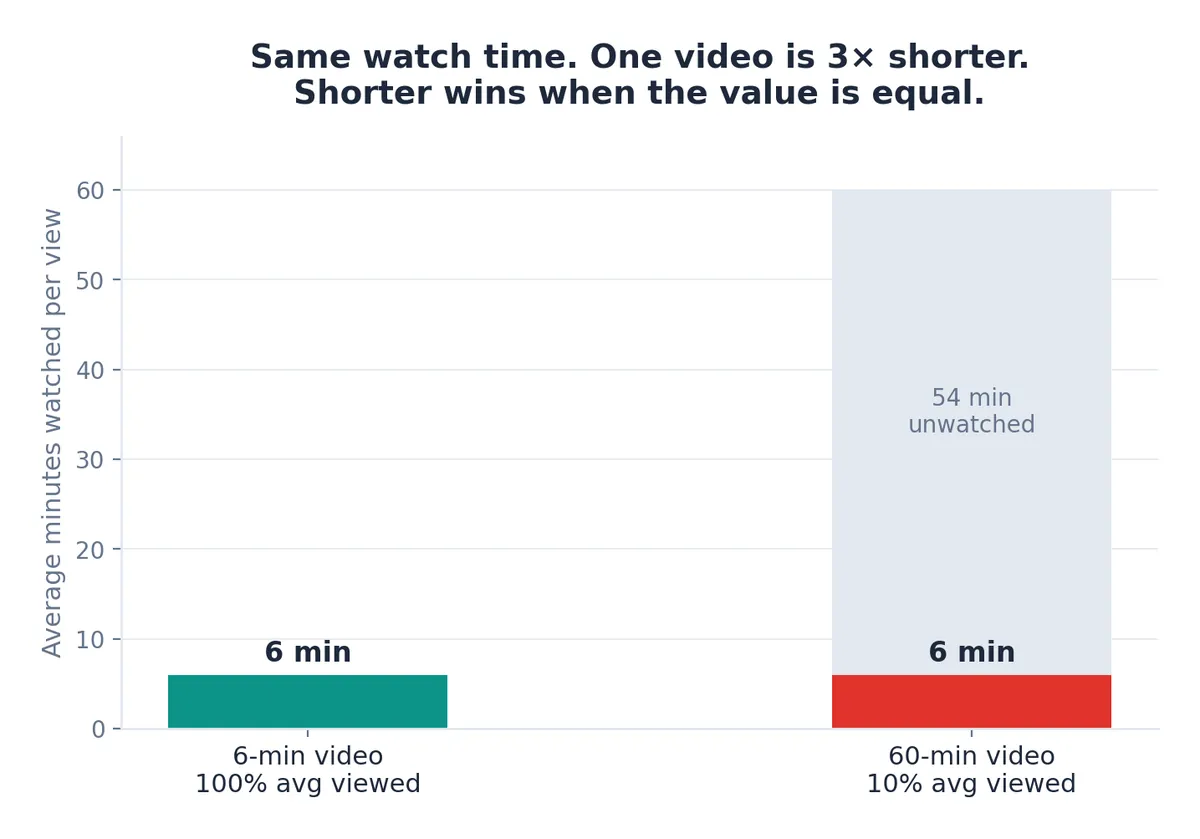
The Best YouTube Video Length for Watch Time and Retention
The best YouTube video length isn't a fixed number — it's the shortest length that fully delivers the value viewers clicked for. Data, niche ranges & frameworks.
Should You Script YouTube Shorts? Retention on Short-Form, One Second at a Time
On Shorts, the first second decides everything. Learn the exact scripting frameworks, retention data, and templates top creators use to beat the swipe and win the Shorts feed.
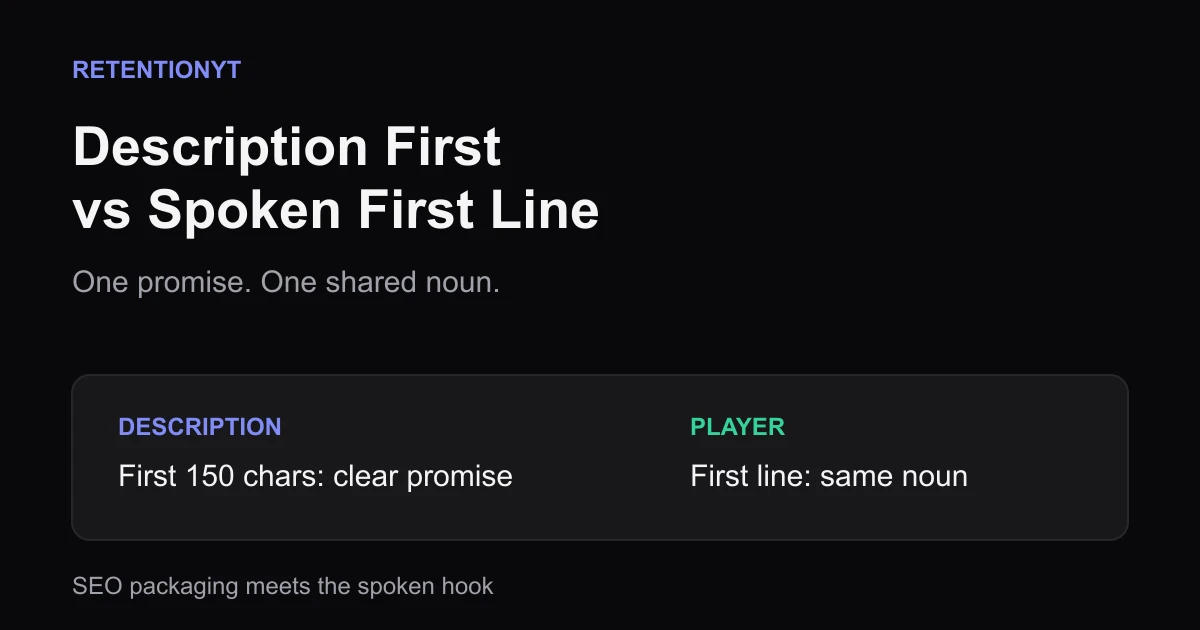
Description First 150 Characters vs Spoken First Line
Use the first 150 characters of your YouTube description as a clear search promise, then make your spoken first line deliver the same noun before the vlog detour.