Pause and Try This — When It Helps, When They Don't Come Back
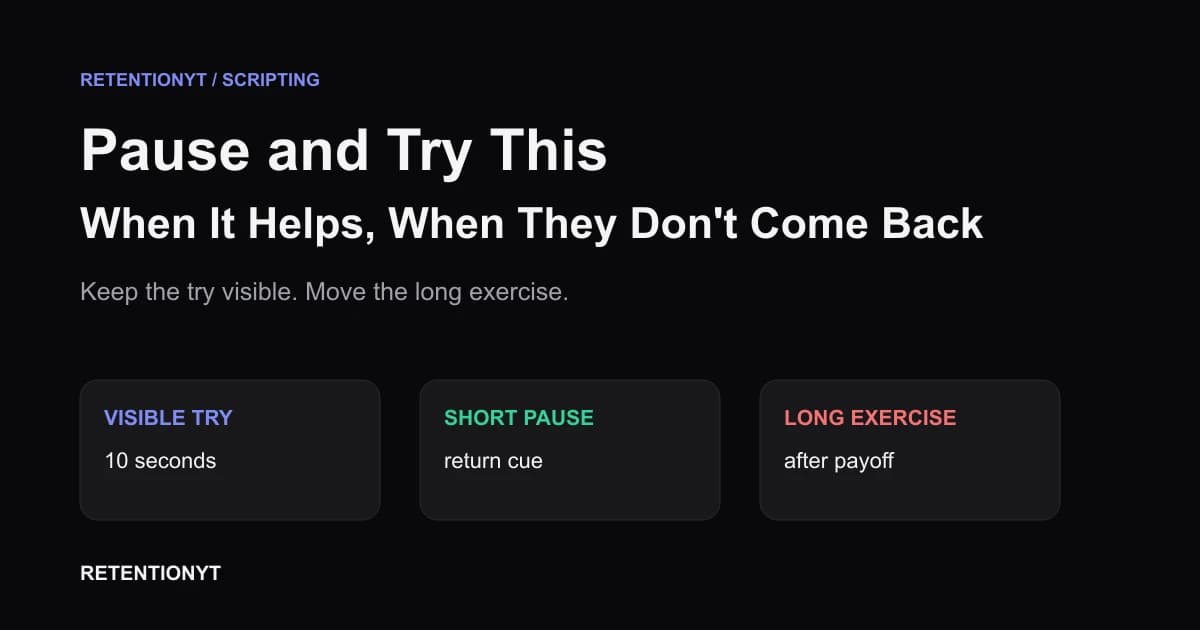
YouTube pause and try this retention advice: move practice after the payoff, or make the action 10 seconds on screen so viewers can try without leaving.

10 min readUpdated
In this guide
A pause-and-try prompt is an exit unless the action stays on screen. If your viewer needs 10 seconds, show the 10 seconds and give a resume cue. If the task needs a journal, a workout set, or a weekend, put it after the method's payoff. Your graph cannot recover a viewer who chose to leave.
What Pause and Try This — When It Helps, When They Don't Come Back actually is (and what it is not)

| PAUSE-AND-TRY TYPE | FIRST JOB | WHAT TO SAY | FAILURE MODE |
|---|---|---|---|
| Visible try | Let the viewer see and do the smallest useful action without leaving the lesson. | “Watch this setting change, then copy it while the result stays on screen.” | The creator says “pause” but hides the result, so the viewer must choose between acting and understanding. |
| Short pause | Give a bounded action and a clear way back. | “Take 10 seconds to repeat this line; come back when the counter reaches zero.” | No timer, no return cue, or a pause that interrupts the only explanation of why the action matters. |
| Long exercise | Protect the main method, then offer deeper practice as an optional next step. | “Now that the method is complete, pause here for a five-minute drill and resume for the recap.” | The exercise lands before the payoff; viewers who follow it may not return, while others feel sent away. |
Workout and language channels are exceptions to the default placement, not exceptions to clarity. In those formats, the try can be the product. Label it as a round, drill, or repetition, show what success looks like, and tell the viewer whether the video continues during the action or after it.
Why this shows up in YouTube Studio
You can inspect the result instead of arguing from instinct. YouTube Help says the Reach tab is used to understand how viewers find content and provides a snapshot of metrics such as click-through rate, watch time, and views. Its computer path is YouTube Studio, Content, the selected video, Analytics, then Reach (SOURCE 1, August 2026).
The channel-level Content tab gives broader context about how the audience finds, watches, and interacts with content. YouTube Help describes that tab as channel-level and lists the computer path as Analytics, then Content (SOURCE 2, August 2026). Use the selected-video view to inspect the upload and the channel-level view to compare similar lessons, not to declare that one pause caused every movement in a graph.

The curve above is illustrative, not YouTube data. It shows why the placement question matters: if the pause arrives before the method is understood, you have created a choice between doing and watching. If it arrives after the payoff, the viewer can leave with the result already delivered.
Worked example 1: the failure
Imagine a language tutorial titled “Order Coffee in Spanish Without Freezing,” with a thumbnail that says “3 LINES TO USE TODAY.” The creator teaches the first line, then says, “Pause the video and practise this conversation for 15 minutes. I’ll see you when you’re ready.” The prompt is honest, but it sends the viewer away before the other two lines or the final role-play appear.
That is the failure: the exercise is not bad, but its placement breaks the lesson's sequence. A viewer who needs the full method cannot get it without ignoring the instruction, and a viewer who follows it has no strong reason to return because the video supplied neither a timer nor a clear next beat.
The values below are illustrative, not YouTube data. They are a simple review model for one hypothetical lesson, not a benchmark or prediction.
| TIME | ILLUSTRATIVE VIEWERS REMAINING | WHAT THE VIDEO ASKS | REVIEW NOTE |
|---|---|---|---|
| 0:00 | 100% | Learn three lines for a coffee order. | The title and thumbnail establish a compact, practical promise. |
| 0:08 | 86% | Repeat line one, then pause for 15 minutes. | The viewer is asked to leave before the promised set is complete. |
| 0:30 | 62% | “Come back when you’re ready.” | Illustrative shape: the exit has no visible return point. |
| End | 41% | The final role-play is still waiting. | The useful sequence arrives after the long exercise instead of before it. |
Worked example 2: the fix
Keep the same title and thumbnail, but finish the compact method before asking for a longer drill. Teach all three lines, run the full coffee-order role-play once, and then say: “You have the three lines. Now pause for a five-minute practice round: play the customer, answer from the screen, and come back for the slower version and the recap.”
A good try prompt is specific about three things: the action, the time, and the return. “Practise this” is a topic. “Repeat the line twice during the 10-second counter, then unpause for the slower version” is a usable instruction. The second line protects the viewer who cannot or does not want to stop.


How to check this in YouTube Studio (step by step)
Open YouTube Studio with the upload and the script beside you. You are not trying to prove that pause-and-try is always bad. You are checking whether the instruction lands before or after the viewer receives the value that made them click.
-
Copy the promise. Write the exact title and thumbnail promise at the top of your notes. Under it, write the method's smallest complete payoff. If the payoff is “three lines,” do not place a 15-minute exercise after line one.
-
Mark every exit phrase. Search the script for “pause,” “try this,” “practice,” “come back,” and similar language. Label each prompt visible, short, or long. This makes the hidden exits countable before you touch the edit.
-
Open the video report. On a computer, follow the locked source path: Content, select the video, Analytics, then Reach. If your account uses different labels, follow the current menu shown in your Studio rather than an old screenshot.
-
Review the retention context. At channel level, use Analytics and Content for the broader performance view described by YouTube Help. If Key moments for audience retention or typical retention is available, compare the upload with similar-length videos. Do not compare a workout drill with a lecture just because both are on your channel.
-
Inspect the pause moment. Put the timestamp beside the first clear change near the prompt. Watch the section with sound, picture, and on-screen text. Did you show the action? Did you name the duration? Did you tell the viewer how to return?
-
Check the promise order. If the long exercise comes before the complete method, move it after the payoff or turn it into a 10-second visible round. If the exercise is the product, keep it in the lesson and label the next transition.
-
Change one thing next time. Keep the title and topic stable if possible. Change the prompt placement, the counter, or the return cue, then record what question the edit was meant to answer. One controlled change teaches you more than rewriting the whole video after one dip.
Where RetentionYT fits
Manual method works alone. RetentionYT shortens the loop by giving you a place to mark practice prompts and review the script before you record. RetentionYT is optional; the placement decision and Studio check do not require an account.
The trap
The trap is confusing viewer activity with viewer abandonment. “Pause and try this” can sound interactive while functioning like an outro in the middle of your lesson. If the viewer must leave to complete the task, you have changed the product from a guided video into a handoff.
The trap
The move

For a broader scripting workflow, see how to script a YouTube video. If you need a timed structure for the next draft, use the YouTube script outline template. Both are references for planning, not evidence that a particular prompt guarantees retention.
What to do in the next upload
If the viewer must leave to do the lesson, finish the lesson before you ask them to leave.
- Write the title and thumbnail promise in one sentence.
- Mark the smallest complete payoff in the script.
- Find every “pause,” “try,” “practice,” and “come back” instruction.
- Label each prompt visible, short, or long.
- Keep the smallest useful action on screen when it matters.
- Use a 10-second counter only as an editorial design choice, not a YouTube benchmark.
- Say what the viewer should do and when the next explanation resumes.
- Put a journal, workout set, or extended drill after the method payoff.
- Label language and workout exceptions as formats where practice is the product.
- Review one timestamp and choose one next-upload change.
A final pre-record option is the YouTube script review tool. Use it beside your own notes to spot hidden exit instructions, then make the editorial decision yourself from the promise, method, and actual cut.
Frequently asked questions
- Does pause and try this kill retention?
- Not automatically, but asking viewers to leave the video creates an exit point. If the try is necessary, keep the action visible and short; if it needs real practice, move it after the method's payoff. Judge the choice against your video's promise and the audience-retention pattern, not a universal rule.
- Should tutorials ask viewers to practise mid-video?
- Only when the practice is part of the immediate lesson and can happen without losing the next step. Show a small action on screen, give a clear return cue, and keep the main payoff close. For longer practice, finish the method first, then offer the exercise as an optional follow-up.
- How long can a try-this be?
- A useful on-screen try can be 10 seconds when you want the viewer to act without leaving. That is a design recommendation, not a YouTube benchmark. If the exercise needs a journal, a workout set, or repeated language practice, label the longer pause and place it after the core payoff.
- What about language or fitness channels?
- Language and fitness channels can make practice the product rather than an interruption, so the contract is different. Say what the viewer should do, demonstrate one short round, and tell them when to resume. Still label any longer practice as a planned exercise, not as a retention trick.
- Should I put practice after the lesson?
- Usually, yes, when practice takes longer than the next useful beat. Deliver the explanation or demonstration first, summarize the result, then give the viewer a clear exercise with a return option. That protects the lesson's promise while respecting people who are watching in one sitting.
- How do I apply “Pause and Try This — When It Helps, When They Don't Come Back” on my next upload?
- Mark every pause-and-try line in your script and classify it as visible action, short pause, or long exercise. Keep visible actions inside the lesson, move long exercises after the payoff, and add a resume cue. Then review the early retention context and write one change for the next upload.
- Where in YouTube Studio do I check “Pause and Try This — When It Helps, When They Don't Come Back”?
- Open the selected video in YouTube Studio, choose Content, select the video, open Analytics, and use Reach for discovery context. At the channel level, Analytics and Content provides broader performance context. The current menus in your account win if labels differ from an older workflow.
- What is the most common mistake with “Pause and Try This — When It Helps, When They Don't Come Back”?
- The common mistake is treating an exit instruction as harmless because the lesson is good. A viewer who stops to practise may not return, while a viewer who only needed the next explanation may feel dismissed. Keep the action visible when it matters, or move the longer exercise after the promised result.
Give your next script a second look
Paste a script into RetentionYT for suggestions on your hook, pacing, and structure. Choose the edits that serve your video, then check audience behavior in YouTube Analytics after publishing.
Get retention tips in your inbox
Occasional, practical emails on hooks, pacing, and retention. No spam.
Related posts
Pay Off Every Loop Before the Outro
Close all open loops before your YouTube outro with a simple A-B-C ledger. Hand off the next video as a clear destination, not a leftover tease from minute 2.
Podcast Clip to YouTube: What to Cut so the Graph Doesn't Stair-Step
Edit podcast clips for YouTube retention by cutting podcast manners, opening on the claim, and smoothing the stair-step graph left by repeated conversation beats.
Quiz-to-Camera Without Losing Search Traffic
Use a YouTube quiz to camera without losing search traffic: answer the question within 20 seconds, replace “comment below,” and check the result in Studio.