5 Storytelling Frameworks That Make YouTube Scripts Addictive
Learn 5 storytelling frameworks — But/Therefore, the Story Spine, In Medias Res, Nested Loops, and the Hero's Journey — that turn any YouTube script into a retention machine. Templates, examples, and a full checklist.

36 min read
Stories are the oldest retention tool there is. These five frameworks turn even educational videos into something people can't stop watching — with templates, pacing math, and before-and-after script examples you can steal today.
At 11:47 on a Tuesday night, a viewer clicks your video about camera settings. They planned to watch for ninety seconds. Twenty-three minutes later they are still there — and they cannot fully explain why. The information was good, but information alone does not do that. What did it was something older than YouTube, older than television, older than the printing press: the video told them a story, and the story was not finished yet.
Every high-retention YouTube video you have ever watched — the video essays, the build videos, the finance explainers, the documentary-style vlogs — runs on story structure. Not because the creators are novelists, but because the human brain treats an unfinished narrative as an open task it urgently wants to close. That pull is the single most reliable way to keep someone watching, and it is available to any creator willing to script for it.
This guide breaks down five storytelling frameworks adapted specifically for YouTube scripts: the But/Therefore rule, the Story Spine, In Medias Res, Nested Loops, and the Hero's Journey. For each one you will get the theory, a YouTube-specific application, a fill-in template, and before/after examples. You will also learn the pacing math behind script length, how to write openings that survive the brutal first 30 seconds, and how to read your retention curve like a story editor.
One note on tooling before we begin: everything in this article pairs with measurement. A story instinct gets you halfway; data tells you where viewers actually leave. At RetentionYT, we built a platform that overlays your script beats on your audience retention graph so you can see exactly which story moment worked and which one bled viewers — we will reference that workflow where it is genuinely useful, but the frameworks below stand entirely on their own.
Why this matters
Psychologist Jerome Bruner's widely cited finding holds that a fact wrapped in a story is up to 22 times more memorable than the fact alone. On a platform where YouTube's own documentation confirms that high audience retention signals engaging content to the recommendation system, memorability and watch time are the same currency. (Stanford Women's Leadership) (YouTube Official Blog)
Why Storytelling Wins on YouTube#
YouTube does not rank videos; it ranks viewer behavior. The platform's recommendation system watches how people respond to your video — whether they click, how long they stay, whether they keep watching YouTube afterward — and amplifies what satisfies them. YouTube's own creator guidance is explicit that watch time and audience retention are core satisfaction signals, and its key moments for audience retention report exists precisely so creators can find and fix the moments where viewers leave.
Here is the uncomfortable arithmetic. If two videos each get 100,000 impressions, and Video A holds 35% average percentage viewed while Video B holds 55%, Video B accumulates roughly 57% more watch time per impression. Over a year of uploads, that gap compounds into the difference between a channel the algorithm treats as a safe recommendation and one it treats as a gamble.
Information is abundant; tension is scarce
Your topic has almost certainly been covered before. There are thousands of videos on camera settings, thousands on sourdough, thousands on index funds. The information in yours is rarely unique. What can be unique — every single time — is the narrative flow: the order in which questions are raised and answered, the character the viewer follows (usually you), the obstacles, the stakes, the payoff.
This is why two creators can make the same tutorial and get wildly different retention. The losing video delivers answers. The winning video delivers answers inside a story the viewer needs to see resolved. The frameworks in this guide are, at their core, five different machines for generating that need.
The brain hates an open task
Psychologists have documented for decades that people remember unfinished tasks better than completed ones (the Zeigarnik effect) and that narrative structure dramatically improves recall (Bruner's research program on narrative cognition). When your script opens a loop — "and that's when the entire prototype caught fire, but the fire turned out to be the best thing that happened" — the viewer's brain flags it as unfinished business. Clicking away means abandoning an open task. Staying is the path of least resistance.
Notice that none of this requires drama, clickbait, or pretending to be someone you are not. It requires structure. And structure can be scripted.
Viewers do not leave videos because the information ran out. They leave because the tension ran out.
The Anatomy of a Retention-First Script#
Before the five frameworks, you need the chassis they bolt onto. A retention-first YouTube script has six parts, and each part has one job:
- The Hook (0:00–0:15). Drop the viewer into the moment of highest tension or curiosity. No greeting, no logo, no "in this video I will."
- Stakes & Promise (0:15–0:45). Tell the viewer what is at risk and what they will know or feel by the end. This converts a click into a contract.
- Setup → First Turn. Establish the starting point, then immediately hit it with a complication — the first "but."
- The Middle (escalating beats). A chain of cause-and-effect beats, each one earning the next, with open loops planted and paid off along the way.
- The Climax. The moment of peak tension where the biggest loop resolves.
- The Ending. A callback to the hook, the final answer delivered, and exactly one clear next action.
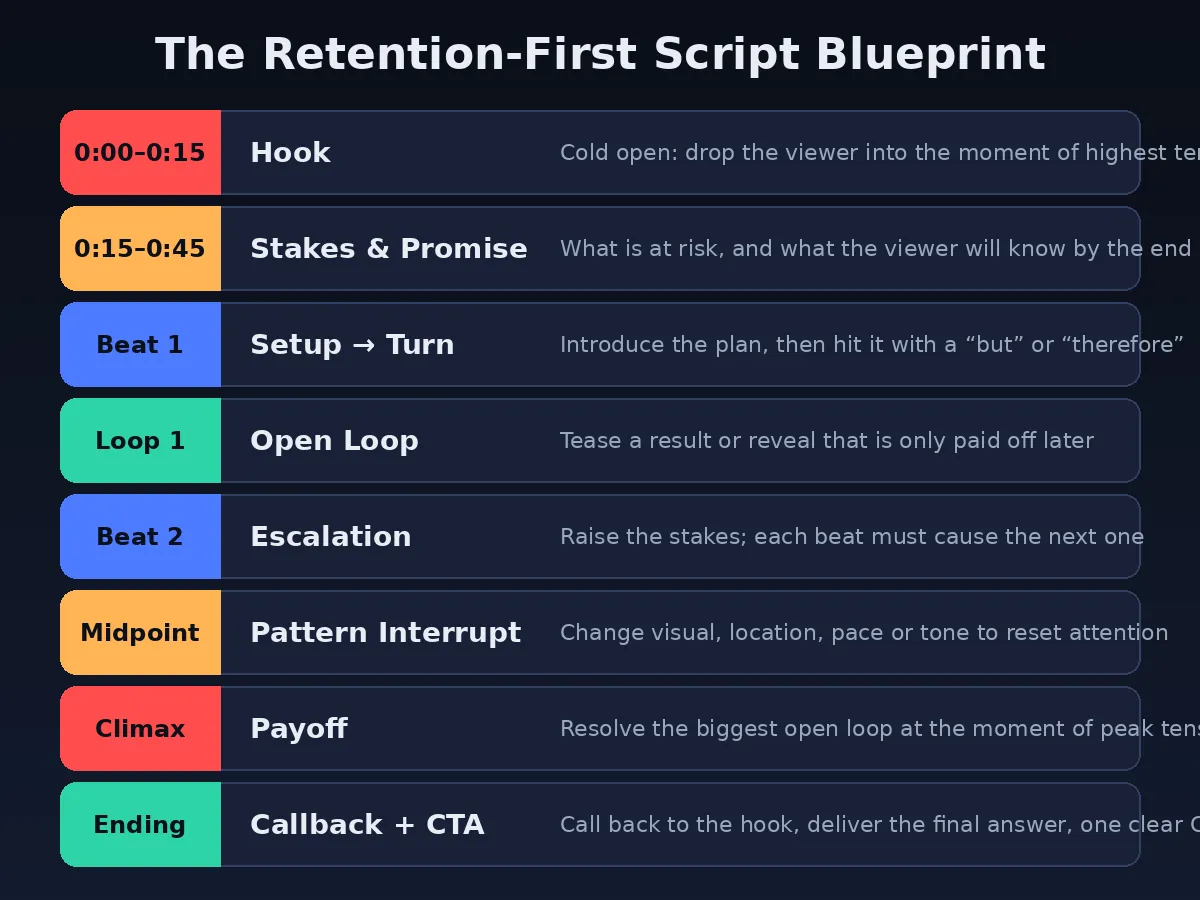
The five storytelling frameworks you are about to learn plug into this chassis at different points. But/Therefore governs every transition. The Story Spine gives you the macro shape. In Medias Res powers the opening. Nested Loops protects the middle. The Hero's Journey elevates long-form and channel-defining videos. Used together, they cover the entire blueprint.
The 5 Storytelling Frameworks#
1
The But/Therefore Rule
Best for: every video you ever make · Governs: transitions between beats
South Park creators Trey Parker and Matt Stone have described their entire plotting method in one sentence: if the beats of your story are connected by the words "and then," you have written something boring — but if between every two beats you can insert the words "but" or "therefore," you have a story where events react to each other, and that is compelling (David Perell's summary of the NYU lecture).
"And then" is a list. "But" introduces conflict. "Therefore" introduces consequence. Conflict and consequence are what make a sequence of events feel like a story rather than a report.
What this looks like in a YouTube script
Imagine a tech-review script written with "and then" connective tissue:
"I bought this laptop for $400. And then I ran some benchmarks. And then the battery test came in at nine hours. And then I compared it to the $1,200 model."
Every beat is fine. None of them create pull. Now rewrite the same facts with but/therefore:
"I bought this laptop for $400 — but the moment I opened it, something was wrong with the screen. Therefore I ran it through the same brutal benchmark suite I use on flagship machines, expecting it to collapse. But it didn't. Therefore I had a much bigger question: if a $400 machine can do this, what exactly are you paying $1,200 for? The battery test answered that — but not the way I expected."
Same information. Completely different retention profile. Each "but" raises tension; each "therefore" pays off the previous tension while setting up the next beat. The viewer is no longer watching a review — they are watching an investigation.
Template — the But/Therefore audit
Print your script outline as a list of beats. Between each pair of beats, write the connecting word. If it is "and then," either merge the beats, reorder them, or find the conflict/consequence hiding between them. Aim for zero "and then" connections in the final script.
2
The Story Spine
Best for: structuring full videos · Governs: macro shape of the script
The Story Spine is the narrative skeleton popularized by Pixar story artist Emma Coats when she tweeted Pixar's 22 rules of storytelling — it was rule #4, originally credited to improv teacher Kenn Adams (Aerogramme Writers' Studio). It runs:
- Once upon a time… (the normal world)
- Every day… (the routine, the status quo)
- Until one day… (the inciting incident)
- Because of that… (consequence, escalation)
- Because of that… (further escalation)
- Until finally… (the climax)
- And ever since then… (the new normal, the takeaway)
Notice how naturally the Spine enforces the But/Therefore rule: "until one day" is a "but," and every "because of that" is a "therefore." The Spine is essentially But/Therefore expanded into a full narrative arc — which is why it maps almost perfectly onto a video script.
What this looks like in a YouTube script
A gardening channel scripting a video about soil pH — a topic that sounds impossible to make addictive:
"Once upon a time I had the saddest tomato plants on the street. Every day I watered them, fed them, talked to them — and every day they got yellower. Until one day a neighbor looked at my soil and said a single sentence that changed how I garden forever. Because of that I tested my pH for the first time, and the number that came back explained two years of failure. Because of that I ran a 30-day experiment on four garden beds, changing only one variable. Until finally the results came in — and one bed outproduced the others by almost double. Ever since then, I test before I plant anything, and in the next four minutes I'll show you exactly how."
The viewer now has a character (you), a wound (two years of dead tomatoes), a mystery (the sentence, the number), an experiment (four beds, one variable), and a promised payoff (the method). A soil chemistry video just became a story with stakes.
Template — 60-second Spine draft
Before writing any script, fill in the seven Spine beats in one sentence each. If any beat takes more than a sentence, your video is trying to be two videos. Split it.
3
In Medias Res
Best for: hooks and cold opens · Governs: the first 30 seconds
In medias res — Latin for "into the middle of things" — is the oldest hook technique in Western storytelling. The Odyssey does not begin with Odysseus leaving Troy; it begins years into his disastrous journey home, and the beginning is filled in later. Starting in the action creates instant questions: how did we get here, and what happens next?
On YouTube this matters more than anywhere else in media, because your retention graph will show you a cliff in the first 30 seconds. YouTube's key-moments retention report literally measures your intro's ability to hold the audience separately from the rest of the video (YouTube Help). A slow, linear opening is the most expensive mistake in scripting.
What this looks like in a YouTube script
A personal-finance video about negotiating salary:
Linear opening (before): "Hey everyone, welcome back. Today I want to talk about salary negotiation, which is a really important skill that most people never learn…"
In medias res opening (after): "The recruiter said $85,000. I said six words. And the number on the offer letter changed by $23,000. In this video I'm going to tell you those six words — but they only work because of what I did in the three weeks before that call, so let's start there."
The second opening drops the viewer into the peak moment (the call), withholds the mechanism (the six words), promises a payoff, and then rewinds to the beginning — which is exactly what the Odyssey does. The viewer's brain now holds two open loops from second ten: what were the words? and what was the preparation?
Warning — the clickbait trap
In medias res only works if you pay off the cold open. Teasing a moment the video never returns to is clickbait, and viewers punish it with drop-off and distrust. Write the payoff into the script first, then write the tease. The promise and the delivery must be the same scene.
4
Nested Loops
Best for: protecting the middle of long videos · Governs: open-loop architecture
One open loop is a hook. Nested loops are a retention system. The idea: your script maintains several unresolved questions at once, stacked like parentheses. A big "master loop" opens near the start and closes at the climax; smaller loops open and close inside it every 60–120 seconds. The viewer is never more than a minute away from a payoff — and never without a reason to keep watching.
Prestige television runs on this structure, but it scales down beautifully to an eight-minute video. The rule of thumb: before you close a loop, open the next one. Retention dies in the gaps between loops — the moments where the viewer has every answer they came for and no new question yet.
What this looks like in a YouTube script
A photography tutorial on shooting at night, structured as nested loops:
- Master loop (0:20): "By the end you'll see how I got this shot with a $90 lens — and why the expensive lens would have ruined it." (Closes at 7:40)
- Loop 2 (0:45): "First, the one setting that matters more than everything else combined." (Closes at 1:50 — as Loop 3 opens: "But that setting creates a new problem: noise.")
- Loop 3 (1:50): The noise problem. (Closes at 3:10 — as Loop 4 opens: "Which is why I broke the cardinal rule of night photography on purpose.")
- Loop 4 (3:10): The broken rule. (Closes at 4:45 — feeding back into the master loop's escalation.)
Each closure delivers satisfaction; each opening renews tension. The viewer experiences the video as a series of small completions inside one big suspense — the exact rhythm that makes a retention curve stay flat instead of decaying.
Template — the loop ledger
Keep two columns while scripting: "loops open" and "loops closed." Every closed loop must appear in the left column first. If the left column is ever empty in your outline, you have found a retention cliff — add a tease before the previous payoff.
5
The Hero's Journey (Condensed)
Best for: long-form videos, series, channel narratives · Governs: transformation arcs
Joseph Campbell's monomyth — the Hero's Journey — is the deep structure beneath most myth and blockbuster film: a hero leaves the ordinary world, faces trials, hits a low point, transforms, and returns changed. You do not need all twelve stages for YouTube. A condensed five-stage version is enough:
- Ordinary world: "I was a beginner / skeptic / failure at this."
- Call & threshold: "I committed to the challenge — and immediately regretted it."
- Trials & the abyss: "Everything that could go wrong did. Here's the moment I almost quit."
- Transformation: "Then one thing changed — the insight, the method, the breakthrough."
- Return with the elixir: "Here's what I can do now that I couldn't before — and how you can skip my mistakes."
What makes the Hero's Journey uniquely powerful for creators is that the hero is you — and your transformation is the product. A fitness channel's "I trained like a Navy SEAL for 30 days," a coding channel's "I rebuilt my app in a weekend," a cooking channel's "I failed at croissants 12 times" — these are all Hero's Journey scripts, and they consistently outperform flat tutorials because the viewer is not just learning a skill; they are watching a person change.
Where creators misuse it
The Hero's Journey is a heavy framework. Forcing a full transformation arc onto a five-minute "3 tips" video produces melodrama. Reserve it for videos where a genuine journey exists: challenges, experiments, builds, 30-day tests, documentary-style pieces. And note the final stage's gift: "return with the elixir" is a built-in reason for the viewer to subscribe — you came back with something for them.
| Framework | Governs | Best video types | Difficulty |
|---|---|---|---|
| But/Therefore | Every transition | All videos — non-negotiable baseline | Easy |
| Story Spine | Macro structure | Tutorials, explainers, educational content | Easy |
| In Medias Res | The first 30 seconds | Any video with a peak moment worth teasing | Medium |
| Nested Loops | The middle | Videos over 6 minutes, list videos, essays | Medium |
| Hero's Journey | Transformation arcs | Challenges, builds, documentaries, series | Advanced |
Structuring the Opening: Winning the First 30 Seconds#
Every retention curve starts with a drop. Some of it is unavoidable — mismatched clickbait clicks, accidental taps — but the size of your first-30-seconds drop is mostly a scripting decision. A strong opening does three things in order:
1. Confirm the click (0–5 seconds)
The viewer arrived with an expectation set by your title and thumbnail. Your first sentence must confirm that expectation instantly. If the thumbnail shows a burning prototype, the first frame and first line should involve the burning prototype. Any mismatch — a greeting, a logo sting, a "before we start" — reads as a bait-and-switch and triggers the back button.
2. Raise the stakes (5–15 seconds)
Immediately escalate from what the video is to why it matters. "I tested five standing desks" is a topic. "One of these five standing desks wobbled so badly it failed my monitor test — and it's the one 40,000 people bought last month" is stakes. The stakes sentence is where the in medias res tease usually lives.
3. Make the promise (15–30 seconds)
Close the opening with a specific, credible payoff: what the viewer will know, have, or feel by the end. "By the end of this video you'll know exactly which desk to buy, which one to avoid, and the $12 fix that makes any of them stable." Specificity is credibility. "Stay tuned for some great tips" promises nothing and retains nothing.
Best practice — script the first 60 seconds verbatim
Even creators who improvise the rest of their videos should write the opening word for word, rehearse it, and cut every syllable that does not confirm the click, raise the stakes, or sharpen the promise. Your first 60 seconds carry more retention weight than the following ten minutes combined.
Building the Middle Without Losing Viewers#
The middle is where scripts go to die. The opening's adrenaline fades, the climax is still far away, and the scriptwriter's instinct is to "deliver value" — long, thorough, undifferentiated explanation. That instinct is exactly wrong. The middle is not where you dump information; it is where you escalate a story that happens to contain information.
Escalation beats explanation
Order your middle beats by rising stakes, not by logical completeness. A cooking video does not need to cover ingredients in the order they appear in the recipe; it needs each step to threaten or promise more than the last. Ask of every middle beat: is this harder, riskier, stranger, or more surprising than the beat before it? If not, reorder or cut.
One idea per beat
A beat is a single unit of change: one decision, one discovery, one complication. When a script covers three ideas in one breath, the viewer cannot feel progress — and felt progress is what retention is made of. Split dense sections into beats with a visible turn in each: a "but," a "therefore," a reveal, a result.
Pay off loops on schedule
Using the Nested Loops ledger from Framework 4, make sure no segment of the middle runs longer than about two minutes without closing some loop. Payoffs are the middle's oxygen. A viewer who has just received a satisfying answer is at their most generous — that is the moment to open the next, bigger loop.
Warning — the "value sandwich" myth
Do not front-load all your best content and save "the good stuff" for a single payoff at the end. Viewers who sense a long stretch of filler before the payoff leave before they reach it. Distribute payoffs through the whole middle and reserve only the biggest one for the climax.
Pacing, Rhythm, and Word Choice#
Pacing starts on the page. Before a camera is involved, your script's word count, sentence lengths, and vocabulary have already determined how the video will feel.
The words-per-minute math
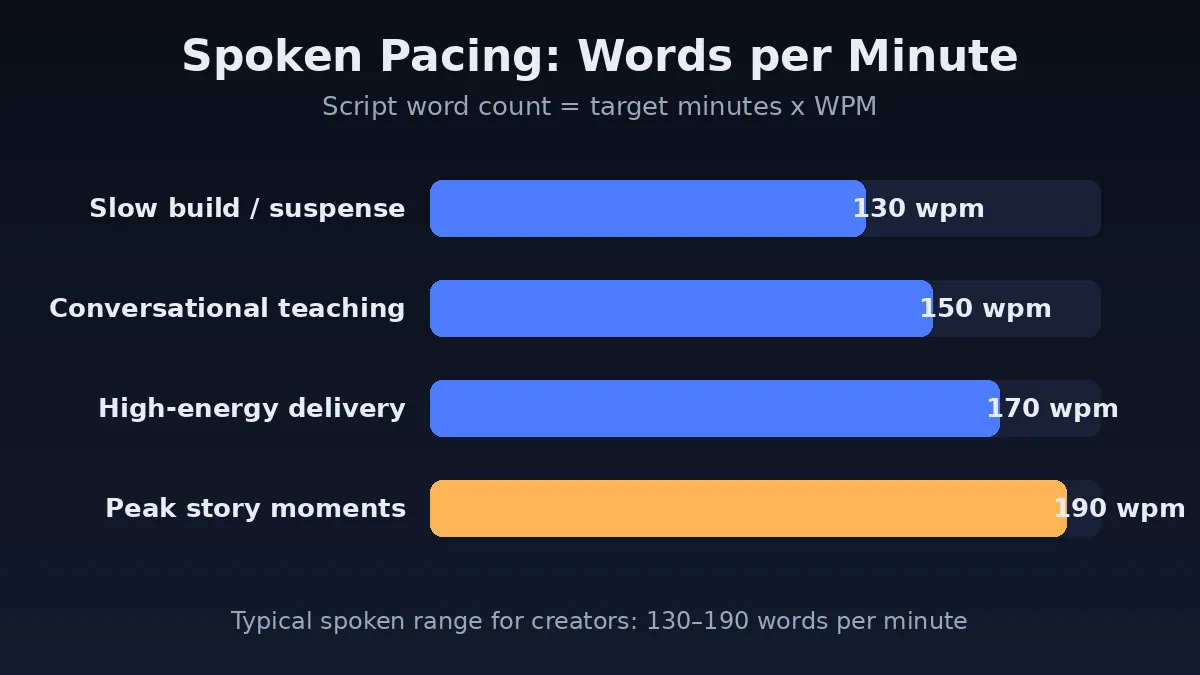
Most creators speak between 130 and 190 words per minute on camera. Use 150 wpm as a planning average, then adjust by section: slow to ~130 for suspense and emotional beats, push toward 170–190 for high-energy escalations and story peaks. Your target script length is simply target minutes × wpm — a 10-minute video lands between roughly 1,300 and 1,900 words.
Rhythm: write in long and short sentences
Read this aloud: "The results came back on Friday. I opened the file. And everything we believed about this channel — every assumption, every strategy, every confident prediction I had made on camera for two years — was wrong." The rhythm carries the meaning: two short sentences create speed and tension; the long third sentence lands the blow. If every sentence in your script is the same length, the delivery will be monotone no matter how energetic you are. Vary sentence length deliberately, and put your most important idea in the shortest sentence on the page.
Word choice: concrete beats clever
- Prefer the specific noun to the adjective. "The desk wobbled 4 centimeters" beats "the desk was really unstable."
- Write spoken English, not written English. Contractions, short connectives, fragments where they land. You are writing a performance, not an essay.
- Cut hedging. "I think it might kind of be" is dead air. Commit or cut.
- Name the emotion in stakes beats. "I was genuinely scared the channel was dead" retains better than "the situation was concerning."
Best practice — the read-aloud pass
Read the entire script aloud at performance pace and record it on your phone. Everywhere you stumble, the sentence is wrong — rewrite for the mouth, not the eye. This single pass catches most pacing problems before they reach the edit.
Story Beats and Narrative Tension#
Narrative tension is the gap between what the viewer knows and what the viewer wants to know. Every beat in your script either widens that gap (raising tension) or narrows it (paying off). A well-shaped video alternates the two so that overall tension rises toward the climax — which is why story-driven retention curves look so different from flat ones.
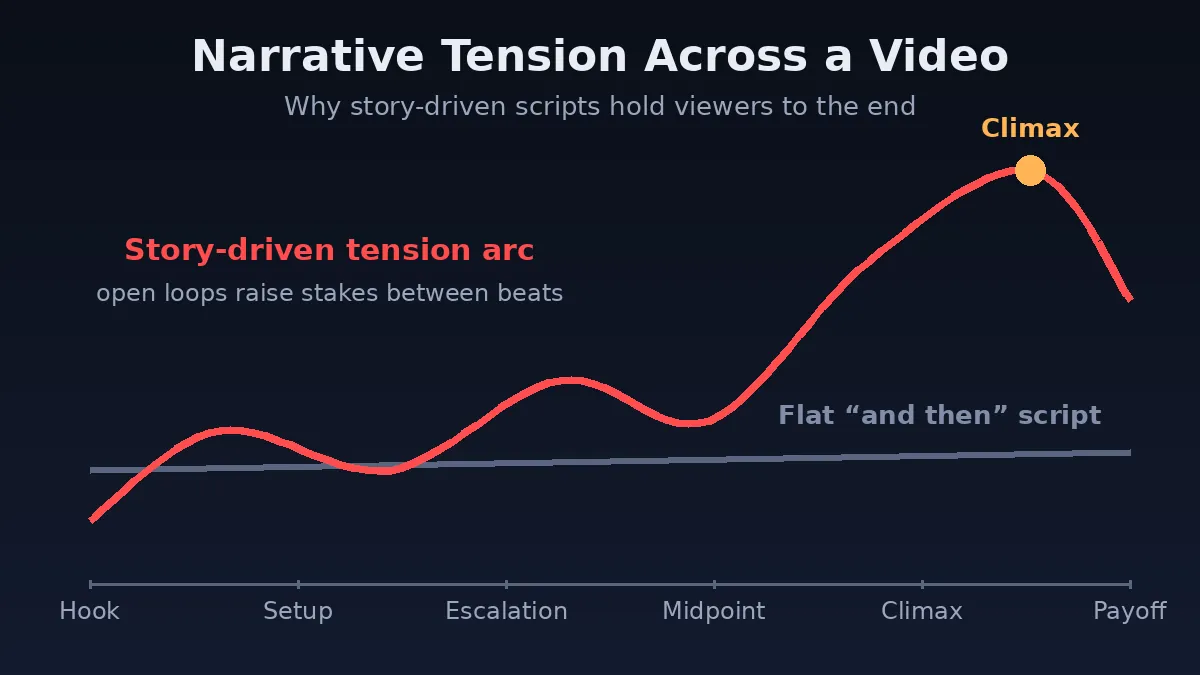
The tension ledger
For each beat in your outline, write two numbers from 1–10: how much tension the beat opens with, and how much it closes with. The closing number should trend upward across the video, with a controlled dip after each payoff and the maximum at the climax. If your ledger shows three beats in a row at the same tension, you have found a flat stretch — the exact spot where a retention graph will later sag.
Stakes: the multiplier on every beat
Tension only exists if something matters. "I tried a new microphone" carries no stakes. "I record all my audio in one take, so if this microphone test failed, I'd lose a full day of production" carries plenty. When a beat feels flat, do not add drama — add consequence. What does this step cost if it goes wrong? What does it unlock if it works?
Pattern Interrupts and Open Loops#
Attention decays in predictable waves. A pattern interrupt is any planned change that breaks the viewer's drift before it becomes a drop-off: a new camera angle, a cut to b-roll, a location change, a shift from teaching to story, a music change, a prop, a joke, a direct question to the viewer. The critical insight for scriptwriters is that pattern interrupts are written, not improvised in the edit. Mark them in the script every 30–90 seconds, the way a screenwriter marks scene changes.
Open loops and pattern interrupts work as a pair: the loop keeps the viewer narratively invested (they need the answer), while the interrupt keeps them sensory engaged (the screen keeps changing). One without the other leaves a gap — a gripping story told over a static ten-minute talking head still bleeds viewers, and constant visual noise without narrative pull feels exhausting.
A practical interrupt menu for scripts
- Visual: cut to the thing being discussed — show, don't describe.
- Spatial: move to a new location for the next beat ("let's go to the workshop").
- Modal: switch modes — teaching → story → demonstration → data.
- Dialogic: ask the viewer a direct question and pause a beat.
- Rhythmic: shift sentence length and delivery pace (your WPM marks).
- Structural: a chapter title card, a recap graphic, the loop ledger on screen.
Best practice — the 90-second rule
In your final script draft, no 90-second window should pass without at least one pattern interrupt and a clear statement of which loop is currently open. If you can point at both on the page, the edit will take care of itself.
Writing the Ending: Callbacks, Payoffs, and the Single CTA#
Most YouTube endings are where retention goes to die: "So yeah, that's basically it, thanks for watching, like and subscribe…" Every second of winding-down energy tells remaining viewers the video is over — and they leave before your end screen can do its job. A scripted ending has three moves, and none of them is "winding down."
1. The callback
Return to the opening image. If you opened in medias res on the recruiter's phone call, the ending shows the signed offer letter. If you opened on burning croissants, the ending is the perfect croissant breaking open. The callback closes the master loop with symmetry — the most satisfying resolution the brain knows.
2. The payoff, fully delivered
Deliver the promised answer completely and cleanly. If your hook teased "six words that changed the offer by $23,000," say the six words plainly, on screen if possible. Creators who blur the payoff to "tease a future video" sacrifice the trust that makes the next video work at all.
3. One CTA, framed as the next story
Pick one next action. The strongest CTAs are themselves open loops pointing at another video: "The negotiation worked — but the counter-offer tactics are a different story, and that video is on your screen now." This converts your ending from a retention cliff into a session-time bridge, which the recommendation system rewards.
Before vs After: Three Script Rewrites#
Frameworks are abstract until you see them fix real lines. Here are three representative openings rewritten with the five frameworks. Study the moves, not the topics.
Example 1 — The tutorial (uses: In Medias Res + Nested Loops)
Before
"What's up guys, welcome back to the channel. Today we're doing something a little different — we're going to restore this old axe I found at a flea market. I don't really know what I'm doing but let's see how it goes. Okay so first, safety equipment…"
After
"This edge can shave hair — and three hours ago it was a rusted flea-market axe I paid four dollars for. The restoration took one tool I didn't own and one mistake that nearly ruined the blade, so let me show you both, starting with why this axe was worth saving at all…"
The moves: open at the peak result (in medias res), plant two loops (the missing tool, the near-ruin mistake), then rewind to the setup. The "I don't know what I'm doing" humility moves from the opening — where it kills stakes — into the story, where it creates them.
Example 2 — The explainer (uses: Story Spine + But/Therefore)
Before
"In this video I'll explain how compound interest works. Compound interest is when you earn interest on your interest. It's very important for investing. Let me show you a chart…"
After
"Two people invest the same $200 a month. One starts at 25, one starts at 35. By 65, the difference between them is not ten years of savings — it's over $300,000. I didn't believe that number, so I rebuilt the math from scratch, and what I found changed when I'm teaching my own kids about money…"
The moves: the "once upon a time" is a concrete two-person contrast; "I didn't believe that number" is a "but" that opens the investigation loop; "changed when I'm teaching my kids" raises personal stakes for a topic that has none on paper.
Example 3 — The challenge video (uses: Hero's Journey + Nested Loops)
Before
"So I'm going to try waking up at 5 AM for 30 days. I've seen a lot of videos about this and wanted to test it myself. Here's day one…"
After
"Day 19, 5:04 AM. I'm standing in my kitchen and I've just done something I haven't managed in fifteen years — and it has almost nothing to do with waking up early. Thirty days ago I was the most skeptical person alive about the 5 AM club. Then day 6 broke me, day 14 surprised me, and day 19 rewired something. Here's the whole experiment, including the week I almost quit…"
The moves: open at the transformation (return with the elixir, teased), then rewind through the abyss (day 6) and the trials (day 14), stacking three time-stamped loops inside the master question: what happened on day 19?
Templates You Can Copy Today#
Four fill-in-the-blank templates, one per job. Expand each into your own script document.
Template 1 — The Universal Script Skeleton (any video)
- Cold open (verbatim): "________ [the moment of peak tension or result]"
- Stakes: "This matters because ________ [cost/risk/reward]."
- Promise: "By the end you'll know ________, ________, and ________."
- Rewind: "But to understand that, we have to start at ________."
- Beats 1–5: each written as "________, but/therefore ________."
- Pattern interrupts: marked every 30–90 seconds: [VISUAL] [LOCATION] [MODE] [QUESTION]
- Climax: "And that's when ________ [master loop payoff]."
- Callback + CTA: "Remember ________ [opening image]? That's ________. Next: ________ [one action, framed as the next story]."
Template 2 — The Story Spine Draft (structure a video in 60 seconds)
- Once upon a time, ________ [my/our normal situation].
- Every day, ________ [the routine or repeated failure].
- Until one day, ________ [the inciting incident].
- Because of that, ________ [first consequence].
- Because of that, ________ [escalation].
- Until finally, ________ [the breakthrough / climax].
- And ever since then, ________ [the takeaway for the viewer].
Template 3 — The Loop Ledger (middle-of-video protection)
- Master loop — opened at , closes at the climax: ""
- Loop 2 — opens ________, closes ________ (and as it closes, Loop 3 opens)
- Loop 3 — opens ________, closes ________
- Loop 4 — opens ________, closes ________
- Rule check: no 2-minute stretch without a payoff; no payoff without a new loop opening immediately after.
Template 4 — The Opening Rewrite Drill (fix any weak hook)
- Write the single most dramatic or surprising moment in your video as one sentence.
- Delete your current first 30 seconds. Make that sentence your new first line.
- Add one stakes sentence: what it costs, risks, or changes.
- Add one promise sentence: three specific things the viewer will know by the end.
- Add the rewind line: "But to get there, we have to start with ________."
- Read it aloud. Target: under 90 words, under 30 seconds at your natural pace.
Diagnosing Your Story with the Retention Curve#
Everything above is the writing side. The editing-room side is measurement, and this is where story craft becomes a repeatable system instead of a guessing game. YouTube Studio's key-moments retention report shows you exactly where viewers leave, replay, and skip (YouTube Help). Read it like a story editor:
- A cliff in the first 30 seconds → the opening didn't confirm the click or raise stakes. Rewrite the hook (Template 4).
- A gradual sag in the middle → flat tension ledger: too many "and then" beats, or a stretch with no loop closing. Run the But/Therefore audit.
- A sharp drop at one timestamp → a broken promise, a tangent, or a pattern-interrupt desert. Find the line at that second and cut or re-order it.
- A spike/replay → a payoff that landed. Study it, and engineer more beats like it.
- A cliff at the ending → the outro is winding down instead of bridging. Rebuild it as callback → payoff → single CTA.
This beat-by-beat mapping is exactly what we built RetentionYT to automate: you import your script, we align each beat to your audience retention graph, and you can see — line by line — which hook held, which loop paid off, and which transition cost you viewers. Creators using the workflow typically find that one or two script-level fixes per video (a reordered beat, a cut tangent, a rewritten 30-second intro) move average percentage viewed more than any amount of thumbnail testing. If you want the data layer under everything in this article, run your last video through RetentionYT and compare its curve against the tension ledger you now know how to write.
Keep Building Your Retention System
- 21 YouTube Hook Examples That Survive the First 30 SecondsScripting · The opening lines that pair with In Medias Res
- The Complete YouTube Script Template (Free Download)Scripting · The universal skeleton from this guide as a reusable document
- Open Loops Explained: The Psychology of "One More Minute"Scripting · A deeper dive into Framework 4
- Audience Retention, Explained: Reading Your Curve Like an EditorAnalytics · Companion to the diagnosis section above
- Video Pacing: Why Great Videos Feel Fast (and Yours Doesn't)Editing · Where your WPM marks become cuts
- End Screens and CTAs That Don't Kill RetentionGrowth · Extends the ending framework
The Storytelling Script Checklist#
Run every script through this before you record. Print it. Tape it to the wall.
Opening
- First sentence confirms the title/thumbnail promise within 5 seconds
- Peak moment teased in medias res (no greeting, no logo, no "in this video")
- Stakes sentence states the cost, risk, or reward
- Promise names 2–3 specific payoffs the viewer will get
- First 60 seconds scripted verbatim and rehearsed
Structure
- Story Spine filled in (one sentence per beat) before drafting
- Zero "and then" connections — every beat linked by "but" or "therefore"
- Master open loop planted in the first minute, paid at the climax
- Loop ledger maintained: a payoff at least every ~2 minutes, a new loop before each payoff closes
- Pattern interrupt scripted every 30–90 seconds
- Tension ledger trends upward; no three consecutive flat beats
Language & pacing
- Word count ≈ target minutes × 130–190 WPM (marked slow/fast by section)
- Sentence lengths vary; the key idea sits in the shortest sentence
- Spoken English (contractions, fragments), hedging deleted
- Read-aloud pass recorded; every stumble rewritten
Ending & review
- Callback closes the master loop with the opening image
- Teased payoff delivered fully and plainly
- Exactly one CTA, framed as the next story / next video
- After publishing: retention curve mapped to script beats, one fix logged for the next script
Frequently Asked Questions#
What is the best storytelling framework for YouTube?
There is no single winner, but the But/Therefore rule is the closest thing to a universal answer because it governs the connective tissue between every beat of every video. Master it first. Then layer structural frameworks on top: In Medias Res for your openings, Nested Loops for your middles, the Story Spine for overall shape, and the Hero's Journey for long-form transformation videos.
Do storytelling techniques work for educational YouTube videos?
They work best for educational videos. Abstract information becomes concrete when it is attached to a character, a problem, and a chain of cause and effect — which is why research popularized by Jerome Bruner finds story-wrapped facts dramatically more memorable than facts alone (Stanford Women's Leadership). The soil-pH and compound-interest examples above show how dry topics become narratives with stakes.
How do you make a YouTube script more engaging?
Open with tension rather than an introduction; connect beats with "but" and "therefore" instead of "and then"; plant open loops and pay them off on schedule; vary pacing between roughly 130 and 190 spoken words per minute; write pattern interrupts into the script; and end with a callback and a single CTA. Then read the script aloud and cut everything that does not advance the story.
What is an open loop in a video script?
An open loop is an unresolved question or teased outcome planted early and answered later — "the six words that changed the offer," "the mistake that nearly ruined the blade." Because the brain treats it as an open task, viewers keep watching to close it. Strong scripts nest several loops: one master loop resolved at the climax, with smaller loops opening and closing throughout the middle.
What is a pattern interrupt on YouTube?
A pattern interrupt is a planned change — visual, location, pacing, music, mode, or tone — that resets drifting attention. In scripted videos, interrupts are written into the script at 30–90 second intervals rather than improvised in the edit, and they work in tandem with open loops: loops keep viewers narratively invested while interrupts keep them sensorily engaged.
How many words should a YouTube script be?
Multiply your target length by your speaking pace. Most creators speak 130–190 words per minute, and 150 wpm is a sound planning average — so a 10-minute video needs roughly 1,300–1,900 words. Mark suspenseful sections slower and high-energy sections faster directly in the document.
Should I write my YouTube script word for word or use bullet points?
Write the hook, the transitions, the open loops, and the ending word for word — those moments carry the retention of the whole video. The explanatory middle can be detailed bullet points if you are confident on camera. Until delivery feels natural, script everything verbatim.
What is a good audience retention rate on YouTube?
Benchmarks vary by niche and length, but holding around 50% of viewers at the halfway point and 30%+ at the end is strong for videos over five minutes. More useful than any number is the curve's shape: flat segments mean the story is working, and sharp drops are script problems with a timestamp attached — fix those first.
Conclusion: Script the Tension, Not Just the Information#
The five frameworks in this guide are not five separate tricks — they are one system. The But/Therefore rule keeps every beat connected by conflict and consequence. The Story Spine gives the whole video a satisfying shape. In Medias Res wins the first 30 seconds by starting at the peak. Nested Loops keep the middle alive with stacked suspense. And the Hero's Journey turns your own experience into the transformation viewers subscribe for. Together they convert the oldest retention tool in human history — story — into a repeatable scripting process.
Start small. Take your next script, run the But/Therefore audit on its beats, rewrite the first 30 seconds with the Opening Rewrite Drill, and plant one master loop with a payoff you are genuinely excited to deliver. Publish it, then read the retention curve against your script and fix one thing. That loop — write, measure, revise — is how storytellers are made on this platform.
And when you are ready to see your story beats drawn directly onto your retention data, try RetentionYT — it is the measurement layer this entire guide is built on, and the fastest way to find out which of your stories are working. Your information deserves an audience that stays to the end. Now you know how to script one.
External references: YouTube Official Blog — creator metrics · YouTube Help — key moments for audience retention · David Perell — the But/Therefore rule (Parker & Stone) · Aerogramme — the Pixar Story Spine (Emma Coats) · Stanford Women's Leadership — the power of stories (Bruner)
Frequently asked questions
- What is the best storytelling framework for YouTube?
- There is no single best framework, but the But/Therefore rule is the most universally applicable because it governs the connective tissue between every beat of any video, regardless of topic. Creators should master it first, then layer a structural framework such as In Medias Res for the opening, Nested Loops for the middle, and the Hero's Journey for long-form or channel-defining videos.
- Do storytelling techniques work for educational YouTube videos?
- Yes. Research popularized by psychologist Jerome Bruner suggests information wrapped in a story is dramatically more memorable than facts alone. Educational videos benefit the most from story structure because abstract concepts become concrete when attached to a character, a problem, and a sequence of cause and effect.
- How do you make a YouTube script more engaging?
- Open with tension instead of an introduction, connect every beat with 'but' or 'therefore' instead of 'and then', plant open loops that are paid off later, vary pacing between roughly 130 and 190 spoken words per minute, and end with a callback to the hook. Then read the script aloud and cut every sentence that does not advance the story.
Find your video’s drop-off points before you publish
RetentionYT audits your script for the moments viewers leave — so you can fix them before recording.
Get retention tips in your inbox
Occasional, practical emails on hooks, pacing, and retention. No spam.
Related posts
Words Per Minute for YouTube Scripts: How Many Words Is a 10-Minute Video?
Turn a target video length into a word budget before you draft: measure your own speaking rate, subtract the non-speaking minutes, and split the remaining words across the script.
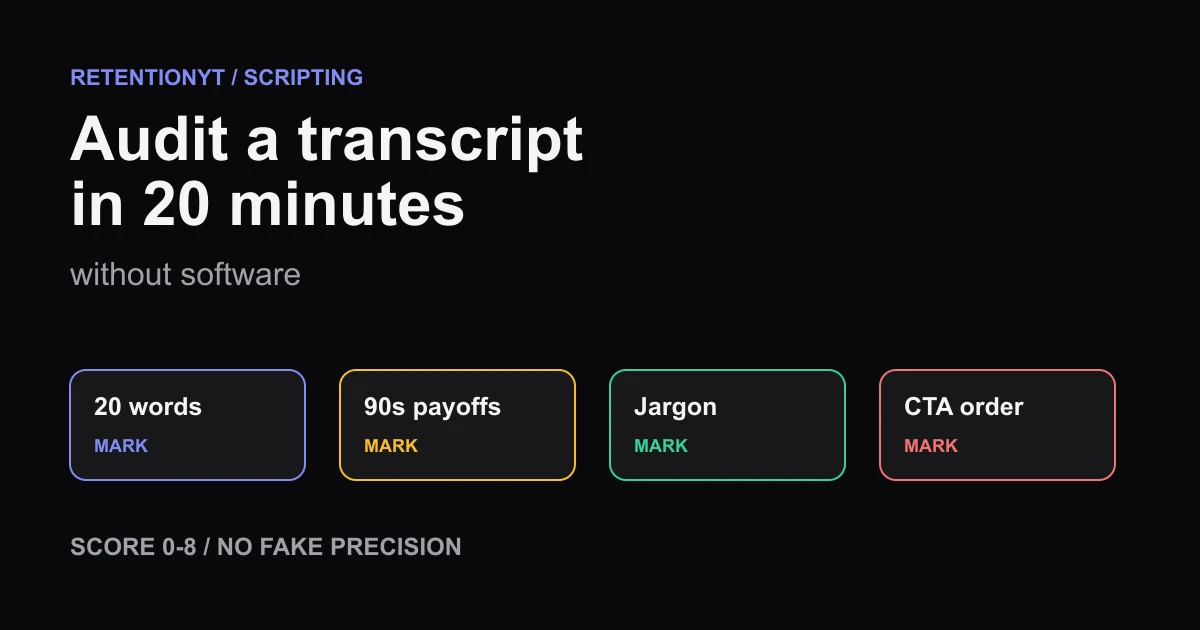
How to Audit a Transcript in 20 Minutes Without Software
Audit a YouTube transcript by hand in 20 minutes: check the first 20 words, mark 90-second payoffs, define jargon, score 0-8, and order your CTA.
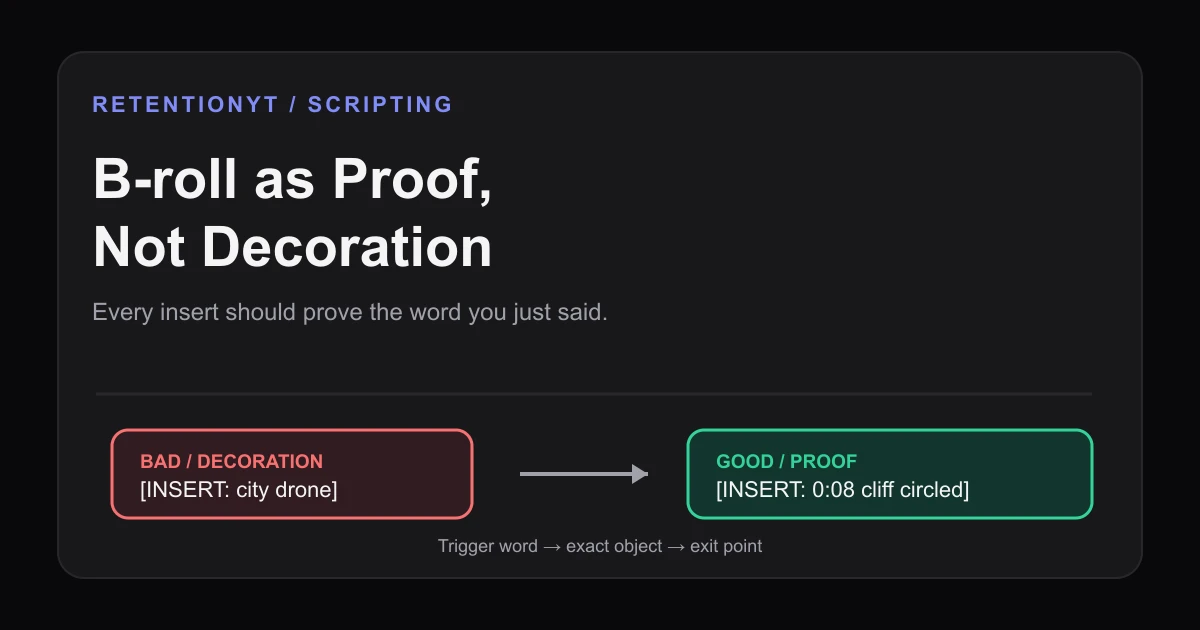
B-roll as Proof, Not Decoration: Script Cues for Inserts
Learn how to script B-roll for retention by tying every insert to a spoken claim, with proof cues, timestamps, failure and fix examples, and a Studio check.