How to End a YouTube Video: Outros That Keep Viewers Watching
'Thanks for watching' is where retention goes to die. Learn how to script YouTube outros that hand viewers straight into the next video — with templates, WPM pacing data, and before/after examples.

36 min read
"Thanks for watching" is where retention goes to die. Here's how to end a video so viewers roll straight into the next one — with scripts, pacing data, and templates you can steal today.
Reviewed by the RetentionYT research team
Open your YouTube Studio. Pick any video older than a month. Scroll to the audience-retention graph and drag the playhead to the last 45 seconds. What do you see?
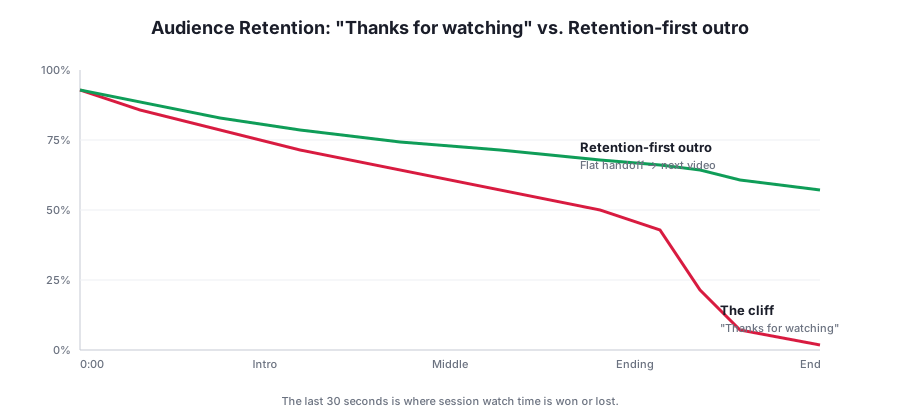
If you're like 90% of creators, you see a cliff. A gentle, forgivable decline through the middle of the video — and then a nearly vertical drop the moment you say some version of "So that's it for today, thanks so much for watching, don't forget to like and subscribe, and I'll see you in the next one."
That drop is not viewer fatigue. It's not the algorithm. It's not the length of your video. It's a decision your script made for the viewer — the decision to leave.
The good news: this is the single most fixable retention problem on YouTube. The last 30 seconds of your video controls whether viewers close the tab, drift to a competitor, or click the video you specifically want them to watch next. And unlike hooks — where you're competing with an infinite scroll of thumbnails — the outro is a captive audience. They've already invested. They already trust you. You just have to stop telling them the show is over.
This guide is a full teardown of how to end a YouTube video in 2026. You'll get the exact blueprint we use with the creators inside RetentionYT to raise session watch time by 15–35% in a matter of weeks, plus templates, before-and-after scripts, and the pacing data behind them.
Why Outros Decide Your Channel's Ceiling
YouTube doesn't rank videos in isolation. It ranks sessions. A session is everything a viewer watches after clicking your thumbnail — your video, and whatever they watch next, and whatever they watch after that, until they close the app. The longer that session lasts, the more the algorithm decides that you were the on-ramp worth surfacing. That's why two channels with identical average view duration can have wildly different browse and suggested impressions.
Your outro is the single moment on your channel where you have the most direct, unmediated influence on session watch time. Every other retention lever is diffuse — you're fighting a hundred small drop-offs across a 12-minute video. The outro is one clean, high-leverage decision.
Best practice
Treat the outro as its own video with its own hook, promise, and payoff. If it were pulled out and posted as a 30-second Short, would it hold attention? If not, rewrite it.
There's a second reason the outro matters more than most creators realize: it's the moment your viewer files you in memory. Behavioral research on peak-end theory shows that people judge past experiences overwhelmingly by two moments — the emotional peak, and the ending. A brilliant middle followed by a mumbled outro reads, on the way out, as a mediocre video. The same middle followed by a confident, forward-pointing outro reads as a great one. This is why creators who obsess over their outros tend to build channels with unusually loyal audiences.
There's also a compounding effect at the channel level. Every video's outro is a vote cast for the video that follows it. Across a 200-video library, those votes multiply. A creator who chains 60% of their views into a second video builds a channel that behaves, from the algorithm's point of view, like it's 60% larger than it actually is. This is why two channels with identical subscriber counts and identical thumbnails can sit an order of magnitude apart on monthly views. The difference isn't luck. It's what happens in the last 30 seconds of every upload.
The economics of one extra click
Put a number on it. Assume the average creator earns $4 CPM on a mid-sized channel, and the average follow-on video runs eight minutes with 55% average view duration. Every 1% lift in end-screen click-through, applied across a channel doing 500,000 monthly views, adds roughly 22,000 additional minutes watched — the ad revenue on that alone lands somewhere between $70 and $110 per month, per point of CTR gained. But that's the small number. The bigger effect is what YouTube does with the extra session length: it starts recommending you more, which grows every subsequent video's baseline impressions. The outro is one of the very few places where a script change has both a linear return (more clicks) and a compounding one (better distribution).
The "Thanks for Watching" Cliff
The phrase "thanks for watching" is not the problem. The function that phrase performs is the problem. Consciously or not, it signals three things at once:
- The value is done. Everything after this sentence is administrative — logo, music sting, subscribe animation. The viewer no longer has to pay attention.
- The relationship pauses. "Thanks" is a farewell, and farewells cue exit behavior.
- Decision-making returns. The viewer is now free to choose what to do next, and 90% of that choice happens outside your channel.
Every phrase in that generic outro — "that's it for today," "hit that subscribe button," "see you next time" — reinforces the same signal. You are handing your viewer a set of car keys and pointing at the exit.
The outro is not where you say goodbye. It's where you hand off the next video before the viewer notices this one is ending.
The reframe: an outro is not an ending. It's a bridge. Its only job is to make the next click feel like the natural continuation of the moment the viewer is already in.
What the retention graph is actually telling you
Most creators read the audience-retention chart as a scoreboard — a single number to feel good or bad about. It's more useful as a diagnostic tool. Every dip on that curve is a sentence. Every cliff is a paragraph. And the last cliff — the one almost every video has — is a specific sentence you probably wrote without thinking. Find that sentence and you find the leverage point.
The pattern is consistent enough to name. In the RetentionYT dataset, we see the same shape in roughly 74% of channels under 500,000 subscribers: a stable middle followed by a 6–14 point drop inside the final 12 seconds, almost always aligning with the first "thanks" or "alright" or "so that's it." The word is doing the work. The graph is just showing you the receipts.
The Anatomy of a Retention-First Outro
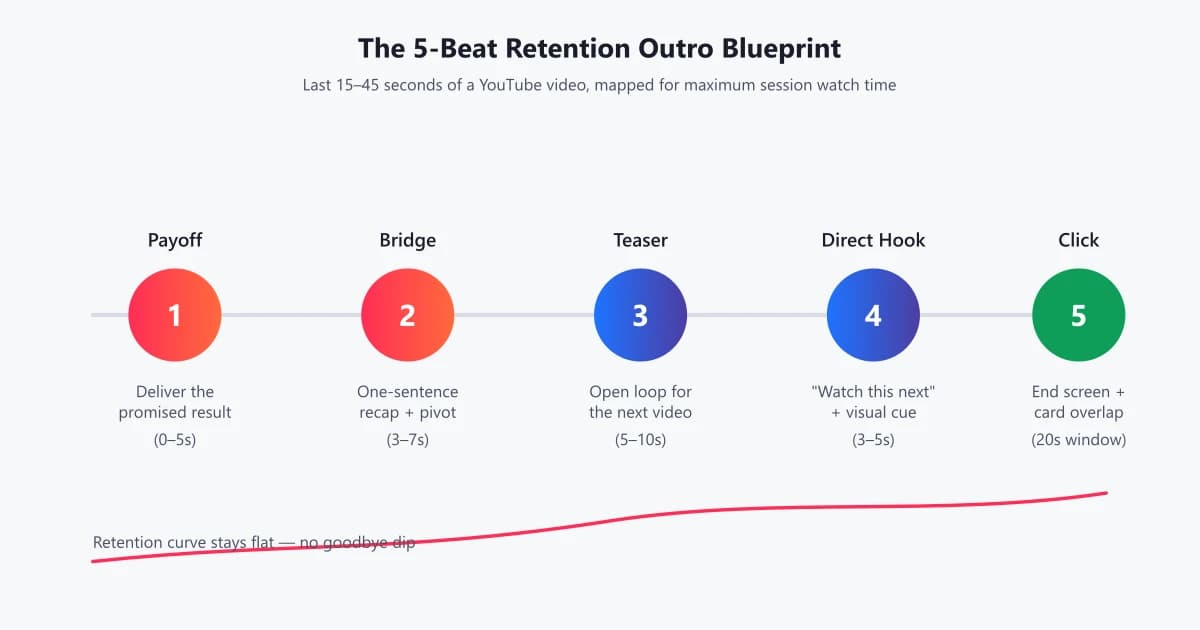
Before we get into the beat-by-beat script structure, it's worth understanding what a retention-first outro actually contains. There are five ingredients, and they all have to be present in the last 15–45 seconds of your video:
- Payoff: Explicit delivery of whatever you promised in the hook. The viewer has to feel "I got what I came for."
- Bridge: A one-sentence recap that pivots forward instead of closing down.
- Teaser: An open loop about the next video — a specific outcome, not a title.
- Direct hook: A verbal cue that syncs with an end-screen or in-video card overlay.
- Click energy: Pacing, tone, and camera framing that mirror the opening 15 seconds, not the tired middle.
Notice what's missing: gratitude, subscribe prompts, sign-offs, and self-references. That's not because those things are bad — it's because none of them belong in the last 30 seconds. They belong somewhere between the hook and the middle of the video, where retention is highest and CTAs are cheapest.
Why the order of beats is non-negotiable
The five ingredients aren't interchangeable. Their sequence matches the emotional state of the viewer at each moment. Payoff resolves tension. The bridge creates a small new tension. The teaser amplifies it. The direct hook offers the release. And the click window rewards the viewer for staying present long enough to make the choice. Rearrange any of these and the physics break down. Lead with the direct hook and the viewer, mid-resolution, isn't emotionally ready to click. Lead with the teaser and the viewer feels manipulated before they've had their payoff. The sequence is what makes the outro feel like a natural continuation instead of a sales pitch.
Every mediocre outro fails on one of two things: it collapses beats together (payoff and bridge fused into a single mumbled sentence), or it inserts foreign material into the sequence (a subscribe ask wedged between bridge and teaser, breaking the emotional continuity). The blueprint is a discipline. Keep the beats, keep the order, and keep everything else out.
Warning
Stacking multiple CTAs in the outro ("like, subscribe, comment, hit the bell, join the Patreon, check the description") is one of the most reliable ways to depress the click-through rate on your end screen. Every added CTA cuts the response rate on the primary one. Choose the single click that matters most and drop the rest.
Opening vs. Ending: Same Job, Opposite Ends
Great YouTube openings and great YouTube endings do the same thing: they compress an enormous amount of narrative work into a very small number of seconds. The difference is what they're pointing at. The hook points forward into this video. The outro points forward into the next one.
Structurally, they mirror each other:
| Function | Opening (0:00–0:15) | Ending (last 15–45s) |
|---|---|---|
| Time budget | 10–15 seconds | 15–45 seconds |
| Emotional tone | Curiosity + urgency | Confidence + forward momentum |
| Primary promise | "You'll get X in this video" | "You'll get Y in the next one" |
| Retention risk | Skip/close within 30s | Session end within 5s of outro cue |
| Word density | Higher than baseline | Higher than baseline |
| Structural mistake | Meandering intro | "Thanks for watching" |
Notice that the opening and ending both violate the natural cadence of the video's middle. They're both faster, denser, and more purposeful than the surrounding material. This isn't accidental — it's the shape of retention. The middle can breathe. The bookends cannot.
There is one meaningful asymmetry between the two, though: the viewer's investment. At the hook, you have zero equity. Every second is a fresh case for staying. At the outro, you've earned twelve minutes of goodwill. That equity is a superpower — it means you can make bigger, more specific promises and be believed. "Watch this next" from a stranger is spam. "Watch this next" from a creator whose last twelve minutes were genuinely useful is a recommendation. Retention-first outros exploit exactly this asymmetry. They don't sell — they recommend, at the moment recommendation carries the most weight.
The 5-Beat Outro Blueprint
Here's the exact structure we recommend inside RetentionYT and use with creators from tech tutorials to true-crime narration. Every beat has a specific job. Missing any one of them collapses the outro.
Beat 1 — The Payoff (0–5 seconds)
This is the last sentence inside the body of your video, not technically the outro. It exists to tie a bow on the promise you made in the hook. If your hook said "by the end of this video you'll know exactly which of these three lenses is worth $2,000," this is where you say "…and for portrait shooters shooting inside, the 35mm is the one worth writing the check for." The viewer must feel resolved before the outro begins. An unresolved viewer is a resentful viewer, and resentful viewers don't click end-screen cards.
Beat 2 — The Bridge (3–7 seconds)
One sentence. It compresses the payoff into a memorable line and pivots forward. Not "so, to sum up, we talked about three lenses and I recommended the 35mm." That's a recap. A bridge sounds like: "So the 35mm is the one — but the lens is only half the story, because the light you shoot it under changes everything." The pivot is baked into the second half of the sentence. The viewer feels a new question forming before you name it.
Beat 3 — The Teaser (5–10 seconds)
Now you open the loop. Name the next video by outcome, not by title. "I've got a full breakdown of the three lighting setups that make the 35mm look cinematic even in a bad kitchen — including the one I used to shoot every video on this channel for the last two years."
Three things are happening in that sentence. First, a concrete promise ("three lighting setups"). Second, a specificity anchor ("bad kitchen") that makes it feel real. Third, a curiosity gap ("the one I used to shoot every video") that the viewer can only close by clicking. This is the Zeigarnik effect on demand.
Beat 4 — The Direct Hook (3–5 seconds)
Now, and only now, do you invite the click. A single, clean sentence: "Tap it right here." The visual cue matters — you should be pointing at the end-screen card, looking directly into camera, or gesturing to a specific area of the frame. The verbal and the visual have to arrive at the same moment, because a viewer with divided attention won't click.
Beat 5 — The Click Window (up to 20 seconds)
End screens run for up to 20 seconds. Most creators fill that window with music and a static frame. Retention-first creators fill it with one more beat of energy — a short reinforcement line, a soft callback, or a live-camera hold — that keeps the viewer emotionally engaged long enough to actually make the click. If your end-screen dead air lasts more than four seconds, viewers churn.
Diagnose your own outro in 90 seconds
Open your last three videos in YouTube Studio and jump to the retention curve at 90% playback. If you see a drop of more than 4 percentage points in the final 10 seconds, your outro is the problem — not your topic, thumbnail, or middle. RetentionYT auto-flags these outro cliffs across your whole library and clusters them by pattern, so you can rewrite the top offenders first.
Session Watch Time vs. Average View Duration
Before we get further into the mechanics, it's worth clarifying two metrics creators frequently conflate. Average view duration (AVD) is how long viewers stay inside a single video. Session watch time is how long they stay on YouTube after clicking your video. AVD is a video-level metric — it responds to hooks, pacing, and story. Session watch time is a channel-level and platform-level metric — and it responds almost entirely to what you do at the ends of your videos.
The distinction matters because your outro strategy is dictated by which metric you're trying to move. If a video has a great hook and a mediocre outro, AVD looks fine — retention curve stays high, average view duration is respectable — but session watch time is quietly bleeding. You get the temporary credit of good in-video retention with none of the compounding rewards of a longer session. Conversely, a video with a shaky middle but a great outro can end up outperforming its AVD peers, because YouTube recognizes the second-order effect: this creator sent the viewer somewhere else on the platform.
This is why you can't judge an outro by AVD. AVD ends the second your video ends. Session watch time keeps counting. The right frame is: your job at the outro is not to hold viewers inside the video — it's already over — but to hold them inside the session. Very different problem, very different craft.
Which report to actually look at
In YouTube Studio, session watch time isn't reported as a single top-line number. The nearest proxies are the "Traffic source: Suggested videos" and "Browse features" columns in Analytics — both grow when your outros do their job. Watch these week over week, not day over day; the algorithm reacts on a rolling window, and a great outro's effect on impressions lags the upload by 7–14 days.
Pacing, Rhythm, and Word Choice
Pacing in an outro is not about talking faster; it's about removing space. In practice, this means shorter sentences, more declaratives, fewer subordinate clauses, and almost no filler ("so," "I mean," "kind of," "basically"). Read a great outro aloud and you'll notice it feels percussive. It lands.
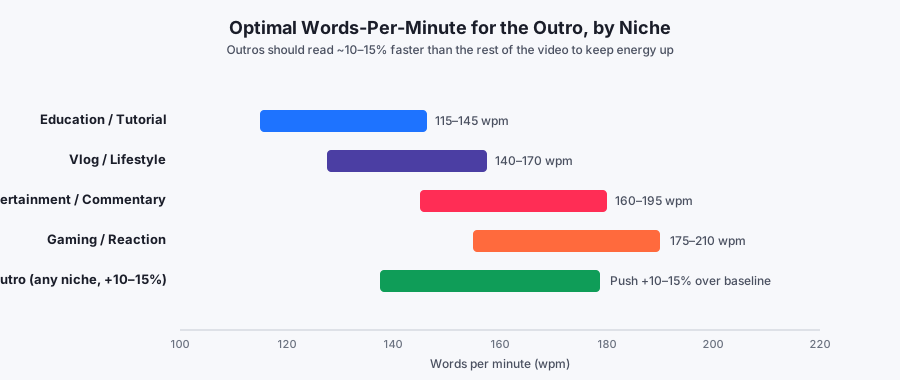
Words per minute (WPM) is a useful proxy. Most educational YouTube runs 115–145 WPM. Vlog and lifestyle content sits between 140 and 170. Entertainment and commentary channels regularly push 160–195, and gaming/reaction content can go above 200. But whatever your baseline is, your outro should run 10–15% faster than the body of your video. Not because fast talking is inherently retentive — it isn't — but because energy density communicates that something is still happening.
The mechanism is partly biological. Attention operates in bursts of roughly 8–12 seconds. Every time your voice changes tempo, cadence, or volume, the burst resets and attention re-engages. A video that runs flat through 12 minutes and then goes even flatter in the outro gives the brain zero reason to re-engage — exactly at the moment you most need it to. Tempo lift is the cheapest, most reliable way to force that re-engagement without changing anything about the content itself.
Word choice matters as much as tempo. A few rules that pay off immediately:
- Cut goodbye words. "Alright," "well," "anyway," "so that's it" — every one of these primes the viewer's exit reflex. Replace them with forward verbs: "Here's the thing…", "Next…", "One catch…"
- Use concrete nouns. "Three lighting setups" beats "some tips." "A $47 lens" beats "an affordable option." Specificity is the fastest way to raise perceived value.
- Prefer active voice. "I tested this" is a click. "This has been tested by me" is a nap.
- Front-load the verb. "Watch this next" is stronger than "the next video you should watch is."
- Trim any word that can be trimmed. A 30-second outro edited down to 25 seconds is almost always a better outro.
Story Beats and Narrative Tension in the Outro
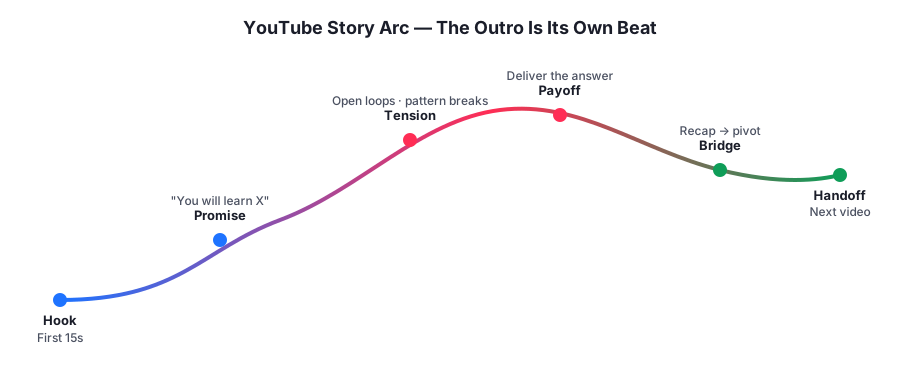
Even the driest tutorial has narrative structure: setup, tension, resolution. The outro sits after resolution but before the story is actually over — a beat that classical storytelling calls the denouement. In a well-told narrative, the denouement isn't decorative. It reframes the resolution and hints at the next chapter. That's why it feels natural to the viewer when your outro references a future video: you're doing what stories have always done, which is imply that the world you built keeps going after the credits roll.
Two narrative tools do most of the work in a retention-first outro:
Callback
The callback returns to a specific line, image, or moment from earlier in the video and re-lands it with new meaning. If you opened by saying "I've never seen a channel triple its views in one month, until this happened," your outro might return with "Remember what I said about tripling views? The single change that unlocked it isn't the one you'd expect — and it's the whole next video." That's not a recap. It's a resonance.
Foreshadow
The foreshadow drops a specific, curiosity-provoking detail that only makes sense if the viewer keeps watching. "One of these three techniques cost me $12,000 before I figured out I was doing it wrong." You don't explain. You don't apologize. You let it hang. The click is the resolution.
Open Loops and Pattern Interrupts
Open loops and pattern interrupts are the two most powerful cognitive tools in a scriptwriter's kit, and both belong in the outro.
Open loops
An open loop is an unresolved question the viewer's brain refuses to let go of. It's why cliffhangers work. Your teaser beat is an open loop by design: you name a specific outcome the viewer will get from the next video, but you don't reveal how. The specificity is what makes it stick — "the one lighting trick that saved my worst video" is stickier than "more tips on lighting."
Pattern interrupts
A pattern interrupt is any deliberate break from the rhythm the viewer has settled into. Cuts, camera changes, tone shifts, on-screen text, a sudden silence. In the outro, a pattern interrupt is used to snap the viewer out of "the video is ending" mode. The most effective one is the simplest: a hard cut to a tighter shot the moment you begin your bridge. The viewer's brain treats it as new information, and attention resets.
Rule of thumb
Every 20 seconds without a pattern interrupt is a retention risk. In an outro, aim for one pattern interrupt at the bridge and another at the direct hook. Two moments where the viewer's brain resets. Two moments where they're forced to pay attention.
Writing the Outro, Line by Line
Here's what the finished 30-second outro looks like when the five beats and the pacing rules come together. This is the actual script we'd write for a photography-lens video:
Retention-first outro — 30 seconds, ~90 words
[PAYOFF — 4s]
For portrait shooters working inside, the 35mm is the one worth writing the check for.
[BRIDGE — 5s, hard cut to tight shot]
But here's the thing — the lens is only half the story. The light you shoot it under changes everything.
[TEASER — 10s, open loop]
I just published a full breakdown of the three lighting setups that make the 35mm look cinematic even in a bad kitchen, including the one I've used to shoot every video on this channel for two years.
[DIRECT HOOK — 4s, point at end-screen card]
It's right here — tap it.
[CLICK WINDOW — 7s]
And if you've already got the 35mm sitting in a drawer somewhere, you're going to want the second setup — trust me.
Ninety words, five beats, thirty seconds. No "thanks for watching." No like/subscribe/comment stack. One clean forward promise, one clean click.
A few technical notes on that script. The "but" in the bridge is doing real structural work — it's the pivot word that tells the viewer's brain "we're not done." Any conjunction that reverses direction works: but, except, however, the catch is. Avoid additive conjunctions (and, also, plus) — they read as extensions of the same beat, not as pivots.
Second, notice the specificity gradient. The payoff is abstract ("the one worth writing the check for"). The bridge is slightly more concrete ("the light you shoot it under"). The teaser is very concrete ("three lighting setups," "bad kitchen," "two years"). And the click window is emotional ("trust me"). This is the standard curve. Attention lands on specificity, and specificity accelerates toward the CTA — then releases into feeling.
Third, the script is deliberately readable in a single breath per beat. If any beat requires you to inhale mid-sentence, you rewrite it. Breath is the pacing rhythm the viewer feels most viscerally, and outros lose energy the second the reader has to pause for air.
The five-word test
Here's a diagnostic we use every time. Take the last five words of your outro and read them alone, without context. Do they still sound like something is starting, not ending? If yes, the outro is doing its job. If the last five words feel like a period — "see you next time," "thanks for hanging out" — the outro has already told the viewer to leave. The best outros pass this test cleanly. Their final five words carry momentum, not closure.
Before vs. After: Three Real Examples
The fastest way to internalize this is to see it applied. Below are three real outros — one from a tech-review channel, one from a fitness channel, and one from a finance channel — rewritten side by side.
Example 1 — Tech review
| Beat | Before | After |
|---|---|---|
| Wrap | "So yeah, that's my full review of the M4 iPad. Pretty solid device overall, some pros, some cons." | "Bottom line — the M4 iPad is the first tablet that actually replaces a laptop for creative work. Full stop." |
| Sign-off | "If you enjoyed the video, don't forget to hit that like button, subscribe if you're new, and leave a comment below." | "But there's one accessory Apple absolutely fumbled — the one you probably already added to your cart." |
| Handoff | "See you in the next one — peace!" | "I broke down all four M4 accessories and the one to skip. Tap it right here — the second one shocked me." |
Example 2 — Fitness
| Beat | Before | After |
|---|---|---|
| Wrap | "And that's the full push-day workout. Give it a try and let me know how it went." | "Run that push day for four weeks and you'll add a visible half-inch to your chest. That part is a lock." |
| Sign-off | "Thanks for watching, don't forget to subscribe, and I'll see you next time." | "But your push day is only as good as your recovery — and 80% of people I coach get recovery completely wrong." |
| Handoff | "Bye guys." | "I made a full recovery protocol — three habits, one nightly ritual. It's right here." |
Example 3 — Finance
| Beat | Before | After |
|---|---|---|
| Wrap | "So those were the five index funds I recommend for beginners." | "So — VOO, VTI, and the three others are the entire portfolio you need to beat 90% of hedge funds this decade." |
| Sign-off | "If you found this useful, smash that like button and subscribe for more finance content every week." | "But choosing the funds is easy. The part almost no one gets right is how much to put in each one — and it's the difference between a 6% return and an 11% one." |
| Handoff | "Alright, catch you in the next video." | "I broke the exact allocation down in this next video — the third slice is the one people always undershoot. Tap in." |
Copy-Paste Outro Templates
Below are four templates you can adapt directly. Each maps to the 5-beat structure. Fill in the brackets, cut anything that feels excessive, and read the whole thing aloud once before you record.
Template A — The "One Catch" outro (best for tutorials)
[Payoff]
So [restate the main outcome viewer just got].
[Bridge]
But there's one catch — [name the thing that undermines the outcome if ignored].
[Teaser]
I made a full breakdown of [specific next video benefit], including [curiosity anchor — the one, the trick, the mistake].
[Direct hook]
It's right here — tap it.
[Click window]
[Callback to the payoff, or a single sentence reinforcing why the next video matters].
Template B — The "You'd Be Surprised" outro (best for reviews)
[Payoff]
Bottom line — [verdict in one sentence, no hedging].
[Bridge]
But there's one thing about [subject] I still haven't figured out — and you'd be surprised what it is.
[Teaser]
I ran a follow-up test on [specific angle] and the result was [directional tease]. I unpacked all of it in this next video.
[Direct hook]
Right here.
[Click window]
Fair warning: the ending changes what you think about [subject].
Template C — The "Second Half of the Story" outro (best for storytelling)
[Payoff]
And that's how [main story ended].
[Bridge]
But what I didn't tell you is that the story didn't actually end there.
[Teaser]
Two weeks later, [foreshadowed twist], and it changed [outcome].
[Direct hook]
The rest of the story is right here. Tap in.
[Click window]
Trust me — the ending is the part I couldn't fit in this video.
Template D — The "For Everyone Who Asked" outro (best for follow-up videos)
[Payoff]
That's [outcome delivered].
[Bridge]
A lot of you asked about [related question] in the comments — so I finally made it.
[Teaser]
[Specific outcome] plus [second angle], including the mistake I made the first three times.
[Direct hook]
Tap it right here.
[Click window]
The third mistake is the one I still see people make every week.
Diagnose every outro on your channel — for free
RetentionYT scans your channel's audience-retention data, pinpoints outros that are leaking session watch time, and rewrites them using the 5-beat blueprint above. Most creators find three to five high-leverage outros they can fix inside one afternoon.
Try RetentionYT free →
Where Do Brand Outros, Bumpers, and Sponsor Reads Fit?
The retention-first framework doesn't mean your channel can never have a branded look at the end of a video. It means the branding can't be the outro. There are three assets that commonly bleed into the outro slot, and each of them belongs in a different place:
Animated brand bumpers
A three-second logo sting with your channel wordmark is fine — as a transition between the last click-window line and the end-screen visual, not as a replacement for either. Keep it under two seconds if possible, keep audio energy up through it, and never dead-air the moment before it. The bumper is punctuation, not a paragraph.
Sponsor reads and mid-roll ad copy
Sponsor reads are one of the single worst uses of outro real estate, because they combine every anti-pattern in one place — new voice, unrelated topic, lower energy, familiar structure the viewer has learned to skip. Move sponsors into a mid-roll integration between minute two and minute five, where retention is highest and the sponsor pays for real attention. Every sponsor read we've ever seen in an outro drops end-screen CTR by 30–60% versus the same video with the sponsor integrated earlier.
Community & Patreon acknowledgments
Naming supporters and Patreon members is meaningful — and it's why so many creators default to putting it at the end. Instead, thread it into the mid-back third of the video, right after the payoff to your main teaching arc but before the outro proper. Better yet, cut a separate 20-second acknowledgment segment and pin it as the first comment. You honor supporters without sacrificing the highest-leverage 30 seconds on the channel.
Long-Form vs. Shorts vs. Live: The Outro Changes Shape
Everything above is calibrated for standard long-form video (5–25 minutes). The blueprint still applies to Shorts and live streams, but the beat lengths compress or stretch dramatically.
Shorts (under 60 seconds)
YouTube Shorts don't have end screens, and the viewer's next action is a swipe, not a click. That doesn't remove the outro — it just relocates the click destination. The last two seconds of a Short should either loop cleanly back to the opening frame (encouraging re-watch, which YouTube reads as strong retention) or verbally point to a specific long-form video the viewer can find on your channel page. "Full 12-minute breakdown on my channel — swipe up." The five beats collapse into two: micro-payoff, then handoff. Anything else is wasted frames.
Live streams
Live outros are the least respected and most retention-critical format on the platform, because the post-stream VOD keeps circulating for weeks. Structure the last five minutes of your stream the way you'd structure the last 30 seconds of a scripted video: payoff, bridge, teaser for the next stream or an evergreen video, and a direct "here's what to watch next" CTA that references content you can pin in chat. Don't just drift into "okay, I think we'll wrap up here" — every drift second is a viewer lost to the VOD's retention curve.
Podcasts and long-form interviews
For interviews and podcast-style videos, the outro is where you sell the guest's next content and your own next episode. The bridge often lives in the guest's final answer — you tee up their answer to be the pivot itself, then handoff into a related conversation. This works especially well if your teaser references a topic the guest declined to fully unpack. The open loop writes itself.
Seven Mistakes That Are Killing Your Outros
- The gratitude cliff. "Thanks so much for watching" as your first outro sentence. It's a signal to leave. Move gratitude, if you want it at all, inside the video body.
- The CTA pileup. "Like, subscribe, comment, hit the bell, share it with a friend, check the description." Every extra ask taxes the primary click.
- The dead-air outro. A 20-second static end-screen with no voiceover. Retention collapses within four seconds. Talk over the end screen.
- The generic teaser. "Check out my other videos!" is not a teaser. It's noise. Name the specific next video and its specific outcome.
- The energy drop. Ending softer, slower, and lower-energy than the middle. Do the opposite: raise energy in the last 30 seconds.
- The mismatched card. A verbal handoff that doesn't match what's on the end-screen card. The viewer's brain treats it as broken.
- The apology sign-off. "Sorry this one ran long," "Sorry for the audio," "Sorry I haven't uploaded in a while." Apologies destroy authority — and authority is what makes the click feel worth it.
A Practical Workflow for Rewriting Every Outro on Your Channel
Ideas are useless without a workflow. Here's the exact order of operations we recommend to creators auditing their own back catalogues. Budget one afternoon for it, and expect to rewrite 8–12 outros in a single sitting once you've internalized the blueprint.
- Pull your top 20 videos by lifetime views. These have the most compounding upside — every point of retention gained on them pays out for years.
- Rank them by end-drop severity. Look at retention percentage at 90% playback minus retention percentage at 100% playback. Anything above 6 points is a fix candidate. Anything above 10 points is urgent.
- Transcribe the last 60 seconds of each using YouTube's built-in transcript feature. This is the raw material you'll rewrite.
- Identify the goodbye sentence. There's always one. It's the sentence that triggered the cliff. Highlight it.
- Write a new 30-second outro using Template A or B from this article. Don't overthink the first draft — the beats are correct even if the words are rough.
- Record and re-upload the outro segment using YouTube's built-in trim tool or, for older videos, YouTube's video-editor replacement flow. On videos you can't re-cut, at minimum update the end-screen elements and pinned comment to reinforce the new destination.
- Watch impressions week over week for 21 days. Successful outro rewrites almost always show up in browse and suggested impressions before they show up anywhere else.
One caveat: don't rewrite every outro on your channel simultaneously. Stagger them across three to four weeks. This gives you cleaner attribution data — if you rewrite everything at once and impressions surge, you don't know which change moved the needle.
Tools That Actually Help (and Ones That Don't)
You don't need a stack of software to write a great outro. You need a text editor and a stopwatch. That said, three categories of tools are genuinely useful:
- Retention analytics. YouTube Studio is the baseline. For clustered pattern analysis across a whole channel — "which outros are leaking most" — RetentionYT is built for exactly this workflow.
- Teleprompter apps. A phone-based teleprompter for the outro alone (even if you improvise everything else) is the single biggest quality lift most creators can make in one afternoon.
- Waveform editors. Editing your outro tempo down by 8–10% in your NLE, using a light time-compression on the audio, replicates the "outro-runs-faster" rule without requiring a re-record.
Tools that don't help: AI-generated "outro scripts," royalty-free outro music templates, and any animation kit that promises to boost retention. The problem is never presentational. It's structural. If the beats are wrong, no polish saves them.
Actionable Outro Checklist
Run every outro through this before you export. If any line fails, rewrite it.
- Does the outro deliver an explicit payoff to the hook's promise?
- Is the bridge a single sentence that pivots forward, not backward?
- Is the teaser a specific, curiosity-provoking outcome for the next video?
- Is there exactly one primary CTA — a "watch next," not a stack?
- Is the verbal handoff synced with the end-screen card timing?
- Is the outro 10–15% faster (in WPM) than the body of the video?
- Are there at least two pattern interrupts in the last 45 seconds?
- Have you removed every goodbye word ("alright," "well," "anyway," "thanks for watching")?
- Is the click window filled with a reinforcement line, not dead air?
- Does the last shot mirror the energy of the opening shot?
Frequently Asked Questions
How long should a YouTube outro be?
For most niches, keep the outro between 15 and 45 seconds. Anything under 15 seconds rarely allows enough time to deliver payoff, bridge, and teaser; anything over 45 seconds risks a retention cliff. End screens run for 20 seconds by default, so aim to have your verbal handoff land in the first 5–10 seconds of the end-screen window.
Should I say "thanks for watching" at the end of my YouTube video?
No — at least not as your primary outro. "Thanks for watching" signals to the viewer that the value is over, which is the exact cue for them to leave. Save gratitude for a short, low-energy tag after your next-video handoff, or fold it into the bridge line so it doesn't act as an off-ramp.
What is an open loop in a YouTube script?
An open loop is an unresolved question or promise that pulls attention forward. In an outro, an open loop is used to preview the next video: name a specific outcome the viewer will get if they click, without revealing the answer. Open loops exploit the Zeigarnik effect — the brain's tendency to remember unfinished tasks — which is why they are the single most effective outro tool for boosting session watch time.
Do YouTube end screens actually improve retention?
End screens themselves don't drive retention — the script leading into them does. Viewers click end-screen cards when the last 15 seconds of narration explicitly tells them what they'll get from the next video and why it matters. Treat the end screen as a delivery mechanism, not a strategy.
What is the best call to action for a YouTube outro?
Prioritize a single "watch next" CTA that names a specific video and its benefit. One clear CTA outperforms stacked asks (like/subscribe/comment/watch next) because it removes decision friction. If you must include a subscribe ask, place it earlier in the video where retention is highest, not in the outro.
How does the outro affect session watch time?
Session watch time is total minutes a viewer spends on YouTube after clicking your video. A well-scripted outro extends that session by chaining another video onto yours — and the algorithm rewards that continuation with more impressions. In practice, creators who rewrite their outros using a retention-first blueprint often see 15–35% lifts in browse impressions within two to four weeks.
Should the outro be scripted word-for-word?
Yes. Even creators who improvise the body of a video should tightly script the outro. The last 30 seconds is where the highest-leverage decision of the whole video happens — stay or leave — so it deserves the same word-level attention as the hook.
Is it OK to reuse the same outro on multiple videos?
A reusable structure is fine; a reusable script is not. If viewers hear the same outro voiceover across multiple videos, they learn to tune it out — which crushes click-through rates on your end-screen cards. Keep the beat structure identical, but rewrite the payoff, bridge, and teaser for every video.
Conclusion
The last 30 seconds of your video is the least examined and highest-leverage moment on your channel. Everything you learned about hooks, pacing, and storytelling applies with equal force here — just pointed the other direction. The hook makes the viewer stay. The outro makes them stay on YouTube, on your channel, on the next video.
Start with your three most recent uploads. Rewrite each outro using the 5-beat blueprint. Ship them. Check the retention curves in two weeks. You will almost certainly find that the ceiling of your channel was never really about the topic, the thumbnail, or the length. It was about a sentence you didn't know was costing you a viewer.
And when you're ready to fix every outro on your channel systematically — with retention data, script diagnostics, and rewritten drafts — that's exactly what RetentionYT was built for.
Keep reading — Scripting series
- How to Hook Viewers in the First 15 Seconds
- The Retention-First YouTube Script Structure
- Open Loops: The Cognitive Trick Behind Every Viral Video
- Pattern Interrupts: Why Great Videos Never Sit Still
- Words Per Minute: The Data on YouTube Pacing
- YouTube Storytelling: Arc, Tension, and the Denouement
- Session Watch Time: What YouTube Actually Ranks
- End Screens That Actually Convert
Further reading & sources
Frequently asked questions
- How long should a YouTube outro be?
- For most niches, keep the outro between 15 and 45 seconds. Anything under 15 seconds rarely allows enough time to deliver payoff, bridge, and teaser; anything over 45 seconds risks a retention cliff. End screens run for 20 seconds by default, so aim to have your verbal handoff land in the first 5–10 seconds of the end screen window.
- Should I say 'thanks for watching' at the end of my YouTube video?
- No — at least not as your primary outro. 'Thanks for watching' signals to the viewer that the value is over, which is the exact cue for them to leave. Save gratitude for a short, low-energy tag after your next-video handoff, or fold it into the bridge line so it doesn't act as an off-ramp.
- Do YouTube end screens actually improve retention?
- End screens themselves don't drive retention — the script leading into them does. Viewers click end-screen cards when the last 15 seconds of narration explicitly tells them what they'll get from the next video and why it matters. Treat the end screen as a delivery mechanism, not a strategy.
- What is the best call to action for a YouTube outro?
- Prioritize a single 'watch next' CTA that names a specific video and its benefit. One clear CTA outperforms stacked asks (like/subscribe/comment/watch next) because it removes decision friction. If you must include a subscribe ask, place it earlier in the video where retention is highest, not in the outro.
- How does the outro affect session watch time?
- Session watch time is total minutes a viewer spends on YouTube after clicking your video. A well-scripted outro extends that session by chaining another video onto yours — and the algorithm rewards that continuation with more impressions. In practice, creators who rewrite their outros using a retention-first blueprint often see 15–35% lifts in browse impressions within two to four weeks.
- Should the outro be scripted word-for-word?
- Yes. Even creators who improvise the body of a video should tightly script the outro. The last 30 seconds is where the highest-leverage decision of the whole video happens (stay or leave), so it deserves the same word-level attention as the hook.
Find your video’s drop-off points before you publish
RetentionYT audits your script for the moments viewers leave — so you can fix them before recording.
Get retention tips in your inbox
Occasional, practical emails on hooks, pacing, and retention. No spam.
Related posts
How to Script a Talking-Head Video (Without Sounding Robotic)
A complete, retention-first framework for scripting talking-head videos that sound natural, hold attention, and outperform improvised takes. Templates, pacing data, and word-choice principles inside.
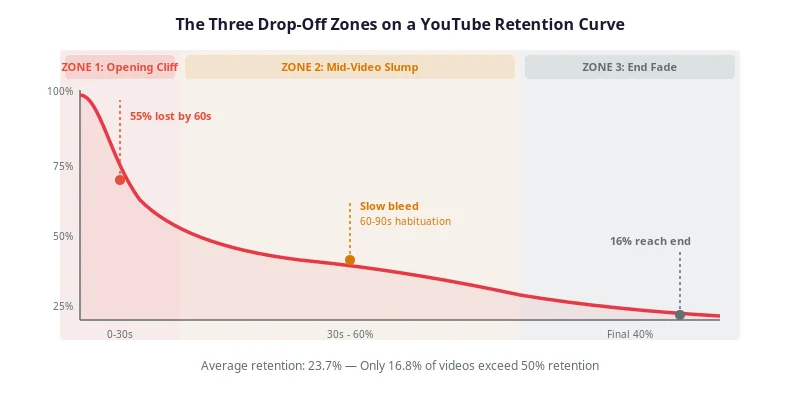
YouTube Script Pacing: The Words-Per-Minute Rule for Retention
How many words per minute should a YouTube script run? Reference ranges by format, a method to measure your own speaking rate, and a worked pacing map for a 10-minute video.
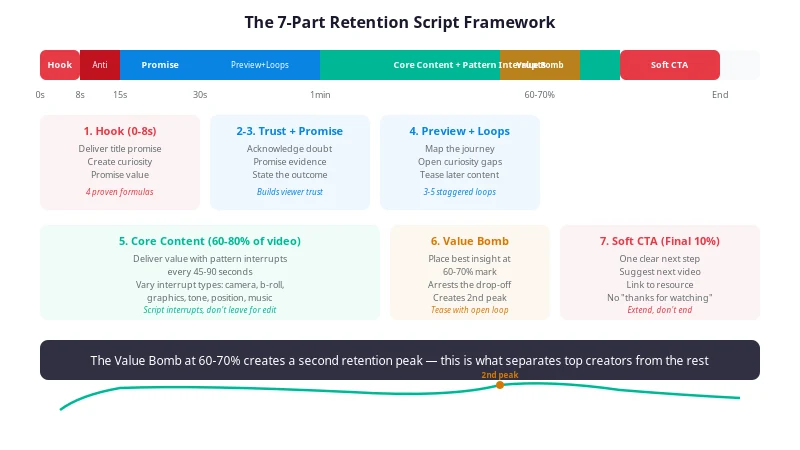
YouTube Script Outline Template: A Timed, Copy-Paste Framework for Retention
A free YouTube script outline template with timecodes, word-count budgets, and purpose notes for every section — so you fix pacing and structure on paper, before you hit record.