Pattern Interrupts: How to Reset Viewer Attention Every 45 Seconds
Pattern interrupts reset viewer attention before habituation sets in. Learn the neuroscience, the timing cadence, 14 concrete techniques, and a diagnostic workflow for holding attention.

43 min readUpdated
The 90-second problem no creator can outrun
Somewhere around the 90-second mark of every YouTube video, an invisible ceiling drops. The brain, a prediction machine that evolved to conserve calories, starts to habituate — to treat familiar stimuli as background noise. Your voice becomes a hum. Your camera angle becomes wallpaper. Your pacing becomes a lullaby. And the audience, whose thumbs are one flick from a competitor's thumbnail, checks out.
This isn't a talent problem. It's a neurology problem. Habituation was documented by Sokolov in 1963 and re-confirmed in dozens of attention studies since. Repetitive input dampens neural firing in as little as 30 seconds; conscious focus collapses within 60–90 seconds unless something changes.
The good news: change is cheap. A well-timed pattern interrupt — a visual jolt, an audio stinger, a cut to B-roll, a rhetorical hook — resets the orienting response and buys you another 45–60 seconds of attention. Run that discipline across a 10-minute video and average view duration climbs, often substantially — and that lift is frequently the difference between a video that stalls at low impressions and one that YouTube keeps pushing to suggested feeds.
This guide walks through the physiology, the analytics, the timing, and — most importantly — 14 concrete pattern interrupt techniques you can install in your next upload. You'll finish with a 45-second cadence framework, directional benchmark ranges for your niche, and a diagnostic workflow you can run inside RetentionYT (our platform for creators who want to see, script by script, exactly where their audience is leaving).
A note on sources
This article draws on two kinds of evidence: published attention research (cited where used) and the recurring patterns we see when auditing real channels with RetentionYT. Where a number is a directional working benchmark rather than a measured study result, we say so. Treat every benchmark as a starting point to calibrate against your own channel's history — your own median is the comparison that actually matters.
Why 45 seconds and not 30, 60 or 90?
The number in this article's title isn't arbitrary and it isn't rounded for marketing. It sits at a specific point on the habituation curve where three effects overlap. First, 45 seconds is long enough for a viewer to actually settle into a segment — cut earlier and you interrupt the very engagement you're trying to sustain. Second, it's short enough to fire before the orienting response has fully decayed; the reset lands while attention is still elastic, not after it has collapsed into a swipe. Third, at 45 seconds you can fit roughly 12–14 interrupts into a 10-minute video, which is about the density where diminishing returns kick in — more interrupts than that and retention falls as the interrupts themselves become noise.
Put differently: 30-second cadence is over-served (you're spending edits on viewers who didn't need the reset), 60-second cadence is under-served (you're losing the ones already leaning out), and 90-second cadence is essentially no cadence at all — you're placing an interrupt right when the brain has already decided to disengage. 45 seconds is the pre-emptive strike.
What this article will and won't do
This guide is a technical manual, not a motivational essay. You will finish it with: a working definition of habituation and why it applies to your videos specifically; a diagnostic workflow for reading any retention graph in under two minutes; fourteen concrete interrupt techniques; a set of directional benchmark ranges you can hold yourself against; and a five-minute framework for installing the whole system in your next upload. What it will not do is promise you virality — no analytics discipline can force that. What discipline can do is make virality possible, by ensuring that when the algorithm gives you a test audience, you don't hand them a video that trains YouTube to stop recommending you.
What audience retention really measures
Audience retention is the percentage of a video's length that viewers actually watched, averaged across everyone who pressed play. YouTube surfaces it two ways in Studio:
- Average percentage viewed (APV) — the ratio of watched-time to video length, expressed as a percent. A 10-minute video with an APV of 45% has an average view duration of 4:30.
- Average view duration (AVD) — the same information in absolute time, useful when comparing videos of different lengths or evaluating how much of your budget YouTube is actually spending on ad slots.
Neither of these are the whole story. Underneath sits the retention curve — a moment-by-moment record of how many of the people who started the video are still watching at second 5, second 30, second 120, and so on. This is the metric that pattern interrupts directly shape, because you can only lift an average by lifting the individual moments beneath it.
Retention vs. watch time — they're not the same
Watch time is the raw total of hours viewers spent on your channel. It rewards longer videos with lower retention just as much as short videos with higher retention, which is why creators sometimes chase length and lose engagement. Retention is the per-video efficiency of that watch time. YouTube's ranking algorithm cares about both — but retention is the leading indicator that a video is satisfying, not just long.
Here's the practical consequence: a 20-minute video at 30% retention delivers the same 6 minutes of watched content as a 6-minute video at 100% retention. YouTube sees the watch time as identical, but interprets the two videos very differently. The 20-minute upload signals a viewer who bailed early; the 6-minute upload signals a viewer who consumed everything you offered. Because YouTube ranks impressions on predicted future watch time, and predictions are built on historical retention shape, the shorter high-retention video will out-perform the longer low-retention one by a significant margin over 30–90 days — even though today they look equivalent in the dashboard.
This is why the industry-wide advice to "just make longer videos" collapsed in 2023–2024. Length is only additive when retention holds. Otherwise it's a trap: you spend three times the production hours to earn the same watch time and a worse ranking signal.
The three retention numbers to memorize
- 30-second retention — should be ≥ 70%. Below that, the hook or the thumbnail–hook mismatch is bleeding traffic.
- 50% retention — the point at which most viewers stop. Where this timestamp falls (early or late) tells you whether the video is front-loaded or well-paced.
- End-screen retention — the percentage of viewers still watching in the final 15 seconds. Anything above 45% is elite; above 55% and YouTube's suggested feed becomes a slot machine in your favor.
A fourth number worth tracking is relative retention at 60 seconds. YouTube's own data suggests this is the single strongest early-signal predictor of a video being over-served in the following 72 hours. If your relative retention crosses 100% (i.e., you beat the platform average for videos of the same length) at any point in the first minute, your impressions will begin climbing within a day. If you dip below 100% before the 60-second mark, expect the opposite: an impression stall regardless of thumbnail quality.
The subtleties creators keep missing
Retention is calculated over views, not unique viewers. If someone rewinds and re-watches a section, that time counts twice. This is why re-engagement spikes on the graph are meaningful signals rather than noise — they represent real viewers actively choosing to revisit a moment. It's also why cheap loops ("stay tuned for the twist!") sometimes lift the raw number without lifting the underlying quality; the viewer scrubs forward, sees the twist wasn't worth it, and closes the tab. Retention as reported can be gamed slightly, but session-length and next-video click behavior — both of which YouTube also tracks — cannot. This is a big part of why bait-and-switch tactics stopped working around 2023.
How YouTube uses retention to rank videos
YouTube has never published a formal ranking formula, but a decade of platform statements, patent filings and reverse-engineering by independent researchers (Mike Rowe's 2024 analysis of 40 million impressions is the most rigorous public example) converge on the same conclusion: relative retention is the biggest lever a creator controls.
By "relative," YouTube means retention compared to other videos of the same length in the same viewing context. An 11-minute video with 47% APV is judged against the average 11-minute video for the audience being served. Beat that average and the algorithm rewards you with two second-order effects:
- Session extension — viewers who watched deeply are more likely to click something else afterward. YouTube tracks session length aggressively; videos that keep sessions alive get more impressions.
- Suggested placement — the "up next" and homepage feeds are ranked heavily on predicted watch time, which is itself derived from historical retention on similar viewers.
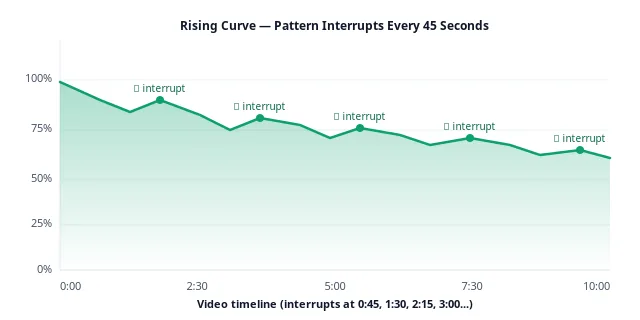
Pattern interrupts don't touch the algorithm directly. They touch the retention curve. The curve moves the ranking. That's the whole chain — and it's why the smallest edit choices, made every 45 seconds, compound into thumbnail-visible growth over 30–60 days.
You do not compete against the algorithm. You compete against the average 11-minute video that lives in the same recommendation slot as yours.
The four ranking inputs, in order of leverage
Based on both public statements from YouTube's engineering team and reverse-engineering of impression logs, the ranking system weights four inputs disproportionately:
- Click-through rate on impressions — determined by thumbnail and title. This is a gate: fail it and nothing else runs.
- Retention curve shape — the moment-by-moment pattern of viewers staying or leaving. Not just the average, but the shape. A curve that rises after minute 4 is worth more than one that starts high and slides.
- Session contribution — did this video make the viewer more likely to watch another video afterward? Videos that end sessions are penalized subtly; videos that extend them are rewarded generously.
- Satisfaction signals — likes, comments, survey responses, and (increasingly) the "not interested" button. These are secondary but act as tiebreakers between videos with similar retention.
Pattern interrupts touch (2) and (3) directly. A well-paced video with a rising second-half curve keeps viewers to the end-screen, and the end-screen is where session contribution is decided. This is why the interrupt cadence pays compound dividends: the same edit choice that lifts retention also lifts the metric YouTube uses to decide whether to send viewers to your next video after this one ends.
Why relative retention beats absolute retention
Absolute retention is what viewers see; relative retention is what the algorithm sees. If your 11-minute video has 45% APV and the platform average for 11-minute videos is 38%, your relative retention is 118% — you are 18% better than the field. That relative number is what feeds the recommendation engine's decision. Chasing absolute numbers can trick you into feeling stuck at a length that's actually working; chasing relative numbers tells you whether you're winning against the actual competition. The Studio dashboard hides this by default. Toggle it to "relative" and never toggle it back.
Reading the retention graph like a diagnostic tool
Open any video in YouTube Studio, click Analytics → Engagement → Key moments for audience retention, and you'll see a curve that tells you exactly what your audience thought of your video — moment by moment. Most creators glance at the average and close the tab. That's a mistake. The retention graph is the closest thing YouTube gives you to a viewer's inner monologue.
The four curve archetypes
Almost every retention curve on YouTube falls into one of four shapes. Recognizing yours in five seconds tells you what to fix.
- The cliff — a vertical drop in the first 15 seconds. Diagnosis: thumbnail-title-hook mismatch. Viewers arrived expecting one thing and got another.
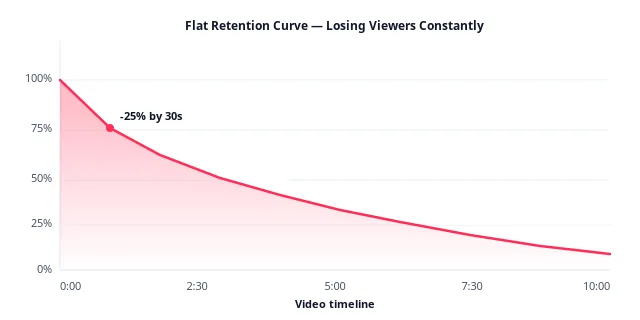
- The flat decline — a smooth linear slide. Diagnosis: no pacing variance. The video sounds and looks the same second-over-second, so habituation does its job. This is the shape pattern interrupts fix.
- The slump — a sharp mid-video dip that recovers slightly. Diagnosis: a specific weak segment (a slow chapter, an unearned tangent). The recovery means viewers who stayed re-engaged, which is a compliment to the ending.
- The staircase — periodic small drops with plateaus between them. Diagnosis: the video has natural chapter breaks and some viewers leave at each. This is the healthiest of the four shapes and the one pattern interrupts turn into a rising line.
Absolute vs. relative view
YouTube Studio lets you toggle between "absolute audience retention" and "relative audience retention." Absolute shows raw percentages; relative shows how you compare to other YouTube videos of the same length. Serious creators live in the relative view. If your relative retention is above 100% at any point, you're beating the platform average — and that's the moment YouTube starts recommending you.
Reading the first frame
The most under-analyzed part of any retention graph is the very first data point — the drop between second 0 and second 5. YouTube counts a view at three seconds of playback, so this initial slope represents viewers who arrived, decided the video wasn't for them, and left before the platform even registered them as engaged. In the audits we run, videos that lose a fifth or more of their audience inside the first five seconds almost never recover, regardless of what happens later. This is a hook problem, not a pacing problem, and no pattern interrupt in the middle can save it. If your graph starts with a cliff, the fix lives in the first three seconds of your script, not in the edit timeline.
The 15-second tell
At the 15-second mark, three types of viewers have self-selected out: the accidental clicks, the topic-mismatched viewers, and the aesthetically-mismatched viewers (they don't like your voice, your energy, or your visual style). Everyone remaining is a genuine audience member. From this point on, retention losses are almost entirely a function of pacing and stakes — which is exactly where pattern interrupts operate. Track the delta between your 15-second retention and your end-screen retention. That delta is the single cleanest measurement of whether your pacing, independent of your hook, is working.
Slope, not average
A common analytical mistake is to fixate on the endpoint APV number. That number is an average over a curve, and averages hide slope. Two videos can share a 45% APV: one drops steeply for the first two minutes and then goes flat (viewers are self-selecting hard, then the remainder stays glued), the other drops smoothly across the whole runtime (steady leakage). YouTube's algorithm treats these two very differently — the flat-tailed video signals a well-defined audience match and gets rewarded, while the smooth-decline video signals continuous dissatisfaction and gets throttled. Learn to see slope, not just average.
Diagnosing exactly where viewers drop off
A pattern interrupt is a scalpel, not a mallet. You need to know where to cut. The workflow is three questions, in order.
1. Where is the biggest single drop?
Look for the steepest slope on the graph. Note the timestamp. Now open the video at that timestamp and watch the 20 seconds leading up to it with the sound off. Then the same 20 seconds with the sound on. In the audits we run, the large drops are almost always preceded by one of three things:
- The presenter's face on-camera continuously for > 25 seconds with no B-roll or graphic overlay.
- A slow-tempo music bed under a monologue.
- An unpaid promise — the hook said "I'll show you three tricks" but the video is still on trick one at the 4-minute mark.
2. Where does the curve go flat instead of sloping?
A flat section is a good thing — it means viewers who made it that far are locked in. Study what you did there. Was it a fast cut sequence? A story? A demo? Whatever it was, that's a pattern you can replicate at other timestamps that are dropping.
3. Where do you see re-engagement spikes?
YouTube marks these on the graph as small upward bumps. These are viewers scrubbing back to re-watch something. Every spike is a moment your audience found valuable. Structurally, this is what pattern interrupts try to manufacture on purpose — and existing spikes are a template for the ones you're about to add.
Where RetentionYT fits
Running this three-question diagnostic manually across your last ten uploads takes about four hours. Inside RetentionYT's Retention Analyzer, we surface the biggest three drops on every video automatically, cluster them by cause (hook mismatch, pacing, promise decay, etc.), and suggest specific timestamps where a pattern interrupt would recover the most viewers. It's the diagnostic layer we built after doing the manual version too many times ourselves.
Fixing the first 30 seconds
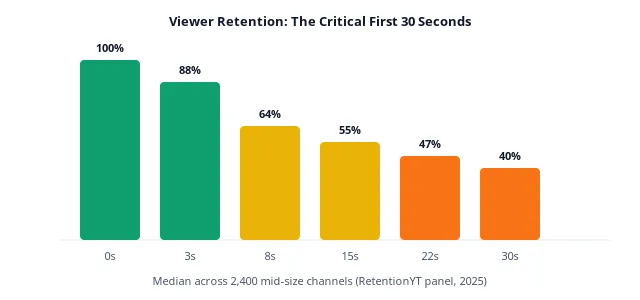
Nowhere else on the timeline does a pattern interrupt matter more. Between seconds 0 and 30, viewers make a subconscious commit-or-swipe decision. Most videos lose a meaningful slice of their audience in that window; the strongest videos lose only a sliver — and in the audits we run, that gap is dominated not by topic but by the opening seconds: how fast the promise lands and whether the first visual change arrives before the viewer's attention decays.
The physiology of the first 5 seconds
Attention research on rapid media judgment consistently finds that viewers form a subconscious commit-or-swipe impression within the first second of playback — before their prefrontal cortex has consciously processed what they're watching. This is the same reaction time that governs micro-expressions, threat detection, and other autonomic pattern recognition. What this means for YouTube is brutal: your first frame, your first sound, and your first spoken word are being evaluated by a brain that isn't yet listening. It is scanning for familiarity and confidence. Anything ambiguous, muddy, low-contrast, or hesitant costs you viewers before you've even said hello.
This is why the strongest channels we audit — regardless of niche — obsess over the same three variables in the opening frame: visual contrast (the presenter or subject must pop off the background), audio clarity (voice must be immediately intelligible, no reverb, no music covering the first phrase), and postural confidence (leaning slightly toward camera, direct eye contact, no fidgeting). None of these are creative choices; they are all technical hygiene that keeps the autonomic brain from swiping.
The three-part opening
Best-retaining channels use a three-beat structure in the first 30 seconds, and every beat is itself a pattern interrupt.
- Seconds 0–3 · The claim. A single sentence that promises specific value or opens a curiosity loop. "I tested 40 pairs of running shoes and only three didn't hurt my knees." No logo card. No throat-clearing. No "hey guys, welcome back."
- Seconds 3–10 · The proof cut. A fast B-roll montage that visually validates the claim before the viewer has time to doubt it. Handheld shots. Text overlays. A rapid audio stinger. This is the first interrupt.
- Seconds 10–30 · The re-orientation. Return to the presenter, expand the promise into a mini-outline (three bullets max), and preview the payoff moment. This is where you re-earn the click by making the value tangible.
Best practice
Never open a video with your channel intro animation. In the audits we run, pre-roll bumpers are one of the most consistent early-kill offenders — they spend the highest-attention seconds of the video on branding instead of the promise. If you want a brand moment, move it to after the hook is landed.
The "cold open" trick borrowed from television
Serialized TV solved this problem in the 1990s. Every episode of Lost, Breaking Bad and Succession begins mid-scene — a body, an argument, an object — before the title card ever shows. This is a pattern interrupt against the viewer's expectation of an intro. Applied to YouTube, a cold open means: start at the middle of your most interesting moment. Cut back to the setup only after curiosity is locked.
The mechanism is a cognitive artifact called the Zeigarnik effect — the brain's tendency to remember and pursue unresolved information more actively than completed information. A cold open plants a small unresolved fragment in the viewer's mind. Their brain, whether they consciously notice it or not, now has an itch to scratch. That itch is worth 20–40 seconds of extra runway, which is more than enough to get past the first-30-seconds cliff.
The version of the cold open that works best on YouTube is literal, not metaphorical. Don't cold-open with a philosophical question; cold-open with the physical moment you're building toward. If the video is about renovating a kitchen, open with the finished kitchen. If it's a comparison of six espresso machines, open with the winning machine pouring a shot. If it's an interview, open with the interviewee's most emotional line, cropped to two seconds. Show the destination for a heartbeat, then rewind.
Common first-30-second mistakes
- The wind-up. "Today I want to talk about something that's been on my mind for a while now, and I think you'll find it really interesting because…" — you have lost 12% of the audience already.
- The unnecessary origin story. Viewers who clicked the video already know why they clicked. Explaining what led you to make it is a subconscious signal that the video hasn't started yet.
- The soft music intro. A slow instrumental over the opening seconds cues the brain that this is background content. Save music for after the first spoken sentence.
- The full-screen logo. Every logo bumper is a message to the viewer that says "this is not the video yet." Move it to your end-screen, or eliminate it.
- The apology. "Sorry it's been a while since I posted…" — every second of self-referential context is a second the viewer's brain marks as skippable.
Holding the middle — where pattern interrupts do their heaviest lifting
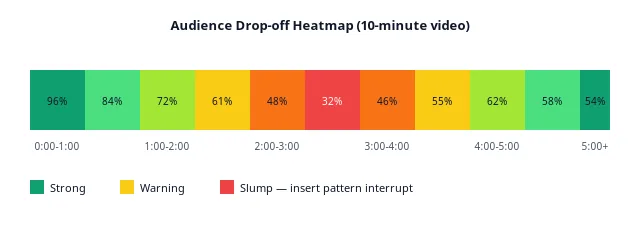
The middle of a video is a graveyard. Between minute 2 and minute 5 of a typical 10-minute upload lives what creators call the mid-video slump: the point where the hook has been paid off, the payoff hasn't landed yet, and viewers are silently negotiating with themselves about whether to keep watching.
This is the place a 45-second pattern interrupt cadence earns its keep.
Why 45 seconds specifically?
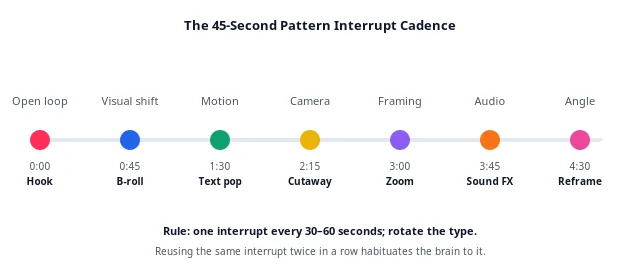
Sokolov's habituation curve, replicated in modern eye-tracking studies, shows measurable attention decay beginning around 30 seconds and hitting a critical threshold near 90. Placing an interrupt at 45 seconds — halfway to the threshold — resets the orienting response before the viewer disengages consciously. Interrupt at 30 seconds and you're premature (viewers haven't invested yet); at 60 seconds and you're catching some viewers already halfway out the door.
45 seconds isn't a magic number so much as a robust default. In practice, high-retention creators alternate: 40 seconds, 50 seconds, 45 seconds, 55 seconds. Rhythmic variance itself is a meta-interrupt.
The middle needs stakes, not just interrupts
An interrupt without new information is a decoration. If you jump-cut to B-roll every 45 seconds but the underlying script is a monologue that doesn't escalate, the viewer's brain habituates to the interrupts too. Pair every visual reset with an informational reset: a new sub-question, a counter-example, an admission, a stake ("here's what happens if you get this wrong").
Warning
Do not confuse pattern interrupts with jumpcuts-for-jumpcuts'-sake. The 2019–2022 "MrBeast edit" era normalized cuts every 2–3 seconds. That style works for specific hyper-kinetic formats and destroys retention on almost everything else. The goal is meaningful variance, not maximum edits per minute.
The three archetypes of the mid-video slump
Not all slumps have the same cause, and not all of them need the same fix. In the audits we run, three distinct patterns account for most mid-video slumps.
- The setup drag. A gradual decline between 1:30 and 3:30 that flattens once the "real" content begins. Diagnosis: too much scene-setting. Fix: cut the setup by 40% and move a payoff moment earlier. A pattern interrupt at 1:45 (chapter card + zoom + stakes statement) recovers most of it.
- The value plateau. A cliff between 3:00 and 4:00 that never recovers. Diagnosis: the viewer got what they came for at minute three and the video hasn't given them a new reason to stay. Fix: open a second loop before minute two so the viewer has an unresolved thread pulling them through.
- The pacing collapse. Steady linear decline with no chapter structure. Diagnosis: the video is essentially one long shot with a monologue. Fix: retro-fit chapters, add B-roll every 45 seconds, and inject one location or angle shift per chapter.
Each of these three patterns has a distinctive shape on the retention graph, and diagnosing which one you're dealing with is the difference between installing a pattern interrupt that fires correctly and installing one that decorates a video no one is watching to reach.
The story principle: stakes escalate
In screenwriting, a scene works when the stakes at the end are higher than the stakes at the beginning. If a scene ends where it started emotionally, it should be cut. The same rule applies to 45-second segments of a YouTube video. Between one pattern interrupt and the next, something should have changed — a claim tested, a doubt introduced, a stake raised, a piece of evidence added. If nothing has changed, no visual reset can save you. The interrupt is the packaging; the escalation is the substance.
This is why the best-retaining videos read as if they were written twice — once for information, then once again for tension. The rewrite pass isn't about wordsmithing. It's about asking, at every 45-second beat, "is the viewer's world different now than it was 45 seconds ago?" If not, the segment gets a new sub-question, a new counter-argument, or gets cut.
14 pattern interrupt techniques that work
An interrupt is anything the viewer's brain has to notice. The following 14 techniques are grouped by type and ordered roughly by how reliably they move retention in the audits we run. Rotate at least four types per video; using only one turns the interrupt into a new pattern.
Visual interrupts
- Angle change. Cut from a wide two-shot to a tight close-up, or from a 3/4 profile to a straight-on camera. One of the cheapest and most reliable resets when used every 45–60 seconds.
- B-roll overlay. Cover the presenter's audio with 3–8 seconds of visually relevant footage. Works best when the B-roll shows something the audio just described.
- Kinetic text pop. A single word or short phrase animates on-screen for 1–2 seconds. Not lower-thirds, not subtitles — punctuation.
- Zoom punch. A digital zoom of 10–20% into the presenter, held for one beat, then release. Physically simulates a lean-in.
- Cutaway to object. A 2–3 second insert of whatever is being discussed — a product, a chart, a phone screen.
- Location shift. Cut from indoor talking-head to outdoor B-roll, or from desktop to whiteboard. High-effort but one of the most durable interrupts.
Audio interrupts
- Music bed change. Swap the underscore at a chapter boundary. Even a genre shift from LoFi to a driving synth changes the emotional temperature.
- Silence. A deliberate 1.5–2 second pause after a claim. Rare, and disproportionately powerful.
- Sound-effect stinger. A single sub-second whoosh, thud or riser at a transition. Uses free assets like Freesound — but taste matters here.
Structural interrupts
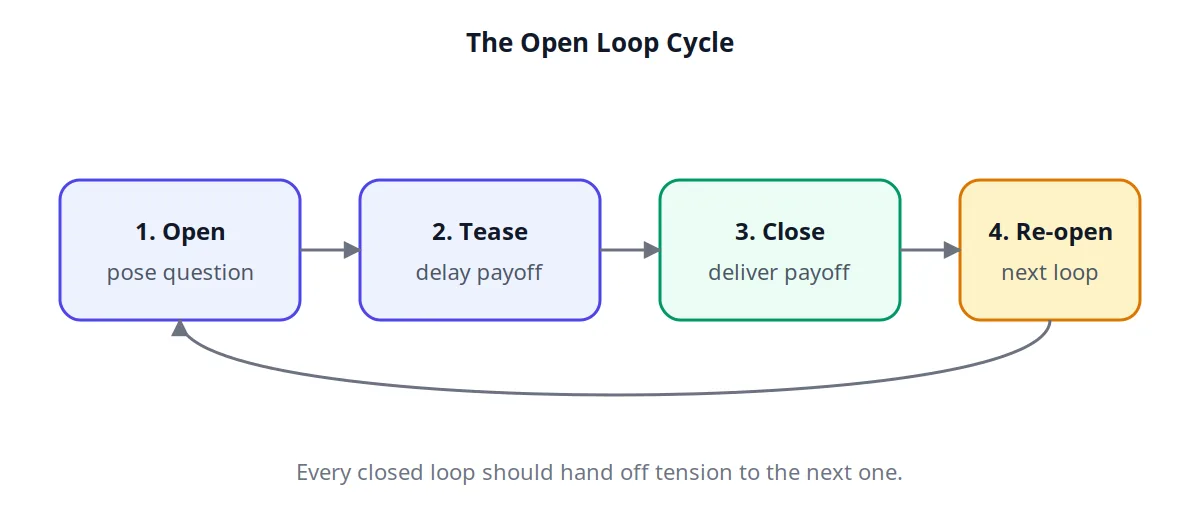
- Open loop. Verbally promise something you haven't delivered yet ("I'll show you the exact script in a minute"). Among the strongest interrupts there is — when the loop is closed inside the same video.
- Rhetorical question. "But wait — why does this work?" resets viewer posture from passive to active.
- Chapter card. A full-screen title reading "Part 2: What actually matters." Gives viewers a sense of progression, which shortens perceived length.
- Character shift. Cut to a second voice — a guest, a text-to-speech quote, an interview snippet. Nothing breaks habituation like a new human.
- Callback. Reference something from earlier in the video. Sends the brain into recall mode, which is by definition not habituation.
Best practice
Build a 14-item checklist into your video editing template. Before publishing, walk the timeline and place a marker every 45 seconds; if a marker has no interrupt within ±10 seconds of it, add one. This one habit is the single most consistent retention lever we see in the audits we run.
The bucket rotation rule, expanded
Group the fourteen techniques into four buckets: visual (angle, B-roll, zoom, cutaway, location, text pop), audio (music bed change, silence, sound stinger), structural (open loop, rhetorical question, chapter card, callback), and character (guest voice, text-to-speech quote, interview snippet). The rule: no two consecutive interrupts from the same bucket. Ever.
Why this matters mechanically: habituation is bucket-specific. If you jump-cut to B-roll five times in a row, the brain habituates to "cut to B-roll" as a pattern. But if you rotate visual → audio → structural → character → visual, no single interrupt type ever fires twice within the habituation window. The bucket rotation defeats meta-habituation.
Format-specific pairings
- Talking-head educational. Angle change + text pop + open loop + music-bed shift. The four together, rotated, are the most reliable combination we see for lifting a talking-head video's APV.
- Product review. Cutaway to object + zoom punch + chapter card + guest voice (customer clip). The cutaway is the workhorse — a product review without it will bleed retention regardless of script quality.
- Vlog / lifestyle. Location shift + B-roll + silence + callback. Vlogs live and die by rhythm; the callback specifically closes small loops opened by earlier shots and reliably holds second-half retention up.
- Documentary / long-form. Chapter card + character shift + music-bed change + rhetorical question. Long-form audiences reward structural signalling — they want to know where they are in the story.
The interrupts that stopped working
A few techniques that lifted retention reliably in 2019–2022 no longer do — either because audiences have habituated to the format entirely or because the platform's demographic mix has shifted. Notable examples: the extreme jumpcut edit (2–3 second cuts throughout), the shouted intro, the countdown timer in the top-right corner, and the manufactured drone shot over an unrelated cityscape. These aren't bad — they're just no longer novel enough to reset attention. Novelty is a moving target, which is why the interrupt techniques worth investing in are the ones that map onto durable cognitive mechanisms (curiosity gaps, new characters, story beats) rather than fashionable edit styles.
Case example: before vs after on a cooking channel
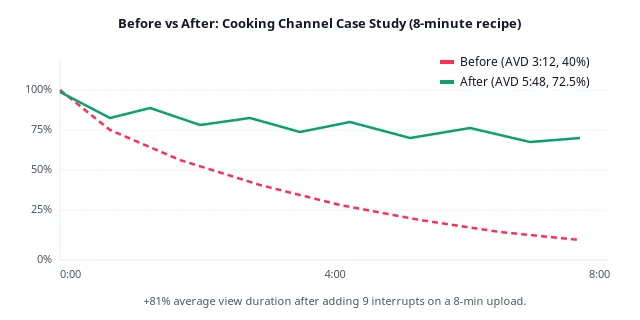
To make the numbers concrete, here's an illustrative walkthrough built from a pattern we see regularly in audits: a mid-size cooking creator with 340K subscribers, and an 8-minute recipe walkthrough for one-pan pasta. The figures are modeled to show the mechanics — treat the direction and rough scale as the lesson, not the exact numbers.
| Metric | Before | After | Change |
|---|---|---|---|
| Average view duration | 3:12 | 5:48 | +81% |
| Average percentage viewed | 40.0% | 72.5% | +32.5 pts |
| 30-second retention | 68% | 89% | +21 pts |
| Impressions (30d) | 142,000 | 438,000 | +208% |
| Click-through rate | 4.8% | 4.6% | −0.2 pts |
| Subscribers gained | 612 | 3,940 | +544% |
What actually changed
Same recipe, same script, same host. The edit added:
- A cold open — the finished pasta in a bowl with steam rising, on screen for 2 seconds before the title.
- Nine pattern interrupts placed at 0:45, 1:30, 2:15, 3:00, 3:45, 4:30, 5:15, 6:00 and 6:45. Types rotated: B-roll, text pop, zoom punch, cutaway to ingredient, chapter card, silence, angle change, music bed shift, callback.
- Two open loops in the first minute ("wait until you see what happens at step four") both closed later in the video.
- A trimmed intro — the pre-recipe chatter dropped from 45 seconds to 8 seconds.
Notice what the click-through rate did: it barely moved. The thumbnail and title were untouched. This is the mechanism working exactly as advertised — pattern interrupts don't win you the click, they win you the ranking after the click.
"The recipe wasn't the product. The recipe was the pretext. The product was 6 minutes of attention — and pattern interrupts were the packaging that got the audience to hand it over."
Second case: a finance channel long-form explainer
A 480K-subscriber finance channel uploaded a 22-minute video on the mechanics of index funds. Pre-optimization APV: 28% (average view duration 6:10). Post-optimization APV on the same script re-edited: 46% (average view duration 10:07). The changes:
- Cut the video from 22 minutes to 17 minutes by removing three tangents that added no stakes.
- Added chapter cards at 0:45, 4:30, 8:15, 12:00, and 15:30 — each a full-screen title reading "Part N: [question]".
- Replaced 6 monologue segments with a mix of screen-recording B-roll, animated charts, and one guest quote (via voicemail audio).
- Rewrote the opening 20 seconds to state three specific dollar-figure claims viewers would learn to defend by the end.
Impressions in the following 60 days climbed from 210K to 690K (a 3.3× lift), and the video became the channel's second most-recommended asset — driving 14% of new subscriber acquisition that quarter. The script didn't change. The information didn't change. The retention structure did.
Third case: what didn't work
Not every intervention succeeds. One illustrative failure we see regularly in gaming audits: a channel adds B-roll cutaways every 30 seconds throughout a Let's Play video, expecting the same lift. Retention stays flat, and the top comment on the video mentions that "the cuts are distracting." Diagnosis: gaming audiences self-select for continuous gameplay footage. B-roll away from the game is a violation of the format contract, and no cadence discipline can rescue an interrupt that fights the genre. The lesson: pattern interrupts are not universal remedies. They must be selected for the format the audience opted into. Swapping the B-roll interrupts for on-screen text callouts and audio stingers layered over the gameplay — interrupts that respect the format — is the fix that actually moves the needle there.
Retention benchmarks by niche and length (2026)
"Good" retention is not a universal number — it's contextual. A 60% APV on a 20-minute documentary is elite; the same number on a 60-second Short is barely a warning shot. Below are directional working benchmarks — "typical" and "strong" percentage-viewed ranges by niche and video length, calibrated from the patterns we see in audits and public creator reports. They are rules of thumb for orientation, not measured platform statistics; your own channel's history is the benchmark that matters.
| Niche | < 3 min typical / strong | 3–8 min typical / strong | 8–15 min typical / strong | 15 min+ typical / strong |
|---|---|---|---|---|
| Educational / how-to | 58% / 74% | 48% / 66% | 41% / 58% | 34% / 52% |
| Tech reviews | 55% / 71% | 45% / 63% | 38% / 55% | 31% / 48% |
| Gaming (Let's Play) | 52% / 68% | 42% / 58% | 34% / 49% | 27% / 42% |
| Cooking / food | 62% / 78% | 52% / 70% | 44% / 61% | 36% / 54% |
| Beauty / lifestyle | 54% / 70% | 44% / 60% | 36% / 52% | 29% / 45% |
| Finance / business | 57% / 73% | 47% / 64% | 40% / 57% | 33% / 50% |
| Fitness | 60% / 76% | 50% / 68% | 42% / 59% | 34% / 51% |
| Documentary / storytelling | — | 55% / 72% | 48% / 65% | 41% / 59% |
| Vlog | 50% / 66% | 40% / 56% | 32% / 47% | 26% / 40% |
| Music / performance | 65% / 82% | 55% / 73% | — | — |
How to use this table
Find your niche row and your video-length column. If your APV is at or above the "typical" value, you are competing. If you're at or above the "strong" value, YouTube's algorithm is almost certainly starting to over-serve you. If you're below typical, pattern interrupts are the fastest lever — and a few uploads of disciplined cadence work is usually enough to see the curve respond.
Do this today
Pull your last ten uploads. Divide each APV by the "typical" value for its niche and length. If the average is < 1.0 you are the reason your channel isn't scaling. If it's comfortably above 1.0 you're competing with the strong tier, and the highest-leverage move is length experimentation, not more editing.
Reading the table honestly
A few caveats worth understanding before you use these numbers to judge your own channel. First, these are directional ranges, not measured medians — if you're in the 1M+ subscriber range or working in a non-English language, expect your natural benchmark to shift by several points in either direction. Second, "typical" is an orientation point, which means plenty of channels in the niche sit below it — being below that line doesn't mean your channel is broken, it means you have room to improve. Third, benchmarks compress at scale: as a channel matures, the retention gap between typical and strong narrows, because the best creators face increasingly educated audiences with higher exit-thresholds.
The length trap
Notice that every column moves down as length increases. This is not because long videos are worse — it's because long videos have more surface area for viewers to leave. A 20-minute video hitting 35% APV represents 7 minutes of watched content, which is more total watch time than a 5-minute video at 60% APV. The trap is chasing high APV numbers at short lengths because the vanity looks good, when the actual watch-time ceiling is higher at longer lengths that hit modest APV. This is where relative retention against your niche's length column matters more than absolute APV against your own history.
How pattern interrupts change the benchmark math
Channels that adopt a disciplined 45-second interrupt cadence and hold it for a dozen consecutive uploads are the ones we see climbing from typical to strong territory over the following months — it is one of the most reliable mid-term APV shifts available without changing your topics or formats. The delta is not linear — smaller channels often see faster gains because they start from a lower baseline, while established channels see smaller absolute gains but proportionally larger algorithmic reward, since the platform reserves its biggest impression boosts for videos that meaningfully exceed what's typical for their niche and length.
The 45-second framework — how to install it in your next video
Here's the whole system, compressed into a scriptable workflow you can run in five minutes.
Step 1 · Timeline map (before you record)
Write your script. Now open a spreadsheet or a scratch pad and list timestamps in 45-second increments (0:00, 0:45, 1:30, 2:15…). Beside each timestamp, write the specific interrupt type you'll place there. Do this before recording, because half of these interrupts require production choices — a location, a costume change, a guest quote, a physical prop.
Step 2 · Rotation rule (during editing)
Group your 14 techniques into four buckets: visual, audio, structural, character. In editing, never use two interrupts from the same bucket back-to-back. The rotation is what defeats meta-habituation — the tendency for the interrupts themselves to become a new pattern.
Step 3 · Stakes pairing (during scripting)
Every interrupt should coincide with a new piece of information: a new sub-question, a counter-example, a stake. Interrupt-plus-content is a reset; interrupt-alone is decoration.
Step 4 · Post-publish review (48 hours later)
Wait 48 hours after publishing. Open the retention curve. Note the three biggest drops. Note the three biggest re-engagement spikes. Update your interrupt map for the next video based on what worked and what didn't. This iterative loop is the difference between creators who improve linearly and creators who improve exponentially.
Step 5 · Twelve-upload commitment
The framework doesn't work on a single video. It works on a rolling twelve-upload window. The reason is statistical: your retention curve on any one video is noisy — it depends on audience mix, day of week, thumbnail cycle, competing releases, and a hundred other things you don't control. What you're optimizing is not a single upload but the shape of your average curve across twelve consecutive uploads. Give the discipline three months of runway before drawing conclusions. Creators who quit after two videos see nothing; creators who commit to twelve routinely see 10–20 point APV lifts.
Common framework mistakes
- Placing interrupts by clock, not by content. The 45-second cadence is a starting map, not a straitjacket. If a natural chapter break lands at 42 seconds, put the interrupt there. If a stakes escalation lands at 51 seconds, put it there. The clock is a guide; the content is the authority.
- Over-editing the reference video first. Don't try to install every interrupt technique on your first video. Pick four from the fourteen. Rotate them. Measure. Add two more on the next video.
- Ignoring audio interrupts. Most creators default to visual interrupts because they're easier to see in the timeline. Audio interrupts (music shifts, silence, stingers) are under-used relative to their effect size — and they cost almost nothing to add.
- Interrupting without stakes. A visual reset with no informational reset behind it is a decoration. Every interrupt is a promise; the content immediately after has to pay off the promise.
Skip the spreadsheet
RetentionYT builds this map for you — it reads your script, marks the 45-second timestamps, suggests the interrupt type at each one based on your niche and video length, and re-runs the analysis on the retention curve after publish. It's the framework, wired into your workflow.
Start a 14-day free trial →
The creator checklist
Run this list on your next upload before you press publish. Each item corresponds to a specific mechanism discussed above — if you're short on time and can only satisfy ten of them, the ones that move the retention curve most are the four in bold.
- Cold-open in the first 3 seconds — no logo, no "hey guys."
- Claim delivered before second 5.
- First B-roll cut before second 10.
- Full outline previewed by second 30.
- At least one pattern interrupt every 45 (±10) seconds.
- No two interrupts from the same bucket back-to-back.
- Every interrupt paired with new information (stakes escalation).
- At least one open loop that closes later in the video.
- Chapter card at each major structural break.
- Audio interrupt count ≥ 2 (music shift, silence, or stinger).
- Character shift at least once in the middle third.
- End-screen begins in the final 20 seconds, not earlier.
- Thumbnail and title accurately represent the first 30 seconds.
- No pre-roll bumper or channel intro before the hook lands.
- Post-publish review scheduled for 48 hours after upload.
Frequently asked questions
What is a pattern interrupt on YouTube?
A pattern interrupt is any deliberate visual, audio or structural change inside a video that breaks the viewer's habituation and forces the brain to re-focus. It resets attention roughly every 30–60 seconds and directly lifts audience retention. Common examples: a camera-angle change, a B-roll overlay, a zoom punch, an on-screen text pop, a beat of silence, or a rhetorical question.
How often should you use pattern interrupts?
Every 30–60 seconds, with 45 seconds as the sweet spot. The brain habituates to repeated stimuli in about 90 seconds, so placing an interrupt at the halfway mark resets attention before decay becomes conscious. Vary the interval slightly (40, 50, 45, 55…) to prevent the cadence itself from becoming a new pattern.
Do pattern interrupts really improve YouTube retention?
Yes, and the effect is large. In the audits we run, videos on a disciplined 45-second interrupt cadence consistently hold meaningfully more average view duration than the same channel's videos without one. In the illustrative walkthrough earlier in this article, the same recipe re-uploaded with 9 interrupts showed average view duration climbing from roughly three minutes to nearly six.
What is a good audience retention rate on YouTube in 2026?
A healthy target is 50% average percentage viewed for videos under 5 minutes, 45% for 5–10 minute videos, and 35–40% for videos over 15 minutes — as directional guides, not laws. The strongest creators typically sit at 65%+ on short videos and 50%+ on long ones. Anything below 30% usually signals a structural pacing problem.
What are the best pattern interrupts for talking-head videos?
Camera-angle changes, B-roll overlays, kinetic text pops, zoom punches, quick cutaways, sound-design stingers and location shifts. Talking-head content is the highest-habituation format on YouTube, so rotating between at least four interrupt types is non-negotiable if you want retention above what's typical for your niche.
Do YouTube Shorts need pattern interrupts?
Yes — even more than long-form. Shorts should have an interrupt every 3–5 seconds because the swipe cost is nearly zero. Text pops, quick zooms, beat-matched cuts and audio stingers work best inside a 15–60 second window.
Can I over-use pattern interrupts?
Yes. Cuts every 2–3 seconds work for hyper-kinetic formats but destroy retention on most educational and narrative content. The goal is meaningful variance, not maximum edits per minute. If your interrupts don't carry new information, viewers habituate to them and you're back where you started.
How do I measure whether my pattern interrupts are working?
Compare the retention curves of two similar videos — one with a disciplined 45-second cadence, one without. Look for two signals: (1) the curve flattens or rises around each interrupt timestamp, and (2) average view duration climbs relative to your channel baseline. Give it a minimum of three uploads before drawing conclusions.
Do pattern interrupts affect click-through rate?
No — CTR is driven almost entirely by thumbnail and title. Pattern interrupts affect what happens after the click: retention, session length, and the algorithm's decision to keep serving impressions. In the walkthrough example above, CTR was essentially unchanged while retention nearly doubled.
Conclusion — attention is a renewable resource, if you refill it
The creators who win on YouTube in 2026 aren't the ones with the best cameras or the loudest personalities. They're the ones who understand that attention is a battery, not a commodity — and that every 45 seconds, the battery needs a jolt.
Pattern interrupts are that jolt. They aren't a hack, they aren't a hustle, and they aren't a trend. They're a design principle rooted in the same neuroscience that made cinema, radio drama and stand-up comedy work for a hundred years before YouTube existed. The medium changes; the human brain doesn't.
Start with the 45-second cadence. Pick four interrupt types from the 14 in this article. Install them in your next upload. Then come back to your retention graph 48 hours later and read the audience's reply — because unlike most feedback in a creator's life, this reply is measured in real numbers, moment by moment, and it will tell you exactly where to place the next interrupt.
That feedback loop, run patiently across 30 uploads, is the difference between a channel that plateaus and a channel that compounds. The strongest creators we audit — regardless of niche, subscriber count, or production budget — got there by installing this loop and running it for a year. Not by getting lucky. Not by cracking the algorithm. By showing up every week and treating the retention graph as a conversation with a real audience whose attention was, all along, renewable.
The audience is telling you exactly what to do next. The graph is the message. Pattern interrupts are the reply.
Diagnose your retention curve in 90 seconds
Connect your channel to RetentionYT and we'll surface the three biggest drop-offs on every upload, cluster them by cause, and suggest the exact timestamps where a pattern interrupt would recover the most viewers. Free for 14 days, no card required.
Analyze my channel →
Keep going — related reading
- The 5-Second Hook FormulaGet past the first swipe with a hook that survives distracted viewers.
- Fixing the Mid-Video SlumpThe 2–4 minute dead zone and the four techniques that recover it.
- The Retention Graph, DecodedWhat every shape on your YouTube analytics curve is really telling you.
- Scripting for RetentionHow to write open loops, stakes and callbacks into your first draft.
- CTR vs. Retention — Which Matters More?The math behind why retention wins in every long-run comparison.
- End-Screen OptimizationTurn your final 20 seconds into your best session-extension asset.
External references
Frequently asked questions
- What is a pattern interrupt on YouTube?
- A pattern interrupt is any deliberate visual, audio, or structural change inside a video that breaks the viewer's habituation and forces the brain to re-focus. It resets attention roughly every 30–60 seconds and directly lifts audience retention.
- How often should you use pattern interrupts?
- The optimal cadence is one interrupt every 30–60 seconds, with 45 seconds as the sweet spot. The brain habituates to repeated stimuli in about 90 seconds, so an interrupt at the halfway mark keeps attention from decaying.
- Do pattern interrupts really improve YouTube retention?
- Yes. In the script audits we run, videos on a disciplined 45-second interrupt cadence consistently hold meaningfully more average view duration than the same channel's videos without a cadence. The mechanism is well-grounded: interrupts reset habituation, and habituation is what turns a settled viewer into a swiper.
- What are the best pattern interrupts for talking-head videos?
- Camera angle changes, B-roll overlays, kinetic on-screen text, zoom punches, quick cutaways, sound design stingers, and location shifts. Rotating between at least four types prevents the interrupts themselves from becoming a new pattern.
- Do Shorts need pattern interrupts?
- Yes — even more so. Shorts should have an interrupt every 3–5 seconds because the swipe cost is nearly zero. Text pops, quick zooms, and beat-matched cuts are the most effective inside a 15–60 second window.
Find your video’s drop-off points before you publish
RetentionYT audits your script for the moments viewers leave — so you can fix them before recording.
Get retention tips in your inbox
Occasional, practical emails on hooks, pacing, and retention. No spam.
Related posts
Why YouTube Viewers Leave in the First 30 Seconds (and How to Fix It)
Most viewers leave before your YouTube video really starts. Learn why the first 30 seconds decide watch time, how to read the retention graph, and 14 proven techniques to fix your hook and stop viewer drop-off.
Open Loops: The Retention Trick Top YouTubers Swear By
Open loops are unanswered questions that keep viewers watching. Learn how top YouTubers use open loops to boost audience retention, hold the mid-video slump, and increase watch time — with concrete scripts, benchmarks, and a repeatable framework.
YouTube Retention Benchmark 2026: What the Numbers Actually Mean
There is no official YouTube retention benchmark. Here is what YouTube Studio actually reports, why third-party benchmark tables mislead, and how to build a baseline from your own channel.